mirror of
https://github.com/bellingcat/tiktok-hashtag-analysis.git
synced 2026-06-11 21:08:31 +03:00

151 lines
7.0 KiB
Markdown
151 lines
7.0 KiB
Markdown
# TikTok hashtag analysis toolset
|
|
The tool helps to download posts and videos from TikTok for a given set of hashtags. It uses the [tiktok-scraper](https://github.com/drawrowfly/tiktok-scraper) Node package to download the posts and videos.
|
|
|
|
## Pre-requisites
|
|
1. Make sure you have Python 3.6 or a later version installed.
|
|
2. Download and install TikTok scraper: https://github.com/drawrowfly/tiktok-scraper
|
|
3. (Optional) create and activate a virtual environment for this tool, for example by executing the following command, which creates the `env` virtual environment:
|
|
|
|
`python3 -m venv env`
|
|
|
|
4. Install the Python package dependencies for this tool by executing the command:
|
|
|
|
`pip install -r requirements.txt`
|
|
|
|
## About the tool
|
|
### Command-line arguments
|
|
```
|
|
$ python run_downloader.py -h
|
|
usage: run_downloader.py [-h] [-t [T [T ...]]] [-f F] [-p] [-v]
|
|
|
|
Download the tiktoks for the requested hashtags
|
|
|
|
optional arguments:
|
|
-h, --help show this help message and exit
|
|
-t [T [T ...]] List of hashtags
|
|
-f F File name with the list of hashtags
|
|
-p Download posts
|
|
-v Download videos
|
|
```
|
|
|
|
### Structure of output data
|
|
```
|
|
$ tree ../data
|
|
../data
|
|
├── ids
|
|
│ └── post_ids.json
|
|
├── log
|
|
│ └── log.json
|
|
├── london
|
|
│ └── posts
|
|
│ └── data.json
|
|
├── newyork
|
|
│ └── posts
|
|
│ └── data.json
|
|
└── paris
|
|
└── posts
|
|
└── data.json
|
|
```
|
|
|
|
The `data` folder contains all the downloaded data as shown in the tree diagram above.
|
|
- The `log` folder contains the `log.json` file, which records the total number of downloaded posts and videos for the hashtags against the timestamp of when the script was run.
|
|
- The `ids` folder contains two files `post_ids.json` and `video_ids.json` that record the ids of the downloaded posts and videos for each hashtag.
|
|
- Each hashtag has a folder with two subfolders `posts` and `videos` that store posts and videos respectively. The posts are stored in the `data.json` file in the `posts` folder, and videos are stored as the `.mp4` files in the `videos` folder.
|
|
|
|
|
|
## How to use
|
|
### Post downloading
|
|
Running the `run_downloader.py` script with the following options will scrape posts containing the hashtags `#london`, `#paris`, or `#newyork`:
|
|
|
|
python3 run_downloader.py -t london paris newyork -p
|
|
|
|
and will produce an output similar to the following log:
|
|
|
|
$ python3 run_downloader.py -t london paris newyork -p
|
|
['london', 'paris', 'newyork']
|
|
SUCCESS - 962 entries added to ../data/london/posts/data.json!!!
|
|
SUCCESS - 962 entries added to ../data/ids/post_ids.json!!!
|
|
Successfully deleted /Users/work/Documents/development_projects/Tiktok/tiktok/data/london/posts/london_1651533070680.json!!!
|
|
Total posts for the hashtag london are: 962
|
|
SUCCESS - 961 entries added to ../data/paris/posts/data.json!!!
|
|
SUCCESS - 961 entries added to ../data/ids/post_ids.json!!!
|
|
Successfully deleted /Users/work/Documents/development_projects/Tiktok/tiktok/data/paris/posts/paris_1651533102789.json!!!
|
|
Total posts for the hashtag paris are: 961
|
|
SUCCESS - 941 entries added to ../data/newyork/posts/data.json!!!
|
|
SUCCESS - 941 entries added to ../data/ids/post_ids.json!!!
|
|
Successfully deleted /Users/work/Documents/development_projects/Tiktok/tiktok/data/newyork/posts/newyork_1651533125549.json!!!
|
|
Total posts for the hashtag newyork are: 941
|
|
Successfully logged 2864 entries!!!!
|
|
|
|
- The `-t` flag allows a space-separated list of hashtags to be specified as a command line argument
|
|
- The `-p` flag specifies that posts, not videos, will be downloaded
|
|
|
|
### Video downloading
|
|
Running the `run_downloader.py` script with the following options will scrape trending videos containing the hashtags `#london`, `#paris`, or `#newyork`:
|
|
` python3 run_downloader.py -t london -v`
|
|
|
|
- The `-t` flag allows a space-separated list of hashtags to be specified as a command line argument
|
|
- The `-v` flag specifies that videos, not posts, will be downloaded
|
|
|
|
Note that video downloading is a time and data rate consuming task, as a result we strongly recommend using one hashtag at a time when using the `-v` flag to avoid complications.
|
|
|
|
## Analyzing results
|
|
### Top n hashtag occurrences
|
|
The script `hashtag_frequencies.py` analyzes the frequencies of top occurring hashtags in a given set of posts.
|
|
|
|
```
|
|
python hashtag_frequencies.py --help
|
|
usage: hashtag_frequencies.py [-h] [-p] [-d] input_file n
|
|
|
|
positional arguments:
|
|
input_file The json hashtag file name
|
|
n The number of top n occurrences
|
|
|
|
optional arguments:
|
|
-h, --help show this help message and exit
|
|
-p, --plot Plot the occurrences
|
|
-d, --print List top n hashtags
|
|
```
|
|
|
|
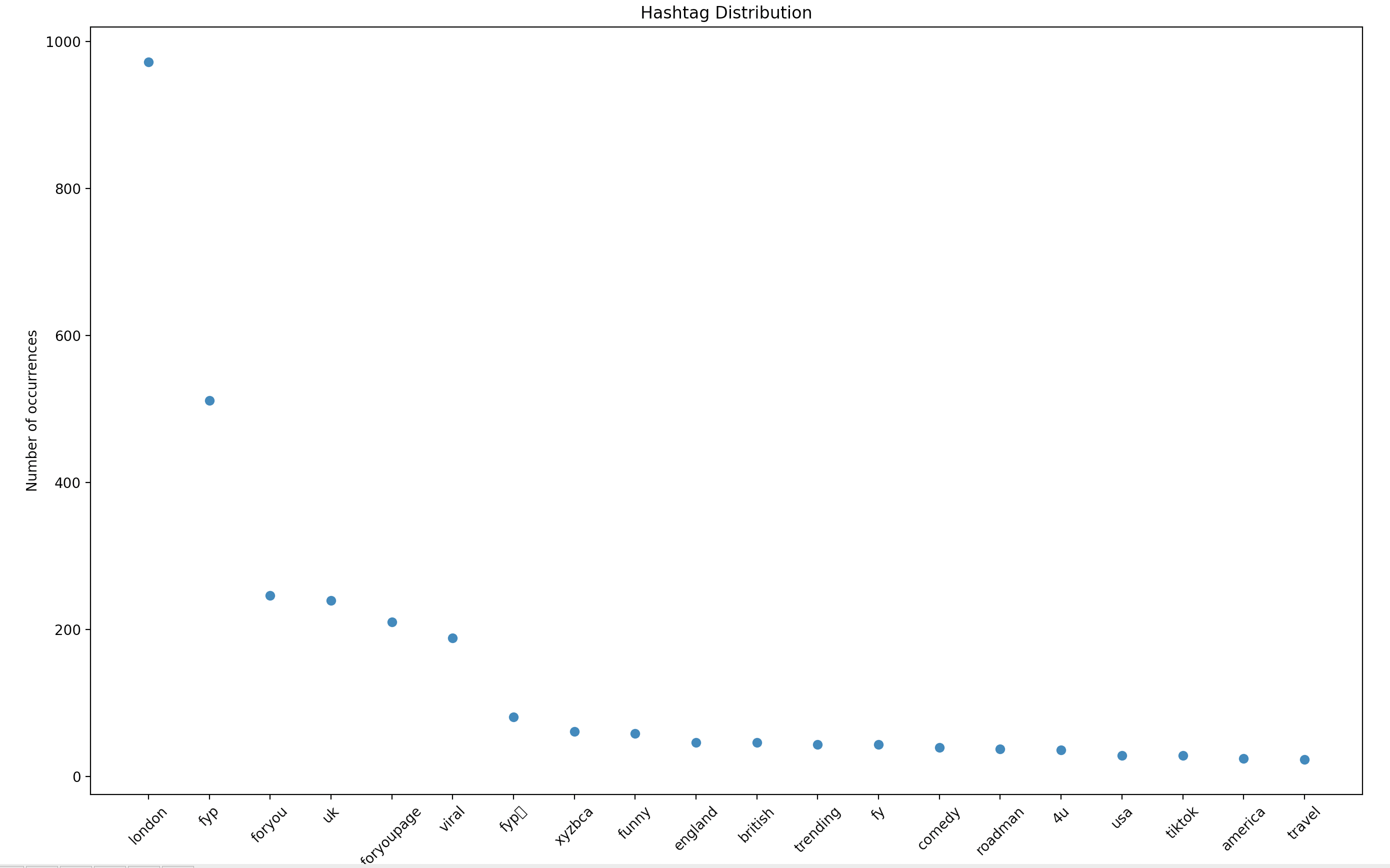
Assume we want to analyze the top 20 occurring hashtags in the downloaded posts of the `#london` hashtag.
|
|
|
|
- The results can be plotted and saved as a PNG file by executing the following command:
|
|
|
|
`python3 hashtag_frequencies.py -p ../data/london/posts/data.json 20`
|
|
|
|
which will produce a figure similar to that shown below:
|
|
|
|
|
|
|
|
Clearly, the highest occurrence will be of the `#london` hashtag, as all posts in the file `data/london/posts/data.json` contain the hashtag `#london`.
|
|
|
|
- The results can be displayed in tabular form by executing the following command:
|
|
|
|
`python3 hashtag_frequencies.py -d ../data/london/posts/data.json 20`
|
|
|
|
which will produce a terminal output similar to the following:
|
|
```
|
|
Rank Hashtag Occurrences Frequency (Occurrences/Total-Posts(total_posts))
|
|
0 london 962 1.0
|
|
1 fyp 493 0.5124740124740125
|
|
2 uk 238 0.24740124740124741
|
|
3 foryou 223 0.23180873180873182
|
|
4 foryoupage 186 0.19334719334719336
|
|
5 viral 177 0.183991683991684
|
|
6 fypシ 85 0.08835758835758836
|
|
7 funny 55 0.057172557172557176
|
|
8 xyzbca 52 0.05405405405405406
|
|
9 england 45 0.04677754677754678
|
|
10 british 44 0.04573804573804574
|
|
11 trending 39 0.04054054054054054
|
|
12 fy 33 0.034303534303534305
|
|
13 comedy 32 0.033264033264033266
|
|
14 roadman 28 0.029106029106029108
|
|
15 4u 27 0.028066528066528068
|
|
16 usa 26 0.02702702702702703
|
|
17 tiktok 26 0.02702702702702703
|
|
18 travel 21 0.02182952182952183
|
|
19 america 20 0.02079002079002079
|
|
```
|
|
|
|
The `Frequency` column shows the ratio of the occurrence to the total number of downloaded posts. |