 dbd89d8e3d
* Fix Windows PowerShell 5.1 compatibility in installer

Use $env:PROCESSOR_ARCHITECTURE for arch detection instead of
RuntimeInformation::OSArchitecture which may not be loaded in
every Windows PowerShell 5.1 session. Also fix null-reference
when user PATH environment variable is empty.

https://claude.ai/code/session_01VFiRDM2ZweyacXN5JneVoP

* Fix executable resolution and tar extraction on Windows

resolveExecutable() used `sh -lc "command -v ..."` which doesn't work
on Windows (no sh). Now uses `cmd /c where` on win32. Also make tar
workspace restoration tolerate symlink failures on Windows — .bin/
symlinks can't be created without Developer Mode, but the actual
package directories are extracted fine.

https://claude.ai/code/session_01VFiRDM2ZweyacXN5JneVoP

* Broad Windows compatibility fixes across the codebase

- runtime.ts: Use path.delimiter instead of hardcoded ":" for PATH
  construction — was completely broken on Windows
- executables.ts: Add Windows fallback paths for Chrome, Edge, Brave,
  and Pandoc in Program Files; skip macOS-only paths on win32
- node-version.ts, check-node-version.mjs, bin/feynman.js: Show
  Windows-appropriate install instructions (irm | iex, nodejs.org)
  instead of nvm/curl on win32
- preview.ts: Support winget for pandoc auto-install on Windows, and
  apt on Linux (was macOS/brew only)
- launch.ts: Catch unsupported signal errors on Windows
- README.md: Add Windows PowerShell commands alongside macOS/Linux
  for all install instructions

https://claude.ai/code/session_01VFiRDM2ZweyacXN5JneVoP

* fix: complete windows bootstrap hardening

---------

Co-authored-by: Claude <noreply@anthropic.com>
Co-authored-by: Advait Paliwal <advaitspaliwal@gmail.com>
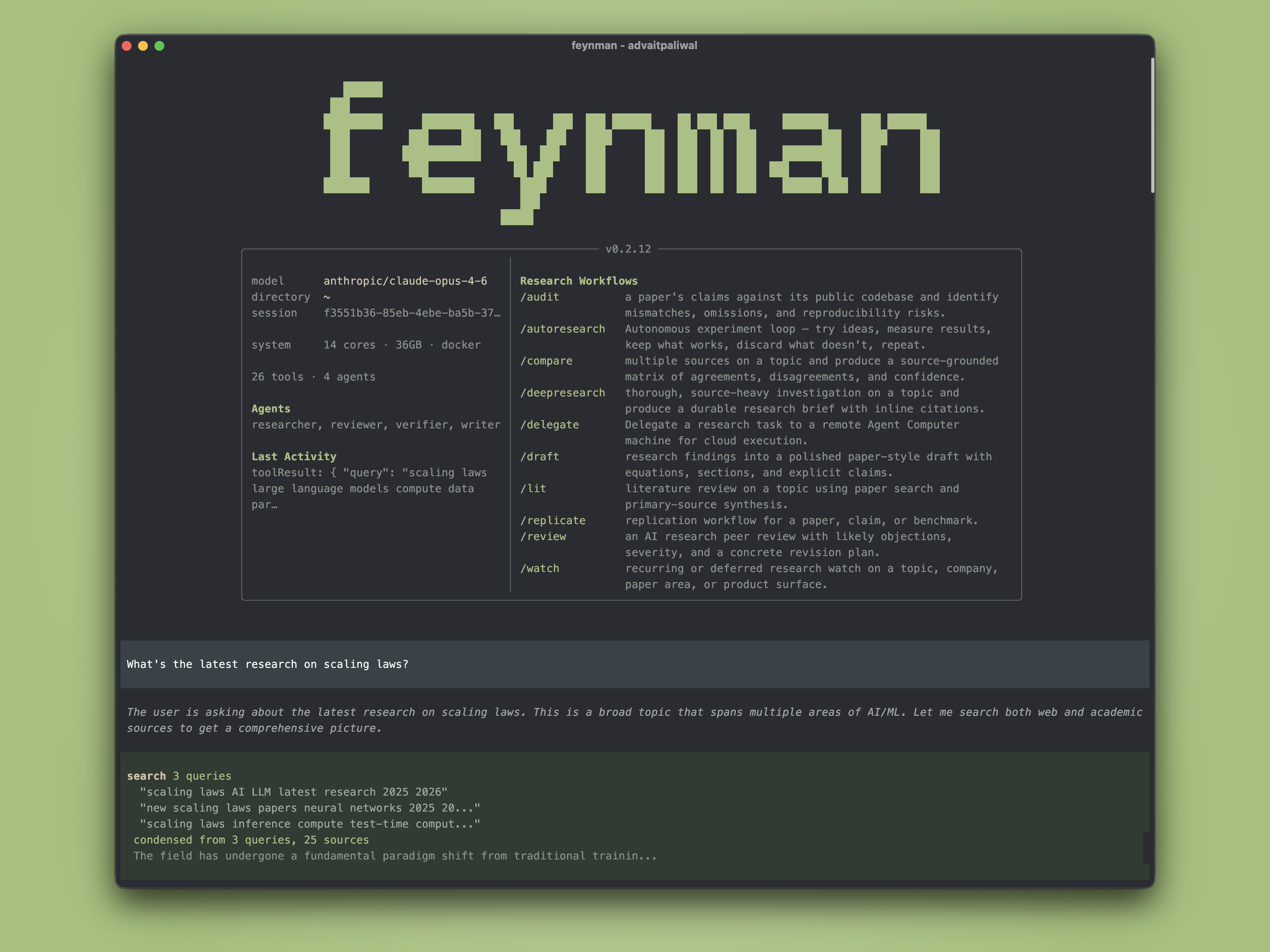
The open source AI research agent.


Installation
macOS / Linux:
curl -fsSL https://feynman.is/install | bash
Windows (PowerShell):
irm https://feynman.is/install.ps1 | iex
If you install via pnpm or bun instead of the standalone bundle, Feynman requires Node.js 20.18.1 or newer.
Skills Only
If you want just the research skills without the full terminal app:
macOS / Linux:
curl -fsSL https://feynman.is/install-skills | bash
Windows (PowerShell):
irm https://feynman.is/install-skills.ps1 | iex
That installs the skill library into ~/.codex/skills/feynman.
For a repo-local install instead:
macOS / Linux:
curl -fsSL https://feynman.is/install-skills | bash -s -- --repo
Windows (PowerShell):
& ([scriptblock]::Create((irm https://feynman.is/install-skills.ps1))) -Scope Repo
That installs into .agents/skills/feynman under the current repository.
What you type → what happens
$ feynman "what do we know about scaling laws"
→ Searches papers and web, produces a cited research brief

$ feynman deepresearch "mechanistic interpretability"
→ Multi-agent investigation with parallel researchers, synthesis, verification

$ feynman lit "RLHF alternatives"
→ Literature review with consensus, disagreements, open questions

$ feynman audit 2401.12345
→ Compares paper claims against the public codebase

$ feynman replicate "chain-of-thought improves math"
→ Replicates experiments on local or cloud GPUs
Workflows
Ask naturally or use slash commands as shortcuts.
| Command | What it does |
|---|---|
/deepresearch <topic> |
Source-heavy multi-agent investigation |
/lit <topic> |
Literature review from paper search and primary sources |
/review <artifact> |
Simulated peer review with severity and revision plan |
/audit <item> |
Paper vs. codebase mismatch audit |
/replicate <paper> |
Replicate experiments on local or cloud GPUs |
/compare <topic> |
Source comparison matrix |
/draft <topic> |
Paper-style draft from research findings |
/autoresearch <idea> |
Autonomous experiment loop |
/watch <topic> |
Recurring research watch |
/outputs |
Browse all research artifacts |
Agents
Four bundled research agents, dispatched automatically.
- Researcher — gather evidence across papers, web, repos, docs
- Reviewer — simulated peer review with severity-graded feedback
- Writer — structured drafts from research notes
- Verifier — inline citations, source URL verification, dead link cleanup
Skills & Tools
- AlphaXiv — paper search, Q&A, code reading, annotations (via
alphaCLI) - Docker — isolated container execution for safe experiments on your machine
- Web search — Gemini or Perplexity, zero-config default
- Session search — indexed recall across prior research sessions
- Preview — browser and PDF export of generated artifacts
- Modal — serverless GPU compute for burst training and inference
- RunPod — persistent GPU pods with SSH access for long-running experiments
How it works
Built on Pi for the agent runtime, alphaXiv for paper search and analysis, and CLI tools for compute and execution. Capabilities are delivered as Pi skills — Markdown instruction files synced to ~/.feynman/agent/skills/ on startup. Every output is source-grounded — claims link to papers, docs, or repos with direct URLs.
Contributing
git clone https://github.com/getcompanion-ai/feynman.git
cd feynman
nvm use || nvm install
pnpm install
pnpm start