
129 lines
5.0 KiB
Markdown
129 lines
5.0 KiB
Markdown
# CodeNomad
|
|
|
|
## A fast, multi-instance workspace for running OpenCode sessions.
|
|
|
|
CodeNomad is built for people who live inside OpenCode for hours on end and need a cockpit, not a kiosk. It delivers a premium, low-latency workspace that favors speed, clarity, and direct control.
|
|
|
|

|
|
_Manage multiple OpenCode sessions side-by-side._
|
|
|
|
<details>
|
|
<summary>📸 More Screenshots</summary>
|
|
|
|

|
|
_Global command palette for keyboard-first control._
|
|
|
|

|
|
_Rich media previews for images and assets._
|
|
|
|

|
|
_Browser support via CodeNomad Server._
|
|
|
|
</details>
|
|
|
|
## Getting Started
|
|
|
|
Choose the way that fits your workflow:
|
|
|
|
### 🖥️ Desktop App (Recommended)
|
|
The best experience. A native application (Electron-based) with global shortcuts, deeper system integration, and a dedicated window.
|
|
|
|
- **Download**: Grab the latest installer for macOS, Windows, or Linux from the [Releases Page](https://github.com/shantur/CodeNomad/releases).
|
|
- **Run**: Install and launch like any other app.
|
|
|
|
### 🦀 Tauri App (Experimental)
|
|
We are also working on a lightweight, high-performance version built with [Tauri](https://tauri.app). It is currently in active development.
|
|
|
|
- **Download**: Experimental builds are available on the [Releases Page](https://github.com/shantur/CodeNomad/releases).
|
|
- **Source**: Check out `packages/tauri-app` if you're interested in contributing.
|
|
|
|
### 💻 CodeNomad Server
|
|
Run CodeNomad as a local server and access it via your web browser. Perfect for remote development (SSH/VPN) or running as a service.
|
|
|
|
```bash
|
|
npx @neuralnomads/codenomad --launch
|
|
```
|
|
|
|
Full server/CLI documentation (flags + env vars, TLS, auth, remote access):
|
|
- [packages/server/README.md](packages/server/README.md)
|
|
|
|
To see all available options:
|
|
|
|
```bash
|
|
npx @neuralnomads/codenomad --help
|
|
```
|
|
|
|
### 🧪 Dev Releases
|
|
Bleeding-edge builds are published as GitHub pre-releases and are generated automatically from the `dev` branch.
|
|
|
|
```bash
|
|
npx @neuralnomads/codenomad-dev --launch
|
|
```
|
|
|
|
## Highlights
|
|
|
|
- **Multi-Instance**: Juggle several OpenCode sessions side-by-side with tabs.
|
|
- **Long-Session Native**: Scroll through massive transcripts without hitches.
|
|
- **Command Palette**: A single global palette to jump tabs, launch tools, and control everything.
|
|
- **Deep Task Awareness**: Monitor background tasks and child sessions without losing flow.
|
|
|
|
## Requirements
|
|
|
|
- **[OpenCode CLI](https://opencode.ai)**: Must be installed and available in your `PATH`.
|
|
- **Node.js 18+**: Required if running the CLI server or building from source.
|
|
|
|
## Troubleshooting
|
|
|
|
### macOS says the app is damaged
|
|
If macOS reports that "CodeNomad.app is damaged and can't be opened," Gatekeeper flagged the download because the app is not yet notarized. You can clear the quarantine flag after moving CodeNomad into `/Applications`:
|
|
|
|
```bash
|
|
xattr -l /Applications/CodeNomad.app
|
|
xattr -dr com.apple.quarantine /Applications/CodeNomad.app
|
|
```
|
|
|
|
After removing the quarantine attribute, launch the app normally. On Intel Macs you may also need to approve CodeNomad from **System Settings → Privacy & Security** the first time you run it.
|
|
|
|
### Linux (Wayland + NVIDIA): Tauri AppImage closes immediately
|
|
On some Wayland compositor + NVIDIA driver setups, WebKitGTK can fail to initialize its DMA-BUF/GBM path and the Tauri build may exit right away.
|
|
|
|
Try running with one of these environment variables:
|
|
|
|
```bash
|
|
# Most reliable workaround (can reduce rendering performance)
|
|
WEBKIT_DISABLE_DMABUF_RENDERER=1 codenomad
|
|
|
|
# Alternative for some Wayland setups
|
|
__NV_DISABLE_EXPLICIT_SYNC=1 codenomad
|
|
```
|
|
|
|
If you're running the Tauri AppImage and want the workaround applied every time, create a tiny wrapper script on your `PATH`:
|
|
|
|
```bash
|
|
#!/bin/bash
|
|
export WEBKIT_DISABLE_DMABUF_RENDERER=1
|
|
exec ~/.local/share/bauh/appimage/installed/codenomad/CodeNomad-Tauri-0.4.0-linux-x64.AppImage "$@"
|
|
```
|
|
|
|
Upstream tracking: https://github.com/tauri-apps/tauri/issues/10702
|
|
|
|
## Architecture & Development
|
|
|
|
CodeNomad is a monorepo split into specialized packages. If you want to contribute or build from source, check out the individual package documentation:
|
|
|
|
| Package | Description |
|
|
|---------|-------------|
|
|
| **[packages/electron-app](packages/electron-app/README.md)** | The native desktop application shell. Wraps the UI and Server. |
|
|
| **[packages/server](packages/server/README.md)** | The core logic and CLI. Manages workspaces, proxies OpenCode, and serves the API. |
|
|
| **[packages/ui](packages/ui/README.md)** | The SolidJS-based frontend. Fast, reactive, and beautiful. |
|
|
|
|
### Quick Build
|
|
To build the Desktop App from source:
|
|
|
|
1. Clone the repo.
|
|
2. Run `npm install` (requires pnpm or npm 7+ for workspaces).
|
|
3. Run `npm run build --workspace @neuralnomads/codenomad-electron-app`.
|
|
|
|
[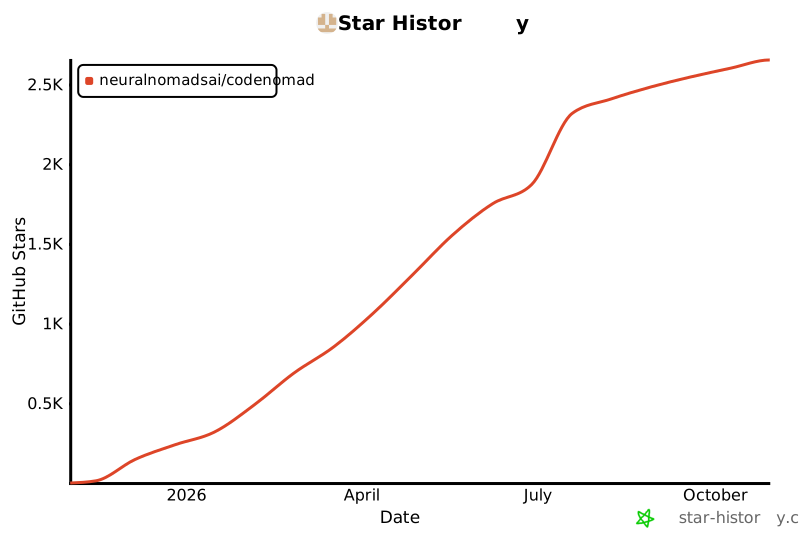](https://star-history.com/#NeuralNomadsAI/CodeNomad&Date)
|
|
|