
6.0 KiB
TikTok hashtag analysis toolset
The tool helps to download posts and videos from tiktok for a given set of hashtags. It uses the tiktok-scraper (https://github.com/drawrowfly/tiktok-scraper) to download the posts and videos.
Pre-requisites
- Make sure you have python 3.6 or a later version installed.
- Download and install TikTok scraper: https://github.com/drawrowfly/tiktok-scraper
- Go to the project folder and run
python3 -m venv env - Run
pip install -r requirements.txt
Options for running run_downloader.py
$ python run_downloader.py -h
usage: run_downloader.py [-h] [-t [T [T ...]]] [-f F] [-p] [-v]

Download the tiktoks for the requested hashtags

optional arguments:
-h, --help      show this help message and exit
-t [T [T ...]]  List of hashtags
-f F            File name with the list of hashtags
-p              Download posts
-v              Download videos
Data organization
$ tree ../data
../data
├── ids
│   └── post_ids.json
├── log
│   └── log.json
├── london
│   └── posts
│       └── data.json
├── newyork
│   └── posts
│       └── data.json
└── paris
    └── posts
        └── data.json
data folder contains all the downloaded data as shown in the picture above.
- the
logfolder contains log.json which records the total number of downloaded posts and videos for the hashtags against the time stamp of when the script is run. - the
idsfolder contains two filespost_ids.jsonandvideo_ids.jsonthat records the ids of the downloaded posts and videos for each hashtag. - Each hashtag has a folder with two subfolders
postsandvideosthat store posts and videos respectively. The posts are stored in thedata.jsonfile in thepostsfolder, and videos are stored as the.mp4files in thevideosfolder.
Post download
Run the run_downloader.py with the following option:
$ python3 run_downloader.py -t london paris newyork -p
['london', 'paris', 'newyork']
SUCCESS - 962 entries added to ../data/london/posts/data.json!!!
SUCCESS - 962 entries added to ../data/ids/post_ids.json!!!
Successfully deleted /Users/work/Documents/development_projects/Tiktok/tiktok/data/london/posts/london_1651533070680.json!!!
Total posts for the hashtag london are: 962
SUCCESS - 961 entries added to ../data/paris/posts/data.json!!!
SUCCESS - 961 entries added to ../data/ids/post_ids.json!!!
Successfully deleted /Users/work/Documents/development_projects/Tiktok/tiktok/data/paris/posts/paris_1651533102789.json!!!
Total posts for the hashtag paris are: 961
SUCCESS - 941 entries added to ../data/newyork/posts/data.json!!!
SUCCESS - 941 entries added to ../data/ids/post_ids.json!!!
Successfully deleted /Users/work/Documents/development_projects/Tiktok/tiktok/data/newyork/posts/newyork_1651533125549.json!!!
Total posts for the hashtag newyork are: 941
Successfully logged 2864 entries!!!!
- The --h option allows to type in hashtag list in the commandline.
- -p option specifies the download posts option.
Video download
python3 run_downloader.py --h london -v
- --h option allows to type in the list of hashtags as command line argument.
- -v option is for downloading the videos The above code download all the trending videos for the hashtag london. Note that video downloading is a time and data rate consuming task, as a result we strongly recommend to use one hashtag at a time so as to avoid complications.
Top n hashtag occurrences
In the analytics folder, the file hashtag_frequencies.py will plot the frequencies of top occurring hashtags in a given set of posts.
Assume we want to plot the graph of top 20 occurring hashtags in the downloaded posts of the hashtag london.
- Plotting the saving the image as a png file:
python3 hashtag_frequencies.py -p ../data/london/posts/data.json 20 -v
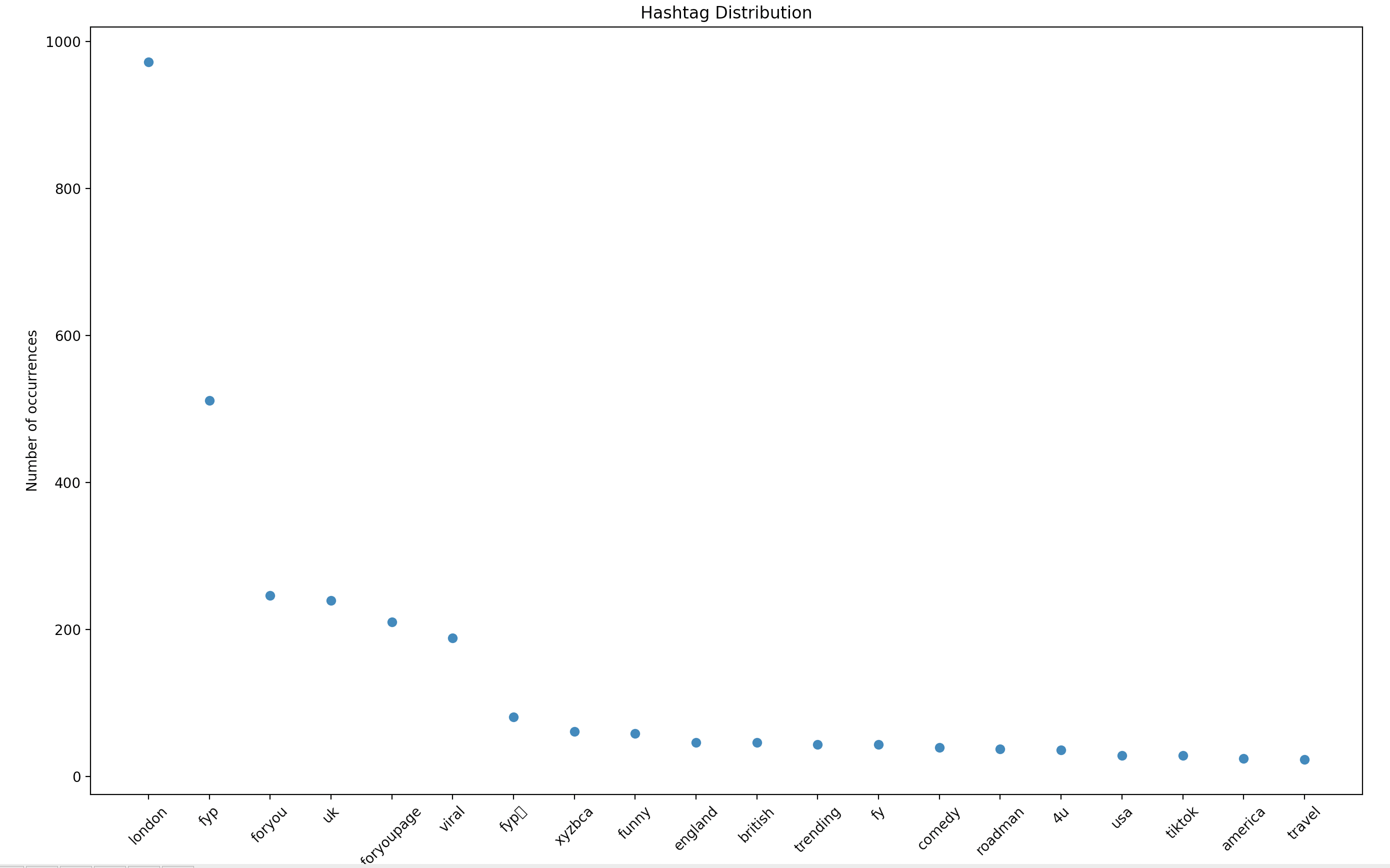
The figure above shows the top 20 occurring hashtags among all the posts downloaded for the hashtag london. Clearly, the highest occurrence will be of the hashtag london as the file data/london/posts/data.json contain all the posts with hashtag london.
- Printing the result in the shell:
python3 hashtag_frequencies.py -d ../data/london/posts/data.json 20 -v
Rank     Hashtag         Occurrences     Frequency (Occurrences/Total-Posts(total_posts))
0        london          962             1.0
1        fyp             493             0.5124740124740125
2        uk              238             0.24740124740124741
3        foryou          223             0.23180873180873182
4        foryoupage      186             0.19334719334719336
5        viral           177             0.183991683991684
6        fypシ            85              0.08835758835758836
7        funny           55              0.057172557172557176
8        xyzbca          52              0.05405405405405406
9        england         45              0.04677754677754678
10       british         44              0.04573804573804574
11       trending        39              0.04054054054054054
12       fy              33              0.034303534303534305
13       comedy          32              0.033264033264033266
14       roadman         28              0.029106029106029108
15       4u              27              0.028066528066528068
16       usa             26              0.02702702702702703
17       tiktok          26              0.02702702702702703
18       travel          21              0.02182952182952183
19       america         20              0.02079002079002079
The same result of 1 is printed in the shell. The last column shows the ratio of the occurrence to the total posts.