mirror of
https://github.com/bellingcat/reddit-post-scraping-tool.git
synced 2026-06-10 12:38:30 +03:00
Compare commits
32 Commits
| Author | SHA1 | Date | |
|---|---|---|---|

|
1f3d8f41eb | ||
|
|
4ac58f0fc4 | ||
|
|
7696dd923a | ||
|
|
45b82e57ac | ||
|
|
6d6e616640 | ||
|
|
4ba402a129 | ||
|
|
52d36baae2 | ||
|
|
1086ba1db1 | ||
|
|
d8919b4357 | ||
|
|
8952c7910b | ||
|
|
5d144fcd00 | ||
|
|
4c86206d0f | ||
|
|
6f77623681 | ||
|
|
e88e1a2d5a | ||
|
|
71b65753cf | ||
|
|
002dd57c0d | ||
|
|
6e9f97c444 | ||
|
|
1ff6d2c9c0 | ||
|
|
b356a6beaa | ||
|
|
618aaa45ba | ||
|
|
f321accfbb | ||
|
|
e2e9228bec | ||
|
|
90e7fefa7f | ||
|
|
64ebdca6ee | ||
|
|
ca0458f328 | ||
|
|
bc10b3020e | ||
|
|
fc0c62a1ee | ||
|
|
151183765b | ||
|
|
210beccce8 | ||
|
|
3a3a0b67dc | ||
|
|
7399683352 | ||
|
|
b536b8245a |
2
.github/dependabot.yml
vendored
2
.github/dependabot.yml
vendored
@@ -8,7 +8,7 @@ updates:
|
||||
- package-ecosystem: "nuget"
|
||||
schedule:
|
||||
interval: "daily"
|
||||
directory: "Reddit Post Scraping Tool"
|
||||
directory: "RPST GUI"
|
||||
ignore:
|
||||
- dependency-name: "Newtonsoft.Json"
|
||||
- package-ecosystem: "pip"
|
||||
|
||||
@@ -6,6 +6,6 @@ WORKDIR /app
|
||||
|
||||
COPY . .
|
||||
|
||||
RUN pip install --upgrade pip && pip install build && python -m build && pip install dist/*.whl
|
||||
RUN pip install --upgrade pip && pip install .
|
||||
|
||||
ENTRYPOINT ["reddit_post_scraping_tool"]
|
||||
ENTRYPOINT ["rpst"]
|
||||
|
||||
39
README.md
39
README.md
@@ -1,30 +1,33 @@
|
||||
# Reddit Post Scraping Tool
|
||||
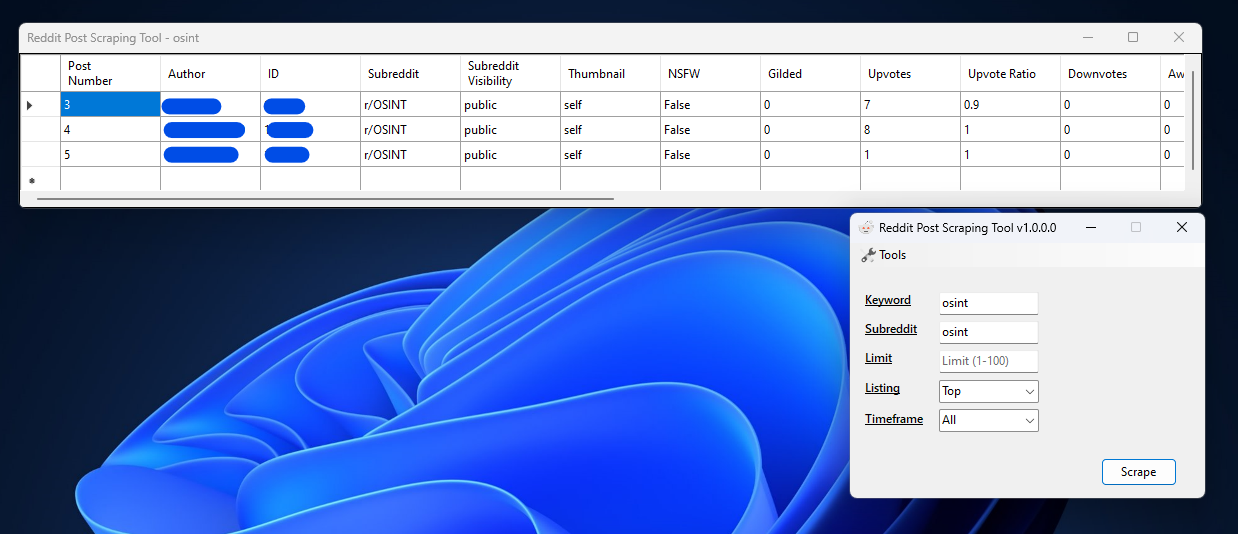
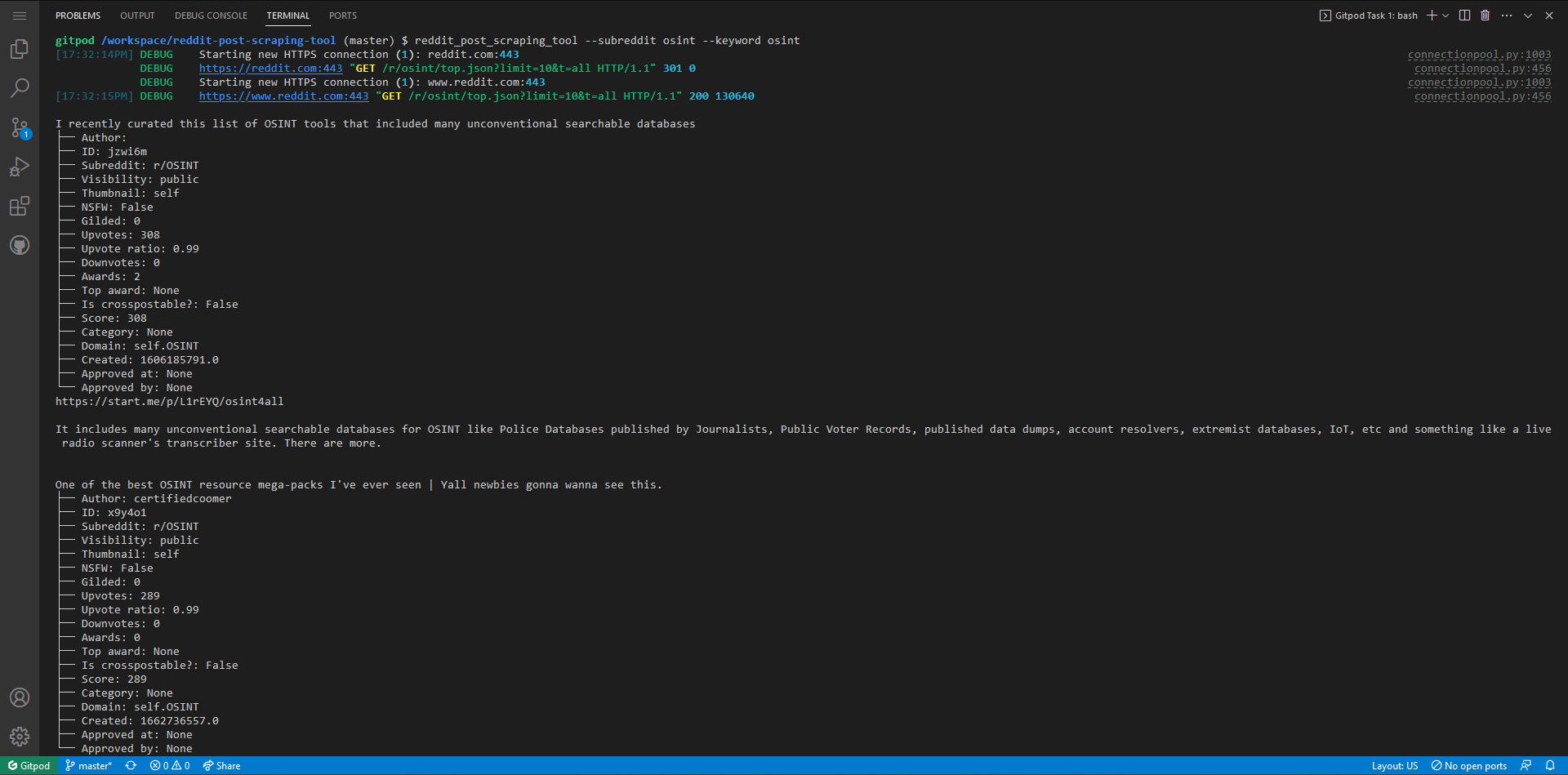
Given a subreddit name and a keyword, this script will return all posts from a specified listing (default is 'top') that contain the provided keyword.
|
||||
# RPST (Reddit Post Scraping Tool)
|
||||
Given a subreddit name and a keyword, RPST will return all posts from a specified listing (default is 'top') that contain the provided keyword.
|
||||
|
||||
[](https://github.com/rly0nheart/reddit-post-scraping-tool/actions/workflows/python-publish.yml) [](https://github.com/rly0nheart/reddit-post-scraping-tool/actions/workflows/codeql.yml)  
|
||||
|
||||
|
||||

|
||||

|
||||
|
||||
|
||||
# Features (GUI)
|
||||
- [x] Auto dark mode from 6pm - 6am
|
||||
- [x] Saves results to a JSON
|
||||
- [ ] Other features coming soon...
|
||||
# ✅ Features
|
||||
## GUI
|
||||
- [x] Dark mode (Right-click)
|
||||
- [x] Saves results to a JSON (Right-click)
|
||||
- [x] Logs errors to a file
|
||||
|
||||
# TODO (GUI)
|
||||
- [ ] Make it a stand alone executable
|
||||
- [ ] Add manual dark mode option, that will be remembered in all sessions
|
||||
## CLI
|
||||
- [x] Saves results to a JSON (-j/--json)
|
||||
- [x] Automatically checks for new updates. Notifies user if update were found.
|
||||
|
||||
# 📃 TODO
|
||||
## GUI
|
||||
- [ ] Make it installable with a setup.exe/setup.msi file.
|
||||
- [x] Add manual dark mode option, that will be persistent in all sessions
|
||||
- [ ] Make it save results to a CSV file
|
||||
|
||||
# Wiki
|
||||
# 📖 Wiki
|
||||
[Refer to the Wiki](https://github.com/rly0nheart/reddit-post-scraping-tool/wiki) for installation instructions, in addition to all other documentation.
|
||||
|
||||
# Note
|
||||
> This is one of the projects I am working on, while learning Visual Basic, so the implementation/code may be messed up. If that's the case, please feel free to open a pull request using the available templates. Otherwise, enjoy!
|
||||
# 😁 Donations
|
||||
If you like `RPST` and would like to show support, you can Buy A Coffee for the developer using the button below
|
||||
|
||||
# Donations
|
||||
If you like `Reddit Post Scraping Tool` and would like to show support, you can Buy A Coffee for the developer using the button below
|
||||
|
||||
<a href="https://www.buymeacoffee.com/189381184" target="_blank"><img src="https://cdn.buymeacoffee.com/buttons/default-orange.png" alt="Buy Me A Coffee" height="41" width="174"></a>
|
||||
<a href="https://www.buymeacoffee.com/_rly0nheart" target="_blank"><img src="https://cdn.buymeacoffee.com/buttons/default-orange.png" alt="Buy Me A Coffee" height="41" width="174"></a>
|
||||
|
||||
Your support will be much appreciated😊
|
||||
|
||||
@@ -3,7 +3,7 @@ Microsoft Visual Studio Solution File, Format Version 12.00
|
||||
# Visual Studio Version 17
|
||||
VisualStudioVersion = 17.4.33213.308
|
||||
MinimumVisualStudioVersion = 10.0.40219.1
|
||||
Project("{F184B08F-C81C-45F6-A57F-5ABD9991F28F}") = "Reddit Post Scraping Tool", "Reddit Post Scraping Tool\Reddit Post Scraping Tool.vbproj", "{46C2541E-6F65-461A-A479-F65D445C36EA}"
|
||||
Project("{778DAE3C-4631-46EA-AA77-85C1314464D9}") = "RPST", "RPST\RPST.vbproj", "{46C2541E-6F65-461A-A479-F65D445C36EA}"
|
||||
EndProject
|
||||
Global
|
||||
GlobalSection(SolutionConfigurationPlatforms) = preSolution
|
||||
144
RPST GUI/RPST/AboutBox.Designer.vb
generated
Normal file
144
RPST GUI/RPST/AboutBox.Designer.vb
generated
Normal file
@@ -0,0 +1,144 @@
|
||||
<Global.Microsoft.VisualBasic.CompilerServices.DesignerGenerated()> _
|
||||
Partial Class AboutBox
|
||||
Inherits System.Windows.Forms.Form
|
||||
|
||||
'Form overrides dispose to clean up the component list.
|
||||
<System.Diagnostics.DebuggerNonUserCode()> _
|
||||
Protected Overrides Sub Dispose(ByVal disposing As Boolean)
|
||||
Try
|
||||
If disposing AndAlso components IsNot Nothing Then
|
||||
components.Dispose()
|
||||
End If
|
||||
Finally
|
||||
MyBase.Dispose(disposing)
|
||||
End Try
|
||||
End Sub
|
||||
|
||||
'Required by the Windows Form Designer
|
||||
Private components As System.ComponentModel.IContainer
|
||||
|
||||
'NOTE: The following procedure is required by the Windows Form Designer
|
||||
'It can be modified using the Windows Form Designer.
|
||||
'Do not modify it using the code editor.
|
||||
<System.Diagnostics.DebuggerStepThrough()> _
|
||||
Private Sub InitializeComponent()
|
||||
Dim resources As ComponentModel.ComponentResourceManager = New ComponentModel.ComponentResourceManager(GetType(AboutBox))
|
||||
PictureBoxLogo = New PictureBox()
|
||||
LabelProgramName = New Label()
|
||||
LabelProgramDescription = New Label()
|
||||
LabelVersion = New Label()
|
||||
LinkLabelReadtheWiki = New LinkLabel()
|
||||
Panel1 = New Panel()
|
||||
LicenseRichTextBox = New RichTextBox()
|
||||
CType(PictureBoxLogo, ComponentModel.ISupportInitialize).BeginInit()
|
||||
Panel1.SuspendLayout()
|
||||
SuspendLayout()
|
||||
'
|
||||
' PictureBoxLogo
|
||||
'
|
||||
PictureBoxLogo.BackColor = Color.Transparent
|
||||
PictureBoxLogo.Image = CType(resources.GetObject("PictureBoxLogo.Image"), Image)
|
||||
PictureBoxLogo.Location = New Point(12, 12)
|
||||
PictureBoxLogo.Name = "PictureBoxLogo"
|
||||
PictureBoxLogo.Size = New Size(99, 111)
|
||||
PictureBoxLogo.SizeMode = PictureBoxSizeMode.StretchImage
|
||||
PictureBoxLogo.TabIndex = 0
|
||||
PictureBoxLogo.TabStop = False
|
||||
'
|
||||
' LabelProgramName
|
||||
'
|
||||
LabelProgramName.AutoSize = True
|
||||
LabelProgramName.Font = New Font("Ink Free", 14.25F, FontStyle.Bold, GraphicsUnit.Point)
|
||||
LabelProgramName.ForeColor = SystemColors.ControlText
|
||||
LabelProgramName.Location = New Point(4, 11)
|
||||
LabelProgramName.Name = "LabelProgramName"
|
||||
LabelProgramName.Size = New Size(60, 23)
|
||||
LabelProgramName.TabIndex = 3
|
||||
LabelProgramName.Text = "Name"
|
||||
'
|
||||
' LabelProgramDescription
|
||||
'
|
||||
LabelProgramDescription.AutoSize = True
|
||||
LabelProgramDescription.Font = New Font("Segoe UI Semibold", 9F, FontStyle.Bold, GraphicsUnit.Point)
|
||||
LabelProgramDescription.ForeColor = SystemColors.ControlText
|
||||
LabelProgramDescription.Location = New Point(4, 54)
|
||||
LabelProgramDescription.Name = "LabelProgramDescription"
|
||||
LabelProgramDescription.Size = New Size(68, 15)
|
||||
LabelProgramDescription.TabIndex = 4
|
||||
LabelProgramDescription.Text = "Description"
|
||||
'
|
||||
' LabelVersion
|
||||
'
|
||||
LabelVersion.AutoSize = True
|
||||
LabelVersion.Font = New Font("Segoe UI", 9F, FontStyle.Underline, GraphicsUnit.Point)
|
||||
LabelVersion.ForeColor = SystemColors.ControlText
|
||||
LabelVersion.Location = New Point(372, 17)
|
||||
LabelVersion.Name = "LabelVersion"
|
||||
LabelVersion.Size = New Size(45, 15)
|
||||
LabelVersion.TabIndex = 5
|
||||
LabelVersion.Text = "Version"
|
||||
'
|
||||
' LinkLabelReadtheWiki
|
||||
'
|
||||
LinkLabelReadtheWiki.AutoSize = True
|
||||
LinkLabelReadtheWiki.Font = New Font("Segoe UI", 9F, FontStyle.Regular, GraphicsUnit.Point)
|
||||
LinkLabelReadtheWiki.Location = New Point(337, 54)
|
||||
LinkLabelReadtheWiki.Name = "LinkLabelReadtheWiki"
|
||||
LinkLabelReadtheWiki.Size = New Size(79, 15)
|
||||
LinkLabelReadtheWiki.TabIndex = 6
|
||||
LinkLabelReadtheWiki.TabStop = True
|
||||
LinkLabelReadtheWiki.Text = "Read the Wiki"
|
||||
'
|
||||
' Panel1
|
||||
'
|
||||
Panel1.BackColor = SystemColors.Control
|
||||
Panel1.Controls.Add(LabelProgramDescription)
|
||||
Panel1.Controls.Add(LabelProgramName)
|
||||
Panel1.Controls.Add(LinkLabelReadtheWiki)
|
||||
Panel1.Controls.Add(LabelVersion)
|
||||
Panel1.Location = New Point(117, 12)
|
||||
Panel1.Name = "Panel1"
|
||||
Panel1.Size = New Size(440, 111)
|
||||
Panel1.TabIndex = 7
|
||||
'
|
||||
' LicenseRichTextBox
|
||||
'
|
||||
LicenseRichTextBox.Font = New Font("Cambria", 9.75F, FontStyle.Regular, GraphicsUnit.Point)
|
||||
LicenseRichTextBox.Location = New Point(12, 135)
|
||||
LicenseRichTextBox.Name = "LicenseRichTextBox"
|
||||
LicenseRichTextBox.ReadOnly = True
|
||||
LicenseRichTextBox.Size = New Size(545, 305)
|
||||
LicenseRichTextBox.TabIndex = 1
|
||||
LicenseRichTextBox.Text = "License notice"
|
||||
'
|
||||
' AboutBox
|
||||
'
|
||||
AutoScaleDimensions = New SizeF(7F, 15F)
|
||||
AutoScaleMode = AutoScaleMode.Font
|
||||
BackColor = Color.Gainsboro
|
||||
ClientSize = New Size(569, 454)
|
||||
Controls.Add(LicenseRichTextBox)
|
||||
Controls.Add(Panel1)
|
||||
Controls.Add(PictureBoxLogo)
|
||||
FormBorderStyle = FormBorderStyle.FixedSingle
|
||||
Icon = CType(resources.GetObject("$this.Icon"), Icon)
|
||||
MaximizeBox = False
|
||||
MinimizeBox = False
|
||||
Name = "AboutBox"
|
||||
ShowInTaskbar = False
|
||||
StartPosition = FormStartPosition.CenterScreen
|
||||
Text = "About"
|
||||
CType(PictureBoxLogo, ComponentModel.ISupportInitialize).EndInit()
|
||||
Panel1.ResumeLayout(False)
|
||||
Panel1.PerformLayout()
|
||||
ResumeLayout(False)
|
||||
End Sub
|
||||
|
||||
Friend WithEvents PictureBoxLogo As PictureBox
|
||||
Friend WithEvents LabelProgramName As Label
|
||||
Friend WithEvents LabelProgramDescription As Label
|
||||
Friend WithEvents LabelVersion As Label
|
||||
Friend WithEvents LinkLabelReadtheWiki As LinkLabel
|
||||
Friend WithEvents Panel1 As Panel
|
||||
Friend WithEvents LicenseRichTextBox As RichTextBox
|
||||
End Class
|
||||
@@ -1,4 +1,64 @@
|
||||
<root>
|
||||
<?xml version="1.0" encoding="utf-8"?>
|
||||
<root>
|
||||
<!--
|
||||
Microsoft ResX Schema
|
||||
|
||||
Version 2.0
|
||||
|
||||
The primary goals of this format is to allow a simple XML format
|
||||
that is mostly human readable. The generation and parsing of the
|
||||
various data types are done through the TypeConverter classes
|
||||
associated with the data types.
|
||||
|
||||
Example:
|
||||
|
||||
... ado.net/XML headers & schema ...
|
||||
<resheader name="resmimetype">text/microsoft-resx</resheader>
|
||||
<resheader name="version">2.0</resheader>
|
||||
<resheader name="reader">System.Resources.ResXResourceReader, System.Windows.Forms, ...</resheader>
|
||||
<resheader name="writer">System.Resources.ResXResourceWriter, System.Windows.Forms, ...</resheader>
|
||||
<data name="Name1"><value>this is my long string</value><comment>this is a comment</comment></data>
|
||||
<data name="Color1" type="System.Drawing.Color, System.Drawing"">Blue</data>
|
||||
<data name="Bitmap1" mimetype="application/x-microsoft.net.object.binary.base64">
|
||||
<value>[base64 mime encoded serialized .NET Framework object]</value>
|
||||
</data>
|
||||
<data name="Icon1" type="System.Drawing.Icon, System.Drawing" mimetype="application/x-microsoft.net.object.bytearray.base64">
|
||||
<value>[base64 mime encoded string representing a byte array form of the .NET Framework object]</value>
|
||||
<comment>This is a comment</comment>
|
||||
</data>
|
||||
|
||||
There are any number of "resheader" rows that contain simple
|
||||
name/value pairs.
|
||||
|
||||
Each data row contains a name, and value. The row also contains a
|
||||
type or mimetype. Type corresponds to a .NET class that support
|
||||
text/value conversion through the TypeConverter architecture.
|
||||
Classes that don't support this are serialized and stored with the
|
||||
mimetype set.
|
||||
|
||||
The mimetype is used for serialized objects, and tells the
|
||||
ResXResourceReader how to depersist the object. This is currently not
|
||||
extensible. For a given mimetype the value must be set accordingly:
|
||||
|
||||
Note - application/x-microsoft.net.object.binary.base64 is the format
|
||||
that the ResXResourceWriter will generate, however the reader can
|
||||
read any of the formats listed below.
|
||||
|
||||
mimetype: application/x-microsoft.net.object.binary.base64
|
||||
value : The object must be serialized with
|
||||
: System.Runtime.Serialization.Formatters.Binary.BinaryFormatter
|
||||
: and then encoded with base64 encoding.
|
||||
|
||||
mimetype: application/x-microsoft.net.object.soap.base64
|
||||
value : The object must be serialized with
|
||||
: System.Runtime.Serialization.Formatters.Soap.SoapFormatter
|
||||
: and then encoded with base64 encoding.
|
||||
|
||||
mimetype: application/x-microsoft.net.object.bytearray.base64
|
||||
value : The object must be serialized into a byte array
|
||||
: using a System.ComponentModel.TypeConverter
|
||||
: and then encoded with base64 encoding.
|
||||
-->
|
||||
<xsd:schema id="root" xmlns="" xmlns:xsd="http://www.w3.org/2001/XMLSchema" xmlns:msdata="urn:schemas-microsoft-com:xml-msdata">
|
||||
<xsd:import namespace="http://www.w3.org/XML/1998/namespace" />
|
||||
<xsd:element name="root" msdata:IsDataSet="true">
|
||||
@@ -58,7 +118,7 @@
|
||||
<value>System.Resources.ResXResourceWriter, System.Windows.Forms, Version=4.0.0.0, Culture=neutral, PublicKeyToken=b77a5c561934e089</value>
|
||||
</resheader>
|
||||
<assembly alias="System.Drawing" name="System.Drawing, Version=4.0.0.0, Culture=neutral, PublicKeyToken=b03f5f7f11d50a3a" />
|
||||
<data name="PictureBox1.Image" type="System.Drawing.Bitmap, System.Drawing" mimetype="application/x-microsoft.net.object.bytearray.base64">
|
||||
<data name="PictureBoxLogo.Image" type="System.Drawing.Bitmap, System.Drawing" mimetype="application/x-microsoft.net.object.bytearray.base64">
|
||||
<value>
|
||||
iVBORw0KGgoAAAANSUhEUgAAAgAAAAIACAYAAAD0eNT6AAAABGdBTUEAALGPC/xhBQAAAAlwSFlzAAAN
|
||||
0AAADdABEGw9BwAAABl0RVh0U29mdHdhcmUAd3d3Lmlua3NjYXBlLm9yZ5vuPBoAAFPuSURBVHhe7d0J
|
||||
53
RPST GUI/RPST/AboutBox.vb
Normal file
53
RPST GUI/RPST/AboutBox.vb
Normal file
@@ -0,0 +1,53 @@
|
||||
Imports System.Runtime
|
||||
|
||||
Public Class AboutBox
|
||||
ReadOnly settings As New SettingsManager()
|
||||
Public Property LicenseText As String = $"MIT License
|
||||
|
||||
{My.Application.Info.Copyright}
|
||||
|
||||
Permission is hereby granted, free of charge, to any person obtaining a copy
|
||||
of this software and associated documentation files (the ""Software""), to deal
|
||||
in the Software without restriction, including without limitation the rights
|
||||
to use, copy, modify, merge, publish, distribute, sublicense, and/or sell
|
||||
copies of the Software, and to permit persons to whom the Software is
|
||||
furnished to do so, subject to the following conditions:
|
||||
|
||||
The above copyright notice and this permission notice shall be included in all
|
||||
copies or substantial portions of the Software.
|
||||
|
||||
THE SOFTWARE IS PROVIDED ""AS IS"", WITHOUT WARRANTY OF ANY KIND, EXPRESS OR
|
||||
IMPLIED, INCLUDING BUT NOT LIMITED TO THE WARRANTIES OF MERCHANTABILITY,
|
||||
FITNESS FOR A PARTICULAR PURPOSE AND NONINFRINGEMENT. IN NO EVENT SHALL THE
|
||||
AUTHORS OR COPYRIGHT HOLDERS BE LIABLE FOR ANY CLAIM, DAMAGES OR OTHER
|
||||
LIABILITY, WHETHER IN AN ACTION OF CONTRACT, TORT OR OTHERWISE, ARISING FROM,
|
||||
OUT OF OR IN CONNECTION WITH THE SOFTWARE OR THE USE OR OTHER DEALINGS IN THE SOFTWARE."
|
||||
|
||||
|
||||
''' <summary>
|
||||
''' Handles the Load event for the AboutBox form.
|
||||
''' </summary>
|
||||
''' <param name="sender">The source of the event.</param>
|
||||
''' <param name="e">The event data.</param>
|
||||
Private Sub AboutBox_Load(sender As Object, e As EventArgs) Handles MyBase.Load
|
||||
settings.LoadSettings()
|
||||
settings.ToggleDarkMode(settings.DarkMode)
|
||||
|
||||
LabelProgramName.Text = My.Application.Info.ProductName
|
||||
LabelProgramDescription.Text = "Given a subreddit name and a keyword,
|
||||
RPST returns all top posts
|
||||
(by default) that contain the specified keyword."
|
||||
LabelVersion.Text = $"v{My.Application.Info.Version}"
|
||||
LicenseRichTextBox.Text = LicenseText
|
||||
End Sub
|
||||
|
||||
''' <summary>
|
||||
''' Handles the LinkClicked event for the LinkLabelReadtheWiki control.
|
||||
''' Opens the Wiki URL in the default browser.
|
||||
''' </summary>
|
||||
''' <param name="sender">The source of the event.</param>
|
||||
''' <param name="e">The event data.</param>
|
||||
Private Sub LinkLabelReadtheWiki_LinkClicked(sender As Object, e As LinkLabelLinkClickedEventArgs) Handles LinkLabelReadtheWiki.LinkClicked
|
||||
Shell("cmd /c start https://github.com/bellingcat/reddit-post-scraping-tool/wiki")
|
||||
End Sub
|
||||
End Class
|
||||
50
RPST GUI/RPST/ApiHandler.vb
Normal file
50
RPST GUI/RPST/ApiHandler.vb
Normal file
@@ -0,0 +1,50 @@
|
||||
Imports System.IO
|
||||
Imports System.Net.Http
|
||||
Imports Newtonsoft.Json
|
||||
Imports Newtonsoft.Json.Linq
|
||||
|
||||
''' <summary>
|
||||
''' Handles requests to Reddit and Github APIs.
|
||||
''' </summary>
|
||||
Public Class ApiHandler
|
||||
Public Property LogFile As String = Path.Combine(Environment.GetFolderPath(Environment.SpecialFolder.ApplicationData), "RedditPostScrapingTool", "logs", $"debug.log")
|
||||
Public Property Headers As String = "Mozilla/5.0 (Macintosh; Intel Mac OS X 10_11_6) AppleWebKit/605.1.15 (KHTML, like Gecko) Version/11.1.2 Safari/605.1.15"
|
||||
Public Property UpdatesEndpoint As String = "https://api.github.com/repos/bellingcat/reddit-post-scraping-tool/releases/latest"
|
||||
|
||||
''' <summary>
|
||||
''' Scrape Reddit data.
|
||||
''' </summary>
|
||||
''' <returns>Json object containing scraped data.</returns>
|
||||
Public Function ScrapeReddit(subreddit As String, listing As String, limit As Integer, timeframe As String) As JObject
|
||||
Dim ApiEndpoint As String = $"https://reddit.com/r/{subreddit}/{listing}.json?limit={limit}&t={timeframe}"
|
||||
Return GetJObjectFromEndpoint(ApiEndpoint)
|
||||
End Function
|
||||
|
||||
''' <summary>
|
||||
''' Gets remote version information from the repository release page.
|
||||
''' </summary>
|
||||
''' <returns>Json object containing update data.</returns>
|
||||
Public Function CheckUpdates() As JObject
|
||||
Return GetJObjectFromEndpoint(UpdatesEndpoint)
|
||||
End Function
|
||||
|
||||
Private Function GetJObjectFromEndpoint(endpoint As String) As JObject
|
||||
Try
|
||||
Using httpClient As New HttpClient()
|
||||
httpClient.DefaultRequestHeaders.Add("User-Agent", headers)
|
||||
Dim response As HttpResponseMessage = httpClient.GetAsync(endpoint).Result
|
||||
If response.IsSuccessStatusCode Then
|
||||
Dim json As String = response.Content.ReadAsStringAsync().Result
|
||||
Dim data As JObject = JsonConvert.DeserializeObject(Of JObject)(json)
|
||||
Return data
|
||||
Else
|
||||
MessageBox.Show(response.ReasonPhrase, "Error", MessageBoxButtons.OK, MessageBoxIcon.Error)
|
||||
End If
|
||||
End Using
|
||||
Catch ex As Exception
|
||||
My.Computer.FileSystem.WriteAllText(LogFile, $"{DateTime.Now}: {ex}{Environment.NewLine}", True)
|
||||
MessageBox.Show($"{ex.Message}. Please see the debug log '{LogFile}' for more information.", "Error", MessageBoxButtons.OK, MessageBoxIcon.Error)
|
||||
End Try
|
||||
Return New JObject()
|
||||
End Function
|
||||
End Class
|
||||
67
RPST GUI/RPST/DataGridViewHandler.vb
Normal file
67
RPST GUI/RPST/DataGridViewHandler.vb
Normal file
@@ -0,0 +1,67 @@
|
||||
Imports Newtonsoft.Json.Linq
|
||||
|
||||
Public Class DataGridViewHandler
|
||||
''' <summary>
|
||||
''' Initializes the DataGridView by clearing any existing data and setting up the necessary columns.
|
||||
''' </summary>
|
||||
''' <param name="dataGridView">The DataGridView to be initialized.</param>
|
||||
Public Shared Sub AddColumn(dataGridView As DataGridView)
|
||||
' Clear the Columns and Rows before adding Items to them
|
||||
dataGridView.Rows.Clear()
|
||||
dataGridView.Columns.Clear()
|
||||
|
||||
dataGridView.Columns.Add("PostCount", "Index")
|
||||
dataGridView.Columns.Add("PostAuthor", "Author")
|
||||
dataGridView.Columns.Add("PostID", "Post ID")
|
||||
dataGridView.Columns.Add("PostText", "Post Text")
|
||||
dataGridView.Columns.Add("PostSubreddit", "Subreddit")
|
||||
dataGridView.Columns.Add("SubredditVisibility", "Subreddit Visibility")
|
||||
dataGridView.Columns.Add("PostThumbnail", "Thumbnail")
|
||||
dataGridView.Columns.Add("PostIsNSFW", "NSFW")
|
||||
dataGridView.Columns.Add("PostIsGilded", "Gilded")
|
||||
dataGridView.Columns.Add("PostUpvotes", "Upvotes")
|
||||
dataGridView.Columns.Add("PostUpvoteRatio", "Upvote Ratio")
|
||||
dataGridView.Columns.Add("PostDownvotes", "Downvotes")
|
||||
dataGridView.Columns.Add("PostAwards", "Awards")
|
||||
dataGridView.Columns.Add("PostTopAward", "Top Award")
|
||||
dataGridView.Columns.Add("PostIsCrosspostable", "Is Crosspostable?")
|
||||
dataGridView.Columns.Add("PostScore", "Score")
|
||||
dataGridView.Columns.Add("PostCategory", "Category")
|
||||
dataGridView.Columns.Add("PostDomain", "Domain")
|
||||
dataGridView.Columns.Add("PostPermalink", "Permalink")
|
||||
dataGridView.Columns.Add("PostCreatedAt", "Created At")
|
||||
dataGridView.Columns.Add("PostApprovedAt", "Approved At")
|
||||
dataGridView.Columns.Add("PostApprovedBy", "Approved By")
|
||||
End Sub
|
||||
|
||||
Public Shared Sub AddRow(dataGridView As DataGridView, post As JObject, postNumber As Integer)
|
||||
''' <summary>
|
||||
''' Adds a row to the DataGridView based on the data from a Reddit post.
|
||||
''' </summary>
|
||||
''' <param name="dataGridView">The DataGridView to which the row will be added.</param>
|
||||
''' <param name="post">A JObject representing the Reddit post.</param>
|
||||
''' <param name="postNumber">The number of the post.</param>
|
||||
dataGridView.Rows.Add(postNumber,
|
||||
post("data")("author"),
|
||||
post("data")("id"),
|
||||
post("data")("selftext"),
|
||||
post("data")("subreddit_name_prefixed"),
|
||||
post("data")("subreddit_type"),
|
||||
post("data")("thumbnail"),
|
||||
post("data")("over_18"),
|
||||
post("data")("gilded"),
|
||||
post("data")("ups"),
|
||||
post("data")("upvote_ratio"),
|
||||
post("data")("downs"),
|
||||
post("data")("total_awards_received"),
|
||||
post("data")("top_awarded_type"),
|
||||
post("data")("is_crosspostable"),
|
||||
post("data")("score"),
|
||||
post("data")("category"),
|
||||
post("data")("domain"),
|
||||
post("data")("permalink"),
|
||||
post("data")("created"),
|
||||
post("data")("approved_at_utc"),
|
||||
post("data")("approved_by"))
|
||||
End Sub
|
||||
End Class
|
||||
89
RPST GUI/RPST/DeveloperBox.Designer.vb
generated
Normal file
89
RPST GUI/RPST/DeveloperBox.Designer.vb
generated
Normal file
@@ -0,0 +1,89 @@
|
||||
<Global.Microsoft.VisualBasic.CompilerServices.DesignerGenerated()>
|
||||
Partial Class DeveloperBox
|
||||
Inherits System.Windows.Forms.Form
|
||||
|
||||
'Form overrides dispose to clean up the component list.
|
||||
<System.Diagnostics.DebuggerNonUserCode()>
|
||||
Protected Overrides Sub Dispose(ByVal disposing As Boolean)
|
||||
Try
|
||||
If disposing AndAlso components IsNot Nothing Then
|
||||
components.Dispose()
|
||||
End If
|
||||
Finally
|
||||
MyBase.Dispose(disposing)
|
||||
End Try
|
||||
End Sub
|
||||
|
||||
'Required by the Windows Form Designer
|
||||
Private components As System.ComponentModel.IContainer
|
||||
|
||||
'NOTE: The following procedure is required by the Windows Form Designer
|
||||
'It can be modified using the Windows Form Designer.
|
||||
'Do not modify it using the code editor.
|
||||
<System.Diagnostics.DebuggerStepThrough()>
|
||||
Private Sub InitializeComponent()
|
||||
Dim resources As ComponentModel.ComponentResourceManager = New ComponentModel.ComponentResourceManager(GetType(DeveloperBox))
|
||||
AboutMeLinkLabel = New LinkLabel()
|
||||
LinkLabelBuyMeACoffee = New LinkLabel()
|
||||
GreetingLabel = New Label()
|
||||
SuspendLayout()
|
||||
'
|
||||
' AboutMeLinkLabel
|
||||
'
|
||||
AboutMeLinkLabel.AutoSize = True
|
||||
AboutMeLinkLabel.BackColor = Color.White
|
||||
AboutMeLinkLabel.Font = New Font("Comic Sans MS", 9F, FontStyle.Regular, GraphicsUnit.Point)
|
||||
AboutMeLinkLabel.Location = New Point(33, 426)
|
||||
AboutMeLinkLabel.Name = "AboutMeLinkLabel"
|
||||
AboutMeLinkLabel.Size = New Size(57, 17)
|
||||
AboutMeLinkLabel.TabIndex = 0
|
||||
AboutMeLinkLabel.TabStop = True
|
||||
AboutMeLinkLabel.Text = "About.me"
|
||||
'
|
||||
' LinkLabelBuyMeACoffee
|
||||
'
|
||||
LinkLabelBuyMeACoffee.AutoSize = True
|
||||
LinkLabelBuyMeACoffee.Font = New Font("Comic Sans MS", 9F, FontStyle.Regular, GraphicsUnit.Point)
|
||||
LinkLabelBuyMeACoffee.Location = New Point(33, 451)
|
||||
LinkLabelBuyMeACoffee.Name = "LinkLabelBuyMeACoffee"
|
||||
LinkLabelBuyMeACoffee.Size = New Size(101, 17)
|
||||
LinkLabelBuyMeACoffee.TabIndex = 1
|
||||
LinkLabelBuyMeACoffee.TabStop = True
|
||||
LinkLabelBuyMeACoffee.Text = "Buy Me A Coffee"
|
||||
'
|
||||
' GreetingLabel
|
||||
'
|
||||
GreetingLabel.AutoSize = True
|
||||
GreetingLabel.Font = New Font("Ink Free", 27.75F, FontStyle.Bold, GraphicsUnit.Point)
|
||||
GreetingLabel.Location = New Point(62, 22)
|
||||
GreetingLabel.Name = "GreetingLabel"
|
||||
GreetingLabel.Size = New Size(355, 46)
|
||||
GreetingLabel.TabIndex = 3
|
||||
GreetingLabel.Text = "👋🏾Hello, I'm Ritchie"
|
||||
'
|
||||
' DeveloperForm
|
||||
'
|
||||
AutoScaleDimensions = New SizeF(7F, 15F)
|
||||
AutoScaleMode = AutoScaleMode.Font
|
||||
BackgroundImage = CType(resources.GetObject("$this.BackgroundImage"), Image)
|
||||
ClientSize = New Size(510, 510)
|
||||
Controls.Add(LinkLabelBuyMeACoffee)
|
||||
Controls.Add(AboutMeLinkLabel)
|
||||
Controls.Add(GreetingLabel)
|
||||
FormBorderStyle = FormBorderStyle.FixedSingle
|
||||
MaximizeBox = False
|
||||
MinimizeBox = False
|
||||
Name = "DeveloperForm"
|
||||
ShowIcon = False
|
||||
ShowInTaskbar = False
|
||||
StartPosition = FormStartPosition.CenterParent
|
||||
Text = "Developer"
|
||||
ResumeLayout(False)
|
||||
PerformLayout()
|
||||
End Sub
|
||||
|
||||
Friend WithEvents AboutMeLinkLabel As LinkLabel
|
||||
Friend WithEvents LinkLabelBuyMeACoffee As LinkLabel
|
||||
Friend WithEvents PictureBox1 As PictureBox
|
||||
Friend WithEvents GreetingLabel As Label
|
||||
End Class
|
||||
@@ -1,4 +1,64 @@
|
||||
<root>
|
||||
<?xml version="1.0" encoding="utf-8"?>
|
||||
<root>
|
||||
<!--
|
||||
Microsoft ResX Schema
|
||||
|
||||
Version 2.0
|
||||
|
||||
The primary goals of this format is to allow a simple XML format
|
||||
that is mostly human readable. The generation and parsing of the
|
||||
various data types are done through the TypeConverter classes
|
||||
associated with the data types.
|
||||
|
||||
Example:
|
||||
|
||||
... ado.net/XML headers & schema ...
|
||||
<resheader name="resmimetype">text/microsoft-resx</resheader>
|
||||
<resheader name="version">2.0</resheader>
|
||||
<resheader name="reader">System.Resources.ResXResourceReader, System.Windows.Forms, ...</resheader>
|
||||
<resheader name="writer">System.Resources.ResXResourceWriter, System.Windows.Forms, ...</resheader>
|
||||
<data name="Name1"><value>this is my long string</value><comment>this is a comment</comment></data>
|
||||
<data name="Color1" type="System.Drawing.Color, System.Drawing"">Blue</data>
|
||||
<data name="Bitmap1" mimetype="application/x-microsoft.net.object.binary.base64">
|
||||
<value>[base64 mime encoded serialized .NET Framework object]</value>
|
||||
</data>
|
||||
<data name="Icon1" type="System.Drawing.Icon, System.Drawing" mimetype="application/x-microsoft.net.object.bytearray.base64">
|
||||
<value>[base64 mime encoded string representing a byte array form of the .NET Framework object]</value>
|
||||
<comment>This is a comment</comment>
|
||||
</data>
|
||||
|
||||
There are any number of "resheader" rows that contain simple
|
||||
name/value pairs.
|
||||
|
||||
Each data row contains a name, and value. The row also contains a
|
||||
type or mimetype. Type corresponds to a .NET class that support
|
||||
text/value conversion through the TypeConverter architecture.
|
||||
Classes that don't support this are serialized and stored with the
|
||||
mimetype set.
|
||||
|
||||
The mimetype is used for serialized objects, and tells the
|
||||
ResXResourceReader how to depersist the object. This is currently not
|
||||
extensible. For a given mimetype the value must be set accordingly:
|
||||
|
||||
Note - application/x-microsoft.net.object.binary.base64 is the format
|
||||
that the ResXResourceWriter will generate, however the reader can
|
||||
read any of the formats listed below.
|
||||
|
||||
mimetype: application/x-microsoft.net.object.binary.base64
|
||||
value : The object must be serialized with
|
||||
: System.Runtime.Serialization.Formatters.Binary.BinaryFormatter
|
||||
: and then encoded with base64 encoding.
|
||||
|
||||
mimetype: application/x-microsoft.net.object.soap.base64
|
||||
value : The object must be serialized with
|
||||
: System.Runtime.Serialization.Formatters.Soap.SoapFormatter
|
||||
: and then encoded with base64 encoding.
|
||||
|
||||
mimetype: application/x-microsoft.net.object.bytearray.base64
|
||||
value : The object must be serialized into a byte array
|
||||
: using a System.ComponentModel.TypeConverter
|
||||
: and then encoded with base64 encoding.
|
||||
-->
|
||||
<xsd:schema id="root" xmlns="" xmlns:xsd="http://www.w3.org/2001/XMLSchema" xmlns:msdata="urn:schemas-microsoft-com:xml-msdata">
|
||||
<xsd:import namespace="http://www.w3.org/XML/1998/namespace" />
|
||||
<xsd:element name="root" msdata:IsDataSet="true">
|
||||
@@ -1,8 +1,8 @@
|
||||
Public Class DeveloperForm
|
||||
Public Class DeveloperBox
|
||||
Private Sub DeveloperForm_Load(sender As Object, e As EventArgs) Handles MyBase.Load
|
||||
GreetingLabel.BackColor = Color.Transparent
|
||||
AboutMeLinkLabel.BackColor = Color.Transparent
|
||||
BuyMeACoffeeLinkLabel.BackColor = Color.Transparent
|
||||
LinkLabelBuyMeACoffee.BackColor = Color.Transparent
|
||||
End Sub
|
||||
|
||||
Private Sub AboutMeLinkLabel_LinkClicked(sender As Object, e As LinkLabelLinkClickedEventArgs) Handles AboutMeLinkLabel.LinkClicked
|
||||
@@ -11,7 +11,7 @@
|
||||
Shell("cmd /c start https://about.me/rly0nheart")
|
||||
End Sub
|
||||
|
||||
Private Sub BuyMeACoffeeLinkLabel_LinkClicked(sender As Object, e As LinkLabelLinkClickedEventArgs) Handles BuyMeACoffeeLinkLabel.LinkClicked
|
||||
Shell("cmd /c start https://buymeacoffee.com/189381184")
|
||||
Private Sub BuyMeACoffeeLinkLabel_LinkClicked(sender As Object, e As LinkLabelLinkClickedEventArgs) Handles LinkLabelBuyMeACoffee.LinkClicked
|
||||
Shell("cmd /c start https://buymeacoffee.com/_rly0nheart")
|
||||
End Sub
|
||||
End Class
|
||||
@@ -33,7 +33,7 @@ Namespace My
|
||||
|
||||
<Global.System.Diagnostics.DebuggerStepThroughAttribute()> _
|
||||
Protected Overrides Sub OnCreateMainForm()
|
||||
Me.MainForm = Global.Reddit_Post_Scraping_Tool.StartForm
|
||||
Me.MainForm = Global.RPST.StartForm
|
||||
End Sub
|
||||
End Class
|
||||
End Namespace
|
||||
@@ -39,7 +39,7 @@ Namespace My.Resources
|
||||
Friend ReadOnly Property ResourceManager() As Global.System.Resources.ResourceManager
|
||||
Get
|
||||
If Object.ReferenceEquals(resourceMan, Nothing) Then
|
||||
Dim temp As Global.System.Resources.ResourceManager = New Global.System.Resources.ResourceManager("Reddit_Post_Scraping_Tool.Resources", GetType(Resources).Assembly)
|
||||
Dim temp As Global.System.Resources.ResourceManager = New Global.System.Resources.ResourceManager("RPST.Resources", GetType(Resources).Assembly)
|
||||
resourceMan = temp
|
||||
End If
|
||||
Return resourceMan
|
||||
29
RPST GUI/RPST/PostsProcessor.vb
Normal file
29
RPST GUI/RPST/PostsProcessor.vb
Normal file
@@ -0,0 +1,29 @@
|
||||
Imports Newtonsoft.Json.Linq
|
||||
|
||||
Public Class PostsProcessor
|
||||
Private ReadOnly ApiHandler As New ApiHandler
|
||||
|
||||
''' <summary>
|
||||
''' Fetches Reddit posts based on the given parameters and returns them as a JObject.
|
||||
''' </summary>
|
||||
''' <param name="subreddit">The subreddit to fetch posts from.</param>
|
||||
''' <param name="listing">The type of listing (e.g., "new", "top", etc.).</param>
|
||||
''' <param name="limit">The maximum number of posts to fetch.</param>
|
||||
''' <param name="timeframe">The timeframe to consider for the posts (e.g., "day", "week", "month", "year", "all").</param>
|
||||
''' <returns>A JObject containing the fetched Reddit posts.</returns>
|
||||
Public Function FetchPosts(subreddit As String, listing As String, limit As Integer, timeframe As String) As JObject
|
||||
Dim posts As JObject = ApiHandler.ScrapeReddit(subreddit, listing, limit, timeframe)
|
||||
Return posts
|
||||
End Function
|
||||
|
||||
''' <summary>
|
||||
''' Checks if the given Reddit post contains the given keyword in its text.
|
||||
''' </summary>
|
||||
''' <param name="post">The Reddit post to check.</param>
|
||||
''' <param name="keyword">The keyword to check for.</param>
|
||||
''' <returns>True if the post contains the keyword, False otherwise.</returns>
|
||||
Public Shared Function PostContainsKeyword(post As JObject, keyword As String) As Boolean
|
||||
Return post("data")("selftext").ToString.ToLower(Globalization.CultureInfo.InvariantCulture).Contains(keyword.ToLower(System.Globalization.CultureInfo.InvariantCulture))
|
||||
End Function
|
||||
|
||||
End Class
|
||||
33
RPST GUI/RPST/README.md
Normal file
33
RPST GUI/RPST/README.md
Normal file
@@ -0,0 +1,33 @@
|
||||
# RPST (Reddit Post Scraping Tool)
|
||||
Given a subreddit name and a keyword, RPST will return all posts from a specified listing (default is 'top') that contain the provided keyword.
|
||||
|
||||
[](https://github.com/rly0nheart/reddit-post-scraping-tool/actions/workflows/python-publish.yml) [](https://github.com/rly0nheart/reddit-post-scraping-tool/actions/workflows/codeql.yml)  
|
||||

|
||||

|
||||
|
||||
|
||||
# ✅ Features
|
||||
## GUI
|
||||
- [x] Dark mode (Right-click)
|
||||
- [x] Saves results to a JSON (Right-click)
|
||||
- [x] Logs errors to a file
|
||||
|
||||
## CLI
|
||||
- [x] Saves results to a JSON (-j/--json)
|
||||
- [x] Automatically checks for new updates. Notifies user if update were found.
|
||||
|
||||
# 📃 TODO
|
||||
## GUI
|
||||
- [ ] Make it installable with a setup.exe/setup.msi file.
|
||||
- [x] Add manual dark mode option, that will be persistent in all sessions
|
||||
- [ ] Make it save results to a CSV file
|
||||
|
||||
# 📖 Wiki
|
||||
[Refer to the Wiki](https://github.com/rly0nheart/reddit-post-scraping-tool/wiki) for installation instructions, in addition to all other documentation.
|
||||
|
||||
# 😁 Donations
|
||||
If you like `RPST` and would like to show support, you can Buy A Coffee for the developer using the button below
|
||||
|
||||
<a href="https://www.buymeacoffee.com/_rly0nheart" target="_blank"><img src="https://cdn.buymeacoffee.com/buttons/default-orange.png" alt="Buy Me A Coffee" height="41" width="174"></a>
|
||||
|
||||
Your support will be much appreciated😊
|
||||
@@ -3,23 +3,29 @@
|
||||
<PropertyGroup>
|
||||
<OutputType>WinExe</OutputType>
|
||||
<TargetFramework>net6.0-windows</TargetFramework>
|
||||
<StartupObject>Reddit_Post_Scraping_Tool.My.MyApplication</StartupObject>
|
||||
<StartupObject>RPST.My.MyApplication</StartupObject>
|
||||
<UseWindowsForms>true</UseWindowsForms>
|
||||
<MyType>WindowsForms</MyType>
|
||||
<ApplicationIcon>icon.ico</ApplicationIcon>
|
||||
<Company>Richard Mwewa</Company>
|
||||
<Description>Given a subreddit name and a keyword, this program returns all top (by default) posts that contain the specified keyword. </Description>
|
||||
<Copyright>Copyright (c) 2023 Richard Mwewa. All rights reserved.</Copyright>
|
||||
<Company>Bellingcat</Company>
|
||||
<Description>Given a subreddit name and a keyword, RPST (Reddit Post Scraping Tool) returns all top (by default) posts that contain the specified keyword. </Description>
|
||||
<Copyright>Copyright (c) 2023-2024 Richard Mwewa</Copyright>
|
||||
<PackageProjectUrl>https://github.com/bellingcat/reddit-post-scraping-tool</PackageProjectUrl>
|
||||
<PackageReadmeFile>README.md</PackageReadmeFile>
|
||||
<RepositoryUrl>https://github.com/bellingcat/reddit-post-scraping-tool</RepositoryUrl>
|
||||
<AssemblyVersion>1.3.0.1</AssemblyVersion>
|
||||
<FileVersion>1.3.0.1</FileVersion>
|
||||
<AssemblyVersion>1.5.0.0</AssemblyVersion>
|
||||
<FileVersion>1.5.0.0</FileVersion>
|
||||
<PackageLicenseFile>LICENSE</PackageLicenseFile>
|
||||
<PackageRequireLicenseAcceptance>True</PackageRequireLicenseAcceptance>
|
||||
<Version>1.3.0</Version>
|
||||
<Version>1.5.0</Version>
|
||||
<PackageTags>reddit;scraper;reddit-scraper;osint</PackageTags>
|
||||
<PackageReleaseNotes></PackageReleaseNotes>
|
||||
<AnalysisLevel>6.0-recommended</AnalysisLevel>
|
||||
<PackageId>RPST</PackageId>
|
||||
<Authors>Richard Mwewa</Authors>
|
||||
<NeutralLanguage>en</NeutralLanguage>
|
||||
<Product>$(AssemblyName) (Reddit Post Scraping Tool)</Product>
|
||||
<AssemblyName>RPST</AssemblyName>
|
||||
</PropertyGroup>
|
||||
|
||||
<ItemGroup>
|
||||
@@ -1,13 +1,10 @@
|
||||
<?xml version="1.0" encoding="utf-8"?>
|
||||
<Project ToolsVersion="Current" xmlns="http://schemas.microsoft.com/developer/msbuild/2003">
|
||||
<ItemGroup>
|
||||
<Compile Update="AboutForm.vb">
|
||||
<Compile Update="AboutBox.vb">
|
||||
<SubType>Form</SubType>
|
||||
</Compile>
|
||||
<Compile Update="DeveloperForm.vb">
|
||||
<SubType>Form</SubType>
|
||||
</Compile>
|
||||
<Compile Update="PostsForm.vb">
|
||||
<Compile Update="DeveloperBox.vb">
|
||||
<SubType>Form</SubType>
|
||||
</Compile>
|
||||
<Compile Update="StartForm.vb">
|
||||
57
RPST GUI/RPST/ResultsForm.Designer.vb
generated
Normal file
57
RPST GUI/RPST/ResultsForm.Designer.vb
generated
Normal file
@@ -0,0 +1,57 @@
|
||||
<Global.Microsoft.VisualBasic.CompilerServices.DesignerGenerated()>
|
||||
Partial Class ResultsForm
|
||||
Inherits System.Windows.Forms.Form
|
||||
|
||||
'Form overrides dispose to clean up the component list.
|
||||
<System.Diagnostics.DebuggerNonUserCode()>
|
||||
Protected Overrides Sub Dispose(ByVal disposing As Boolean)
|
||||
Try
|
||||
If disposing AndAlso components IsNot Nothing Then
|
||||
components.Dispose()
|
||||
End If
|
||||
Finally
|
||||
MyBase.Dispose(disposing)
|
||||
End Try
|
||||
End Sub
|
||||
|
||||
'Required by the Windows Form Designer
|
||||
Private components As System.ComponentModel.IContainer
|
||||
|
||||
'NOTE: The following procedure is required by the Windows Form Designer
|
||||
'It can be modified using the Windows Form Designer.
|
||||
'Do not modify it using the code editor.
|
||||
<System.Diagnostics.DebuggerStepThrough()>
|
||||
Private Sub InitializeComponent()
|
||||
DataGridViewResults = New DataGridView()
|
||||
CType(DataGridViewResults, ComponentModel.ISupportInitialize).BeginInit()
|
||||
SuspendLayout()
|
||||
'
|
||||
' DataGridViewResults
|
||||
'
|
||||
DataGridViewResults.BackgroundColor = Color.Gainsboro
|
||||
DataGridViewResults.ColumnHeadersHeightSizeMode = DataGridViewColumnHeadersHeightSizeMode.AutoSize
|
||||
DataGridViewResults.Dock = DockStyle.Fill
|
||||
DataGridViewResults.Location = New Point(0, 0)
|
||||
DataGridViewResults.Name = "DataGridViewResults"
|
||||
DataGridViewResults.ReadOnly = True
|
||||
DataGridViewResults.RowHeadersVisible = False
|
||||
DataGridViewResults.RowTemplate.Height = 25
|
||||
DataGridViewResults.Size = New Size(800, 450)
|
||||
DataGridViewResults.TabIndex = 3
|
||||
'
|
||||
' ResultsForm
|
||||
'
|
||||
AutoScaleDimensions = New SizeF(7.0F, 15.0F)
|
||||
AutoScaleMode = AutoScaleMode.Font
|
||||
ClientSize = New Size(800, 450)
|
||||
Controls.Add(DataGridViewResults)
|
||||
Name = "ResultsForm"
|
||||
ShowIcon = False
|
||||
ShowInTaskbar = False
|
||||
Text = "ResultsForm"
|
||||
CType(DataGridViewResults, ComponentModel.ISupportInitialize).EndInit()
|
||||
ResumeLayout(False)
|
||||
End Sub
|
||||
|
||||
Friend WithEvents DataGridViewResults As DataGridView
|
||||
End Class
|
||||
120
RPST GUI/RPST/ResultsForm.resx
Normal file
120
RPST GUI/RPST/ResultsForm.resx
Normal file
@@ -0,0 +1,120 @@
|
||||
<?xml version="1.0" encoding="utf-8"?>
|
||||
<root>
|
||||
<!--
|
||||
Microsoft ResX Schema
|
||||
|
||||
Version 2.0
|
||||
|
||||
The primary goals of this format is to allow a simple XML format
|
||||
that is mostly human readable. The generation and parsing of the
|
||||
various data types are done through the TypeConverter classes
|
||||
associated with the data types.
|
||||
|
||||
Example:
|
||||
|
||||
... ado.net/XML headers & schema ...
|
||||
<resheader name="resmimetype">text/microsoft-resx</resheader>
|
||||
<resheader name="version">2.0</resheader>
|
||||
<resheader name="reader">System.Resources.ResXResourceReader, System.Windows.Forms, ...</resheader>
|
||||
<resheader name="writer">System.Resources.ResXResourceWriter, System.Windows.Forms, ...</resheader>
|
||||
<data name="Name1"><value>this is my long string</value><comment>this is a comment</comment></data>
|
||||
<data name="Color1" type="System.Drawing.Color, System.Drawing"">Blue</data>
|
||||
<data name="Bitmap1" mimetype="application/x-microsoft.net.object.binary.base64">
|
||||
<value>[base64 mime encoded serialized .NET Framework object]</value>
|
||||
</data>
|
||||
<data name="Icon1" type="System.Drawing.Icon, System.Drawing" mimetype="application/x-microsoft.net.object.bytearray.base64">
|
||||
<value>[base64 mime encoded string representing a byte array form of the .NET Framework object]</value>
|
||||
<comment>This is a comment</comment>
|
||||
</data>
|
||||
|
||||
There are any number of "resheader" rows that contain simple
|
||||
name/value pairs.
|
||||
|
||||
Each data row contains a name, and value. The row also contains a
|
||||
type or mimetype. Type corresponds to a .NET class that support
|
||||
text/value conversion through the TypeConverter architecture.
|
||||
Classes that don't support this are serialized and stored with the
|
||||
mimetype set.
|
||||
|
||||
The mimetype is used for serialized objects, and tells the
|
||||
ResXResourceReader how to depersist the object. This is currently not
|
||||
extensible. For a given mimetype the value must be set accordingly:
|
||||
|
||||
Note - application/x-microsoft.net.object.binary.base64 is the format
|
||||
that the ResXResourceWriter will generate, however the reader can
|
||||
read any of the formats listed below.
|
||||
|
||||
mimetype: application/x-microsoft.net.object.binary.base64
|
||||
value : The object must be serialized with
|
||||
: System.Runtime.Serialization.Formatters.Binary.BinaryFormatter
|
||||
: and then encoded with base64 encoding.
|
||||
|
||||
mimetype: application/x-microsoft.net.object.soap.base64
|
||||
value : The object must be serialized with
|
||||
: System.Runtime.Serialization.Formatters.Soap.SoapFormatter
|
||||
: and then encoded with base64 encoding.
|
||||
|
||||
mimetype: application/x-microsoft.net.object.bytearray.base64
|
||||
value : The object must be serialized into a byte array
|
||||
: using a System.ComponentModel.TypeConverter
|
||||
: and then encoded with base64 encoding.
|
||||
-->
|
||||
<xsd:schema id="root" xmlns="" xmlns:xsd="http://www.w3.org/2001/XMLSchema" xmlns:msdata="urn:schemas-microsoft-com:xml-msdata">
|
||||
<xsd:import namespace="http://www.w3.org/XML/1998/namespace" />
|
||||
<xsd:element name="root" msdata:IsDataSet="true">
|
||||
<xsd:complexType>
|
||||
<xsd:choice maxOccurs="unbounded">
|
||||
<xsd:element name="metadata">
|
||||
<xsd:complexType>
|
||||
<xsd:sequence>
|
||||
<xsd:element name="value" type="xsd:string" minOccurs="0" />
|
||||
</xsd:sequence>
|
||||
<xsd:attribute name="name" use="required" type="xsd:string" />
|
||||
<xsd:attribute name="type" type="xsd:string" />
|
||||
<xsd:attribute name="mimetype" type="xsd:string" />
|
||||
<xsd:attribute ref="xml:space" />
|
||||
</xsd:complexType>
|
||||
</xsd:element>
|
||||
<xsd:element name="assembly">
|
||||
<xsd:complexType>
|
||||
<xsd:attribute name="alias" type="xsd:string" />
|
||||
<xsd:attribute name="name" type="xsd:string" />
|
||||
</xsd:complexType>
|
||||
</xsd:element>
|
||||
<xsd:element name="data">
|
||||
<xsd:complexType>
|
||||
<xsd:sequence>
|
||||
<xsd:element name="value" type="xsd:string" minOccurs="0" msdata:Ordinal="1" />
|
||||
<xsd:element name="comment" type="xsd:string" minOccurs="0" msdata:Ordinal="2" />
|
||||
</xsd:sequence>
|
||||
<xsd:attribute name="name" type="xsd:string" use="required" msdata:Ordinal="1" />
|
||||
<xsd:attribute name="type" type="xsd:string" msdata:Ordinal="3" />
|
||||
<xsd:attribute name="mimetype" type="xsd:string" msdata:Ordinal="4" />
|
||||
<xsd:attribute ref="xml:space" />
|
||||
</xsd:complexType>
|
||||
</xsd:element>
|
||||
<xsd:element name="resheader">
|
||||
<xsd:complexType>
|
||||
<xsd:sequence>
|
||||
<xsd:element name="value" type="xsd:string" minOccurs="0" msdata:Ordinal="1" />
|
||||
</xsd:sequence>
|
||||
<xsd:attribute name="name" type="xsd:string" use="required" />
|
||||
</xsd:complexType>
|
||||
</xsd:element>
|
||||
</xsd:choice>
|
||||
</xsd:complexType>
|
||||
</xsd:element>
|
||||
</xsd:schema>
|
||||
<resheader name="resmimetype">
|
||||
<value>text/microsoft-resx</value>
|
||||
</resheader>
|
||||
<resheader name="version">
|
||||
<value>2.0</value>
|
||||
</resheader>
|
||||
<resheader name="reader">
|
||||
<value>System.Resources.ResXResourceReader, System.Windows.Forms, Version=4.0.0.0, Culture=neutral, PublicKeyToken=b77a5c561934e089</value>
|
||||
</resheader>
|
||||
<resheader name="writer">
|
||||
<value>System.Resources.ResXResourceWriter, System.Windows.Forms, Version=4.0.0.0, Culture=neutral, PublicKeyToken=b77a5c561934e089</value>
|
||||
</resheader>
|
||||
</root>
|
||||
1
RPST GUI/RPST/ResultsForm.vb
Normal file
1
RPST GUI/RPST/ResultsForm.vb
Normal file
@@ -0,0 +1 @@
|
||||
|
||||
209
RPST GUI/RPST/Settings.vb
Normal file
209
RPST GUI/RPST/Settings.vb
Normal file
@@ -0,0 +1,209 @@
|
||||
Imports System.IO
|
||||
Imports System.Text.Json
|
||||
Imports Newtonsoft.Json.Linq
|
||||
|
||||
|
||||
Public Class SettingsManager
|
||||
|
||||
''' <summary>
|
||||
''' Represents the Dark Mode property.
|
||||
''' Indicates whether the dark mode is enabled or disabled.
|
||||
''' </summary>
|
||||
Public Property DarkMode As Boolean
|
||||
|
||||
Private ReadOnly settingsFilePath As String = Path.Combine(Environment.CurrentDirectory, "settings.json")
|
||||
|
||||
''' <summary>
|
||||
''' Loads application settings from the 'settings.json' file.
|
||||
''' If the settings file doesn't exist, it creates a new file with default settings.
|
||||
''' </summary>
|
||||
Public Sub LoadSettings()
|
||||
' Check if the settings.json file exists
|
||||
' and load the configurations from it
|
||||
If File.Exists(settingsFilePath) Then
|
||||
Dim json As String = File.ReadAllText(settingsFilePath)
|
||||
Dim options As New JsonSerializerOptions With {.PropertyNameCaseInsensitive = True}
|
||||
Dim settings = Text.Json.JsonSerializer.Deserialize(Of SettingsManager)(json, options)
|
||||
Me.DarkMode = settings.DarkMode
|
||||
StartForm.ToolStripMenuItemDarkMode.Checked = settings.DarkMode
|
||||
Else
|
||||
' Settings file does not exist
|
||||
' Create a new file with default settings 'False'
|
||||
Dim defaultSettings = New SettingsManager With {.DarkMode = False}
|
||||
Dim jsonOutput = Text.Json.JsonSerializer.Serialize(defaultSettings)
|
||||
File.WriteAllText(settingsFilePath, jsonOutput)
|
||||
|
||||
Me.DarkMode = False
|
||||
StartForm.ToolStripMenuItemDarkMode.Checked = False
|
||||
End If
|
||||
End Sub
|
||||
|
||||
|
||||
''' <summary>
|
||||
''' Toggles the Dark Mode setting on or off based on the provided parameter.
|
||||
''' </summary>
|
||||
''' <param name="enabled">A Boolean indicating if Dark Mode should be enabled or not.</param>
|
||||
Public Sub ToggleDarkMode(enabled As Boolean)
|
||||
Dim json As String = File.ReadAllText(settingsFilePath)
|
||||
Dim options As New JsonSerializerOptions With {.PropertyNameCaseInsensitive = True}
|
||||
Dim settings As SettingsManager = JsonSerializer.Deserialize(Of SettingsManager)(json, options)
|
||||
settings.DarkMode = enabled
|
||||
SaveSettings(settings)
|
||||
ApplyTheme()
|
||||
End Sub
|
||||
|
||||
''' <summary>
|
||||
''' Saves the provided settings to the 'settings.json' file.
|
||||
''' </summary>
|
||||
''' <param name="settings">An instance of the SettingsManager containing the configurations to be saved.</param>
|
||||
Private Sub SaveSettings(settings)
|
||||
Dim jsonOutput = JsonSerializer.Serialize(settings)
|
||||
File.WriteAllText(settingsFilePath, jsonOutput)
|
||||
End Sub
|
||||
|
||||
|
||||
''' <summary>
|
||||
''' Applies the visual theme based on the Dark Mode setting.
|
||||
''' If Dark Mode is enabled, a dark theme is applied. If it's disabled, a light theme is set.
|
||||
''' </summary>
|
||||
Public Sub ApplyTheme()
|
||||
Dim DarkMode As Boolean = GetDarkMode()
|
||||
If DarkMode Then
|
||||
' Enable dark mode for the Main form
|
||||
' Background colours (I know 'Colours'/'Colors'😆)
|
||||
StartForm.BackColor = ColorTranslator.FromHtml("#FF121212")
|
||||
StartForm.SubredditTextBox.BackColor = ColorTranslator.FromHtml("#FF2E2E2E")
|
||||
StartForm.KeywordTextBox.BackColor = ColorTranslator.FromHtml("#FF2E2E2E")
|
||||
StartForm.LimitNumericUpDown.BackColor = ColorTranslator.FromHtml("#FF2E2E2E")
|
||||
StartForm.LimitNumericUpDown.BackColor = ColorTranslator.FromHtml("#FF2E2E2E")
|
||||
StartForm.ListingComboBox.BackColor = ColorTranslator.FromHtml("#FF2E2E2E")
|
||||
StartForm.TimeframeComboBox.BackColor = ColorTranslator.FromHtml("#FF2E2E2E")
|
||||
' Foreground colours
|
||||
StartForm.KeywordTextBox.ForeColor = SystemColors.Control
|
||||
StartForm.SubredditTextBox.ForeColor = SystemColors.Control
|
||||
StartForm.LimitNumericUpDown.ForeColor = SystemColors.Control
|
||||
StartForm.LimitNumericUpDown.ForeColor = SystemColors.Control
|
||||
StartForm.ListingComboBox.ForeColor = SystemColors.Control
|
||||
StartForm.TimeframeComboBox.ForeColor = SystemColors.Control
|
||||
StartForm.LabelRPST.ForeColor = SystemColors.Control
|
||||
StartForm.LabelKeyword.ForeColor = SystemColors.Control
|
||||
StartForm.LabelSubreddit.ForeColor = SystemColors.Control
|
||||
StartForm.LabelLimit.ForeColor = SystemColors.Control
|
||||
StartForm.LabelListing.ForeColor = SystemColors.Control
|
||||
StartForm.LabelTimeframe.ForeColor = SystemColors.Control
|
||||
|
||||
ResultsForm.BackColor = ColorTranslator.FromHtml("#FF121212")
|
||||
|
||||
' Enable dark mode on 'Right Click Menu' items
|
||||
' Background colours
|
||||
StartForm.ToolStripMenuItemDarkMode.BackColor = ColorTranslator.FromHtml("#FF121212")
|
||||
StartForm.ToolStripMenuItemSavePosts.BackColor = ColorTranslator.FromHtml("#FF121212")
|
||||
StartForm.ToolStripMenuItemtoJSON.BackColor = ColorTranslator.FromHtml("#FF121212")
|
||||
StartForm.ToolStripMenuItemtoCSV.BackColor = ColorTranslator.FromHtml("#FF121212")
|
||||
StartForm.ToolStripMenuItemAbout.BackColor = ColorTranslator.FromHtml("#FF121212")
|
||||
StartForm.ToolStripMenuItemDeveloper.BackColor = ColorTranslator.FromHtml("#FF121212")
|
||||
StartForm.ToolStripMenuItemCheckUpdates.BackColor = ColorTranslator.FromHtml("#FF121212")
|
||||
StartForm.ToolStripMenuItemQuit.BackColor = ColorTranslator.FromHtml("#FF121212")
|
||||
' Foreground colours
|
||||
StartForm.ToolStripMenuItemDarkMode.ForeColor = SystemColors.Control
|
||||
StartForm.ToolStripMenuItemSavePosts.ForeColor = SystemColors.Control
|
||||
StartForm.ToolStripMenuItemtoJSON.ForeColor = SystemColors.Control
|
||||
StartForm.ToolStripMenuItemtoCSV.ForeColor = SystemColors.Control
|
||||
StartForm.ToolStripMenuItemAbout.ForeColor = SystemColors.Control
|
||||
StartForm.ToolStripMenuItemDeveloper.ForeColor = SystemColors.Control
|
||||
StartForm.ToolStripMenuItemCheckUpdates.ForeColor = SystemColors.Control
|
||||
StartForm.ToolStripMenuItemQuit.ForeColor = SystemColors.Control
|
||||
|
||||
|
||||
' Enable dark mode for the About box
|
||||
' Background colours
|
||||
AboutBox.BackColor = ColorTranslator.FromHtml("#FF121212")
|
||||
AboutBox.LicenseRichTextBox.BackColor = ColorTranslator.FromHtml("#FF2E2E2E")
|
||||
AboutBox.Panel1.BackColor = ColorTranslator.FromHtml("#FF121212")
|
||||
' Foreground colours
|
||||
AboutBox.ForeColor = SystemColors.Control
|
||||
AboutBox.LicenseRichTextBox.ForeColor = SystemColors.Control
|
||||
AboutBox.LabelProgramName.ForeColor = SystemColors.Control
|
||||
AboutBox.LabelProgramDescription.ForeColor = SystemColors.Control
|
||||
AboutBox.LabelVersion.ForeColor = SystemColors.Control
|
||||
|
||||
' If dark mode is enabled, set the 'Dark Mode' text value to 'Light mode'
|
||||
StartForm.ToolStripMenuItemDarkMode.Text = "Light Mode"
|
||||
Else
|
||||
' Disable dark mode for the Main Form
|
||||
' Background colours
|
||||
StartForm.BackColor = Color.Gainsboro
|
||||
StartForm.KeywordTextBox.BackColor = SystemColors.Control
|
||||
StartForm.SubredditTextBox.BackColor = SystemColors.Control
|
||||
StartForm.LimitNumericUpDown.BackColor = SystemColors.Control
|
||||
StartForm.LimitNumericUpDown.BackColor = SystemColors.Control
|
||||
StartForm.TimeframeComboBox.BackColor = SystemColors.Control
|
||||
StartForm.ListingComboBox.BackColor = SystemColors.Control
|
||||
' Foreground colours
|
||||
StartForm.KeywordTextBox.ForeColor = ColorTranslator.FromHtml("#FF121212")
|
||||
StartForm.SubredditTextBox.ForeColor = ColorTranslator.FromHtml("#FF121212")
|
||||
StartForm.LimitNumericUpDown.ForeColor = ColorTranslator.FromHtml("#FF121212")
|
||||
StartForm.LimitNumericUpDown.ForeColor = ColorTranslator.FromHtml("#FF121212")
|
||||
StartForm.ListingComboBox.ForeColor = ColorTranslator.FromHtml("#FF121212")
|
||||
StartForm.TimeframeComboBox.ForeColor = ColorTranslator.FromHtml("#FF121212")
|
||||
StartForm.LabelRPST.ForeColor = ColorTranslator.FromHtml("#FF121212")
|
||||
StartForm.LabelKeyword.ForeColor = ColorTranslator.FromHtml("#FF121212")
|
||||
StartForm.LabelSubreddit.ForeColor = ColorTranslator.FromHtml("#FF121212")
|
||||
StartForm.LabelLimit.ForeColor = ColorTranslator.FromHtml("#FF121212")
|
||||
StartForm.LabelListing.ForeColor = ColorTranslator.FromHtml("#FF121212")
|
||||
StartForm.LabelTimeframe.ForeColor = ColorTranslator.FromHtml("#FF121212")
|
||||
|
||||
' Disable dark mode on 'Right Click Menu' items
|
||||
' Background colours
|
||||
StartForm.ToolStripMenuItemDarkMode.BackColor = Color.Gainsboro
|
||||
StartForm.ToolStripMenuItemSavePosts.BackColor = Color.Gainsboro
|
||||
StartForm.ToolStripMenuItemtoJSON.BackColor = Color.Gainsboro
|
||||
StartForm.ToolStripMenuItemtoCSV.BackColor = Color.Gainsboro
|
||||
StartForm.ToolStripMenuItemAbout.BackColor = Color.Gainsboro
|
||||
StartForm.ToolStripMenuItemDeveloper.BackColor = Color.Gainsboro
|
||||
StartForm.ToolStripMenuItemCheckUpdates.BackColor = Color.Gainsboro
|
||||
StartForm.ToolStripMenuItemQuit.BackColor = Color.Gainsboro
|
||||
' Foreground colours
|
||||
StartForm.ToolStripMenuItemDarkMode.ForeColor = Color.Black
|
||||
StartForm.ToolStripMenuItemSavePosts.ForeColor = Color.Black
|
||||
StartForm.ToolStripMenuItemtoJSON.ForeColor = Color.Black
|
||||
StartForm.ToolStripMenuItemtoCSV.ForeColor = Color.Black
|
||||
StartForm.ToolStripMenuItemAbout.ForeColor = Color.Black
|
||||
StartForm.ToolStripMenuItemDeveloper.ForeColor = Color.Black
|
||||
StartForm.ToolStripMenuItemCheckUpdates.ForeColor = Color.Black
|
||||
StartForm.ToolStripMenuItemQuit.ForeColor = Color.Black
|
||||
|
||||
' Disable dark mode for the About box
|
||||
' Background colours
|
||||
AboutBox.BackColor = Color.Gainsboro
|
||||
AboutBox.ForeColor = SystemColors.WindowText
|
||||
AboutBox.LicenseRichTextBox.BackColor = SystemColors.Control
|
||||
AboutBox.LicenseRichTextBox.ForeColor = SystemColors.WindowText
|
||||
AboutBox.Panel1.BackColor = Color.Gainsboro
|
||||
' Foreground colours
|
||||
AboutBox.Panel1.ForeColor = SystemColors.WindowText
|
||||
AboutBox.LabelProgramName.ForeColor = SystemColors.WindowText
|
||||
AboutBox.LabelProgramDescription.ForeColor = SystemColors.WindowText
|
||||
AboutBox.LabelVersion.ForeColor = SystemColors.WindowText
|
||||
|
||||
' If dark mode is disabled, set the 'Light Mode' text value to 'Dark Mode'
|
||||
StartForm.ToolStripMenuItemDarkMode.Text = "Dark Mode"
|
||||
End If
|
||||
End Sub
|
||||
|
||||
|
||||
''' <summary>
|
||||
''' Retrieves the Dark Mode setting value from 'settings.json'.
|
||||
''' If the settings file doesn't exist, defaults to returning 'False' (Dark Mode off).
|
||||
''' </summary>
|
||||
''' <returns>A Boolean indicating if Dark Mode is enabled or not.</returns>
|
||||
Private Function GetDarkMode() As Boolean
|
||||
If File.Exists(settingsFilePath) Then
|
||||
Dim json As String = File.ReadAllText(settingsFilePath)
|
||||
Dim settings As JObject = JObject.Parse(json)
|
||||
Return settings(NameOf(DarkMode)).ToObject(Of Boolean)()
|
||||
Else
|
||||
Return False
|
||||
End If
|
||||
End Function
|
||||
End Class
|
||||
318
RPST GUI/RPST/StartForm.Designer.vb
generated
Normal file
318
RPST GUI/RPST/StartForm.Designer.vb
generated
Normal file
@@ -0,0 +1,318 @@
|
||||
<Global.Microsoft.VisualBasic.CompilerServices.DesignerGenerated()>
|
||||
Partial Class StartForm
|
||||
Inherits System.Windows.Forms.Form
|
||||
|
||||
'Form overrides dispose to clean up the component list.
|
||||
<System.Diagnostics.DebuggerNonUserCode()>
|
||||
Protected Overrides Sub Dispose(ByVal disposing As Boolean)
|
||||
Try
|
||||
If disposing AndAlso components IsNot Nothing Then
|
||||
components.Dispose()
|
||||
End If
|
||||
Finally
|
||||
MyBase.Dispose(disposing)
|
||||
End Try
|
||||
End Sub
|
||||
|
||||
'Required by the Windows Form Designer
|
||||
Private components As System.ComponentModel.IContainer
|
||||
|
||||
'NOTE: The following procedure is required by the Windows Form Designer
|
||||
'It can be modified using the Windows Form Designer.
|
||||
'Do not modify it using the code editor.
|
||||
<System.Diagnostics.DebuggerStepThrough()>
|
||||
Private Sub InitializeComponent()
|
||||
components = New ComponentModel.Container()
|
||||
Dim resources As ComponentModel.ComponentResourceManager = New ComponentModel.ComponentResourceManager(GetType(StartForm))
|
||||
KeywordTextBox = New TextBox()
|
||||
SubredditTextBox = New TextBox()
|
||||
ButtonScrape = New Button()
|
||||
TimeframeComboBox = New ComboBox()
|
||||
ListingComboBox = New ComboBox()
|
||||
LabelKeyword = New Label()
|
||||
LabelSubreddit = New Label()
|
||||
LabelLimit = New Label()
|
||||
LabelListing = New Label()
|
||||
LabelTimeframe = New Label()
|
||||
ContextMenuStripRightClick = New ContextMenuStrip(components)
|
||||
ToolStripMenuItemDarkMode = New ToolStripMenuItem()
|
||||
ToolStripMenuItemSavePosts = New ToolStripMenuItem()
|
||||
ToolStripMenuItemtoJSON = New ToolStripMenuItem()
|
||||
ToolStripMenuItemtoCSV = New ToolStripMenuItem()
|
||||
ToolStripMenuItemAbout = New ToolStripMenuItem()
|
||||
ToolStripMenuItemDeveloper = New ToolStripMenuItem()
|
||||
ToolStripMenuItemCheckUpdates = New ToolStripMenuItem()
|
||||
ToolStripMenuItemQuit = New ToolStripMenuItem()
|
||||
LimitNumericUpDown = New NumericUpDown()
|
||||
PictureBoxLogo = New PictureBox()
|
||||
LabelRPST = New Label()
|
||||
ContextMenuStripRightClick.SuspendLayout()
|
||||
CType(LimitNumericUpDown, ComponentModel.ISupportInitialize).BeginInit()
|
||||
CType(PictureBoxLogo, ComponentModel.ISupportInitialize).BeginInit()
|
||||
SuspendLayout()
|
||||
'
|
||||
' KeywordTextBox
|
||||
'
|
||||
KeywordTextBox.BackColor = SystemColors.Window
|
||||
KeywordTextBox.ForeColor = SystemColors.WindowText
|
||||
KeywordTextBox.Location = New Point(159, 75)
|
||||
KeywordTextBox.Name = "KeywordTextBox"
|
||||
KeywordTextBox.PlaceholderText = "Keyword"
|
||||
KeywordTextBox.Size = New Size(100, 23)
|
||||
KeywordTextBox.TabIndex = 0
|
||||
'
|
||||
' SubredditTextBox
|
||||
'
|
||||
SubredditTextBox.Location = New Point(159, 106)
|
||||
SubredditTextBox.Name = "SubredditTextBox"
|
||||
SubredditTextBox.PlaceholderText = "Subreddit"
|
||||
SubredditTextBox.Size = New Size(100, 23)
|
||||
SubredditTextBox.TabIndex = 4
|
||||
'
|
||||
' ButtonScrape
|
||||
'
|
||||
ButtonScrape.Location = New Point(208, 29)
|
||||
ButtonScrape.Name = "ButtonScrape"
|
||||
ButtonScrape.Size = New Size(51, 28)
|
||||
ButtonScrape.TabIndex = 6
|
||||
ButtonScrape.Text = "Scrape"
|
||||
ButtonScrape.UseVisualStyleBackColor = True
|
||||
'
|
||||
' TimeframeComboBox
|
||||
'
|
||||
TimeframeComboBox.FormattingEnabled = True
|
||||
TimeframeComboBox.Items.AddRange(New Object() {"Hour", "Day", "Week", "Month", "Year"})
|
||||
TimeframeComboBox.Location = New Point(159, 200)
|
||||
TimeframeComboBox.Name = "TimeframeComboBox"
|
||||
TimeframeComboBox.Size = New Size(100, 23)
|
||||
TimeframeComboBox.TabIndex = 8
|
||||
TimeframeComboBox.Text = "All"
|
||||
'
|
||||
' ListingComboBox
|
||||
'
|
||||
ListingComboBox.FormattingEnabled = True
|
||||
ListingComboBox.Items.AddRange(New Object() {"Controversial", "Hot", "Best", "New", "Rising"})
|
||||
ListingComboBox.Location = New Point(159, 168)
|
||||
ListingComboBox.Name = "ListingComboBox"
|
||||
ListingComboBox.Size = New Size(100, 23)
|
||||
ListingComboBox.TabIndex = 9
|
||||
ListingComboBox.Text = "Top"
|
||||
'
|
||||
' LabelKeyword
|
||||
'
|
||||
LabelKeyword.AutoEllipsis = True
|
||||
LabelKeyword.Font = New Font("Segoe UI Semibold", 9F, FontStyle.Bold Or FontStyle.Underline, GraphicsUnit.Point)
|
||||
LabelKeyword.ForeColor = Color.Black
|
||||
LabelKeyword.Location = New Point(19, 78)
|
||||
LabelKeyword.Name = "LabelKeyword"
|
||||
LabelKeyword.Size = New Size(71, 20)
|
||||
LabelKeyword.TabIndex = 10
|
||||
LabelKeyword.Text = "Keyword:"
|
||||
'
|
||||
' LabelSubreddit
|
||||
'
|
||||
LabelSubreddit.AutoEllipsis = True
|
||||
LabelSubreddit.Font = New Font("Segoe UI Semibold", 9F, FontStyle.Bold Or FontStyle.Underline, GraphicsUnit.Point)
|
||||
LabelSubreddit.ForeColor = Color.Black
|
||||
LabelSubreddit.Location = New Point(19, 109)
|
||||
LabelSubreddit.Name = "LabelSubreddit"
|
||||
LabelSubreddit.Size = New Size(71, 23)
|
||||
LabelSubreddit.TabIndex = 11
|
||||
LabelSubreddit.Text = "Subreddit:"
|
||||
'
|
||||
' LabelLimit
|
||||
'
|
||||
LabelLimit.AutoEllipsis = True
|
||||
LabelLimit.Font = New Font("Segoe UI Semibold", 9F, FontStyle.Bold Or FontStyle.Underline, GraphicsUnit.Point)
|
||||
LabelLimit.ForeColor = Color.Black
|
||||
LabelLimit.Location = New Point(19, 137)
|
||||
LabelLimit.Name = "LabelLimit"
|
||||
LabelLimit.Size = New Size(56, 23)
|
||||
LabelLimit.TabIndex = 12
|
||||
LabelLimit.Text = "Limit:"
|
||||
'
|
||||
' LabelListing
|
||||
'
|
||||
LabelListing.AutoEllipsis = True
|
||||
LabelListing.Font = New Font("Segoe UI Semibold", 9F, FontStyle.Bold Or FontStyle.Underline, GraphicsUnit.Point)
|
||||
LabelListing.ForeColor = Color.Black
|
||||
LabelListing.Location = New Point(19, 168)
|
||||
LabelListing.Name = "LabelListing"
|
||||
LabelListing.Size = New Size(56, 23)
|
||||
LabelListing.TabIndex = 13
|
||||
LabelListing.Text = "Listing:"
|
||||
'
|
||||
' LabelTimeframe
|
||||
'
|
||||
LabelTimeframe.AutoEllipsis = True
|
||||
LabelTimeframe.Font = New Font("Segoe UI Semibold", 9F, FontStyle.Bold Or FontStyle.Underline, GraphicsUnit.Point)
|
||||
LabelTimeframe.ForeColor = Color.Black
|
||||
LabelTimeframe.Location = New Point(19, 200)
|
||||
LabelTimeframe.Name = "LabelTimeframe"
|
||||
LabelTimeframe.Size = New Size(81, 23)
|
||||
LabelTimeframe.TabIndex = 14
|
||||
LabelTimeframe.Text = "Timeframe:"
|
||||
'
|
||||
' ContextMenuStripRightClick
|
||||
'
|
||||
ContextMenuStripRightClick.Items.AddRange(New ToolStripItem() {ToolStripMenuItemDarkMode, ToolStripMenuItemSavePosts, ToolStripMenuItemAbout, ToolStripMenuItemDeveloper, ToolStripMenuItemCheckUpdates, ToolStripMenuItemQuit})
|
||||
ContextMenuStripRightClick.Name = "ContextMenuStrip1"
|
||||
ContextMenuStripRightClick.Size = New Size(154, 136)
|
||||
'
|
||||
' ToolStripMenuItemDarkMode
|
||||
'
|
||||
ToolStripMenuItemDarkMode.AutoToolTip = True
|
||||
ToolStripMenuItemDarkMode.CheckOnClick = True
|
||||
ToolStripMenuItemDarkMode.Image = CType(resources.GetObject("ToolStripMenuItemDarkMode.Image"), Image)
|
||||
ToolStripMenuItemDarkMode.Name = "ToolStripMenuItemDarkMode"
|
||||
ToolStripMenuItemDarkMode.Size = New Size(153, 22)
|
||||
ToolStripMenuItemDarkMode.Text = "Dark Mode"
|
||||
'
|
||||
' ToolStripMenuItemSavePosts
|
||||
'
|
||||
ToolStripMenuItemSavePosts.AutoToolTip = True
|
||||
ToolStripMenuItemSavePosts.DropDownItems.AddRange(New ToolStripItem() {ToolStripMenuItemtoJSON, ToolStripMenuItemtoCSV})
|
||||
ToolStripMenuItemSavePosts.Image = CType(resources.GetObject("ToolStripMenuItemSavePosts.Image"), Image)
|
||||
ToolStripMenuItemSavePosts.Name = "ToolStripMenuItemSavePosts"
|
||||
ToolStripMenuItemSavePosts.Size = New Size(153, 22)
|
||||
ToolStripMenuItemSavePosts.Text = "Save Posts"
|
||||
ToolStripMenuItemSavePosts.ToolTipText = "Save found posts to..."
|
||||
'
|
||||
' ToolStripMenuItemtoJSON
|
||||
'
|
||||
ToolStripMenuItemtoJSON.AutoToolTip = True
|
||||
ToolStripMenuItemtoJSON.CheckOnClick = True
|
||||
ToolStripMenuItemtoJSON.Image = CType(resources.GetObject("ToolStripMenuItemtoJSON.Image"), Image)
|
||||
ToolStripMenuItemtoJSON.Name = "ToolStripMenuItemtoJSON"
|
||||
ToolStripMenuItemtoJSON.Size = New Size(116, 22)
|
||||
ToolStripMenuItemtoJSON.Text = "to JSON"
|
||||
'
|
||||
' ToolStripMenuItemtoCSV
|
||||
'
|
||||
ToolStripMenuItemtoCSV.AutoToolTip = True
|
||||
ToolStripMenuItemtoCSV.Enabled = False
|
||||
ToolStripMenuItemtoCSV.Image = CType(resources.GetObject("ToolStripMenuItemtoCSV.Image"), Image)
|
||||
ToolStripMenuItemtoCSV.Name = "ToolStripMenuItemtoCSV"
|
||||
ToolStripMenuItemtoCSV.Size = New Size(116, 22)
|
||||
ToolStripMenuItemtoCSV.Text = "to CSV"
|
||||
'
|
||||
' ToolStripMenuItemAbout
|
||||
'
|
||||
ToolStripMenuItemAbout.AutoToolTip = True
|
||||
ToolStripMenuItemAbout.Image = CType(resources.GetObject("ToolStripMenuItemAbout.Image"), Image)
|
||||
ToolStripMenuItemAbout.Name = "ToolStripMenuItemAbout"
|
||||
ToolStripMenuItemAbout.Size = New Size(153, 22)
|
||||
ToolStripMenuItemAbout.Text = "About"
|
||||
'
|
||||
' ToolStripMenuItemDeveloper
|
||||
'
|
||||
ToolStripMenuItemDeveloper.AutoToolTip = True
|
||||
ToolStripMenuItemDeveloper.Image = CType(resources.GetObject("ToolStripMenuItemDeveloper.Image"), Image)
|
||||
ToolStripMenuItemDeveloper.Name = "ToolStripMenuItemDeveloper"
|
||||
ToolStripMenuItemDeveloper.Size = New Size(153, 22)
|
||||
ToolStripMenuItemDeveloper.Text = "Developer"
|
||||
'
|
||||
' ToolStripMenuItemCheckUpdates
|
||||
'
|
||||
ToolStripMenuItemCheckUpdates.AutoToolTip = True
|
||||
ToolStripMenuItemCheckUpdates.Image = CType(resources.GetObject("ToolStripMenuItemCheckUpdates.Image"), Image)
|
||||
ToolStripMenuItemCheckUpdates.Name = "ToolStripMenuItemCheckUpdates"
|
||||
ToolStripMenuItemCheckUpdates.Size = New Size(153, 22)
|
||||
ToolStripMenuItemCheckUpdates.Text = "Check Updates"
|
||||
'
|
||||
' ToolStripMenuItemQuit
|
||||
'
|
||||
ToolStripMenuItemQuit.AutoToolTip = True
|
||||
ToolStripMenuItemQuit.Image = CType(resources.GetObject("ToolStripMenuItemQuit.Image"), Image)
|
||||
ToolStripMenuItemQuit.Name = "ToolStripMenuItemQuit"
|
||||
ToolStripMenuItemQuit.Size = New Size(153, 22)
|
||||
ToolStripMenuItemQuit.Text = "Quit"
|
||||
'
|
||||
' LimitNumericUpDown
|
||||
'
|
||||
LimitNumericUpDown.Location = New Point(159, 137)
|
||||
LimitNumericUpDown.Minimum = New Decimal(New Integer() {5, 0, 0, 0})
|
||||
LimitNumericUpDown.Name = "LimitNumericUpDown"
|
||||
LimitNumericUpDown.ReadOnly = True
|
||||
LimitNumericUpDown.Size = New Size(100, 23)
|
||||
LimitNumericUpDown.TabIndex = 15
|
||||
LimitNumericUpDown.Value = New Decimal(New Integer() {10, 0, 0, 0})
|
||||
'
|
||||
' PictureBoxLogo
|
||||
'
|
||||
PictureBoxLogo.BackColor = Color.Transparent
|
||||
PictureBoxLogo.Image = CType(resources.GetObject("PictureBoxLogo.Image"), Image)
|
||||
PictureBoxLogo.Location = New Point(19, 12)
|
||||
PictureBoxLogo.Name = "PictureBoxLogo"
|
||||
PictureBoxLogo.Size = New Size(41, 45)
|
||||
PictureBoxLogo.SizeMode = PictureBoxSizeMode.StretchImage
|
||||
PictureBoxLogo.TabIndex = 17
|
||||
PictureBoxLogo.TabStop = False
|
||||
'
|
||||
' LabelRPST
|
||||
'
|
||||
LabelRPST.AutoSize = True
|
||||
LabelRPST.BackColor = Color.Transparent
|
||||
LabelRPST.Font = New Font("Ink Free", 9F, FontStyle.Regular, GraphicsUnit.Point)
|
||||
LabelRPST.Location = New Point(50, 51)
|
||||
LabelRPST.Name = "LabelRPST"
|
||||
LabelRPST.Size = New Size(36, 15)
|
||||
LabelRPST.TabIndex = 18
|
||||
LabelRPST.Text = "RPST"
|
||||
'
|
||||
' StartForm
|
||||
'
|
||||
AutoScaleDimensions = New SizeF(7F, 15F)
|
||||
AutoScaleMode = AutoScaleMode.Font
|
||||
BackColor = SystemColors.Control
|
||||
ClientSize = New Size(281, 244)
|
||||
ContextMenuStrip = ContextMenuStripRightClick
|
||||
Controls.Add(LabelRPST)
|
||||
Controls.Add(PictureBoxLogo)
|
||||
Controls.Add(TimeframeComboBox)
|
||||
Controls.Add(KeywordTextBox)
|
||||
Controls.Add(LabelTimeframe)
|
||||
Controls.Add(LabelKeyword)
|
||||
Controls.Add(ListingComboBox)
|
||||
Controls.Add(LimitNumericUpDown)
|
||||
Controls.Add(LabelListing)
|
||||
Controls.Add(ButtonScrape)
|
||||
Controls.Add(LabelLimit)
|
||||
Controls.Add(LabelSubreddit)
|
||||
Controls.Add(SubredditTextBox)
|
||||
FormBorderStyle = FormBorderStyle.FixedSingle
|
||||
Icon = CType(resources.GetObject("$this.Icon"), Icon)
|
||||
MaximizeBox = False
|
||||
Name = "StartForm"
|
||||
StartPosition = FormStartPosition.CenterScreen
|
||||
Text = "ProgramName ProgramVersion"
|
||||
ContextMenuStripRightClick.ResumeLayout(False)
|
||||
CType(LimitNumericUpDown, ComponentModel.ISupportInitialize).EndInit()
|
||||
CType(PictureBoxLogo, ComponentModel.ISupportInitialize).EndInit()
|
||||
ResumeLayout(False)
|
||||
PerformLayout()
|
||||
End Sub
|
||||
|
||||
Friend WithEvents KeywordTextBox As TextBox
|
||||
Friend WithEvents SubredditTextBox As TextBox
|
||||
Friend WithEvents ButtonScrape As Button
|
||||
Friend WithEvents TimeframeComboBox As ComboBox
|
||||
Friend WithEvents ListingComboBox As ComboBox
|
||||
Friend WithEvents LabelKeyword As Label
|
||||
Friend WithEvents LabelSubreddit As Label
|
||||
Friend WithEvents LabelLimit As Label
|
||||
Friend WithEvents LabelListing As Label
|
||||
Friend WithEvents LabelTimeframe As Label
|
||||
Friend WithEvents ContextMenuStripRightClick As ContextMenuStrip
|
||||
Friend WithEvents ToolStripMenuItemSavePosts As ToolStripMenuItem
|
||||
Friend WithEvents ToolStripMenuItemtoJSON As ToolStripMenuItem
|
||||
Friend WithEvents ToolStripMenuItemtoCSV As ToolStripMenuItem
|
||||
Friend WithEvents LimitNumericUpDown As NumericUpDown
|
||||
Friend WithEvents ToolStripMenuItemDarkMode As ToolStripMenuItem
|
||||
Friend WithEvents ToolStripMenuItemAbout As ToolStripMenuItem
|
||||
Friend WithEvents ToolStripMenuItemDeveloper As ToolStripMenuItem
|
||||
Friend WithEvents ToolStripMenuItemCheckUpdates As ToolStripMenuItem
|
||||
Friend WithEvents ToolStripMenuItemQuit As ToolStripMenuItem
|
||||
Friend WithEvents PictureBoxLogo As PictureBox
|
||||
Friend WithEvents LabelRPST As Label
|
||||
End Class
|
||||
File diff suppressed because it is too large
Load Diff
103
RPST GUI/RPST/StartForm.vb
Normal file
103
RPST GUI/RPST/StartForm.vb
Normal file
@@ -0,0 +1,103 @@
|
||||
Imports System.IO
|
||||
Imports Newtonsoft.Json
|
||||
Imports Newtonsoft.Json.Linq
|
||||
|
||||
Public Class StartForm
|
||||
ReadOnly settings As New SettingsManager()
|
||||
ReadOnly ApiHandler As New ApiHandler()
|
||||
|
||||
''' <summary>
|
||||
''' Handles the click event of the ScrapeButton.
|
||||
''' Collects inputs, fetches Reddit posts based on the inputs,
|
||||
''' and updates the DataGridView with the fetched posts.
|
||||
''' </summary>
|
||||
''' <param name="sender">The sender of the event.</param>
|
||||
''' <param name="e">The EventArgs instance containing the event data.</param>
|
||||
Private Sub ButtonScrape_Click(sender As Object, e As EventArgs) Handles ButtonScrape.Click
|
||||
Utilities.ProcessRedditPosts(ToolStripMenuItemtoJSON)
|
||||
End Sub
|
||||
|
||||
|
||||
''' <summary>
|
||||
''' Event handler for the form load event.
|
||||
''' It loads settings, toggles dark mode if necessary, checks for directories, logs first time launch, and sets the form title.
|
||||
''' </summary>
|
||||
''' <param name="sender">The source of the event.</param>
|
||||
''' <param name="e">An EventArgs that contains the event data.</param>
|
||||
Private Sub StartForm_Load(sender As Object, e As EventArgs) Handles MyBase.Load
|
||||
settings.LoadSettings()
|
||||
settings.ToggleDarkMode(settings.DarkMode)
|
||||
Utilities.PathFinder()
|
||||
Utilities.LogFirstTimeLaunch()
|
||||
Me.Text = $"{My.Application.Info.AssemblyName} v{My.Application.Info.Version}"
|
||||
End Sub
|
||||
|
||||
|
||||
''' <summary>
|
||||
''' Event handler for the 'Dark Mode' checkbox change event.
|
||||
''' It toggles the dark mode of the application based on the checkbox status.
|
||||
''' </summary>
|
||||
''' <param name="sender">The source of the event.</param>
|
||||
''' <param name="e">An EventArgs that contains the event data.</param>
|
||||
Private Sub DarkModeToolStripMenuItem_CheckedChanged(sender As Object, e As EventArgs) Handles ToolStripMenuItemDarkMode.CheckedChanged
|
||||
settings.ToggleDarkMode(ToolStripMenuItemDarkMode.Checked)
|
||||
End Sub
|
||||
|
||||
|
||||
''' <summary>
|
||||
''' Event handler for the 'About' menu item click.
|
||||
''' It shows the 'About' box.
|
||||
''' </summary>
|
||||
''' <param name="sender">The source of the event.</param>
|
||||
''' <param name="e">An EventArgs that contains the event data.</param>
|
||||
Private Sub ToolStripMenuItemAbout_Click(sender As Object, e As EventArgs) Handles ToolStripMenuItemAbout.Click
|
||||
AboutBox.Show()
|
||||
End Sub
|
||||
|
||||
|
||||
''' <summary>
|
||||
''' Event handler for the 'Developer' menu item click.
|
||||
''' It shows the 'Developer' dialog box.
|
||||
''' </summary>
|
||||
''' <param name="sender">The source of the event.</param>
|
||||
''' <param name="e">An EventArgs that contains the event data.</param>
|
||||
Private Sub ToolStripMenuItemDeveloper_Click(sender As Object, e As EventArgs) Handles ToolStripMenuItemDeveloper.Click
|
||||
DeveloperBox.ShowDialog()
|
||||
End Sub
|
||||
|
||||
|
||||
''' <summary>
|
||||
''' Event handler for the 'Check Updates' menu item click.
|
||||
''' It checks for application updates and provides update information if a newer version is available.
|
||||
''' </summary>
|
||||
''' <param name="sender">The source of the event.</param>
|
||||
''' <param name="e">An EventArgs that contains the event data.</param>
|
||||
Private Sub ToolStripMenuItemCheckUpdates_Click(sender As Object, e As EventArgs) Handles ToolStripMenuItemCheckUpdates.Click
|
||||
Dim data As JObject = ApiHandler.CheckUpdates()
|
||||
If data("tag_name").ToString = $"{My.Application.Info.Version}" Then
|
||||
MessageBox.Show($"You're running the current version v{My.Application.Info.Version} of {My.Application.Info.ProductName}. Check again soon! :)", "Information", MessageBoxButtons.OK, MessageBoxIcon.Information)
|
||||
Else
|
||||
Dim confirm As DialogResult = MessageBox.Show($"A new version v{data("tag_name")} of {My.Application.Info.ProductName} is available, would you like to get it?
|
||||
|
||||
{data("body")}
|
||||
", "Update", MessageBoxButtons.YesNo, MessageBoxIcon.Question)
|
||||
If confirm = DialogResult.Yes Then
|
||||
Shell($"cmd /c start {data("html_url")}")
|
||||
End If
|
||||
End If
|
||||
End Sub
|
||||
|
||||
|
||||
''' <summary>
|
||||
''' Event handler for the 'Quit' menu item click.
|
||||
''' It asks the user for confirmation and closes the program if the user agrees.
|
||||
''' </summary>
|
||||
''' <param name="sender">The source of the event.</param>
|
||||
''' <param name="e">An EventArgs that contains the event data.</param>
|
||||
Private Sub ToolStripMenuItemQuit_Click(sender As Object, e As EventArgs) Handles ToolStripMenuItemQuit.Click
|
||||
Dim result As DialogResult = MessageBox.Show("This will close the program, continue?", "Quit", MessageBoxButtons.YesNo, MessageBoxIcon.Question)
|
||||
If result = DialogResult.Yes Then
|
||||
Me.Close()
|
||||
End If
|
||||
End Sub
|
||||
End Class
|
||||
175
RPST GUI/RPST/Utilities.vb
Normal file
175
RPST GUI/RPST/Utilities.vb
Normal file
@@ -0,0 +1,175 @@
|
||||
Imports System.IO
|
||||
Imports Newtonsoft.Json
|
||||
Imports Newtonsoft.Json.Linq
|
||||
|
||||
Public Class Utilities
|
||||
''' <summary>
|
||||
''' Collects user inputs, fetches Reddit posts based on the inputs, checks if posts contain the keyword, and saves posts to a JSON file if necessary.
|
||||
''' </summary>
|
||||
''' <param name="JSONToolStripMenuItem">Indicates whether to save the posts to a JSON file.</param>
|
||||
''' <remarks>
|
||||
''' This function initializes the DataGridView, iterates over each post, adds the posts containing the keyword to the DataGridView and updates the UI.
|
||||
''' It also shows a message if the keyword was not found in any of the posts or if the inputs are empty.
|
||||
''' </remarks>
|
||||
Public Shared Sub ProcessRedditPosts(JSONToolStripMenuItem As ToolStripMenuItem)
|
||||
' Collect inputs from the user
|
||||
Dim inputs = CollectInputs()
|
||||
|
||||
If inputs.HasValue Then
|
||||
' Initialize the DataGridView
|
||||
DataGridViewHandler.AddColumn(ResultsForm.DataGridViewResults)
|
||||
|
||||
' Fetch Reddit posts based on the inputs
|
||||
Dim processor As New PostsProcessor()
|
||||
Dim posts As JObject = processor.FetchPosts(inputs.Value.Subreddit, inputs.Value.Listing, inputs.Value.Limit, inputs.Value.Timeframe)
|
||||
Dim totalPosts As Integer = 0
|
||||
Dim keywordFound As Boolean = False
|
||||
|
||||
' Iterate over each post
|
||||
For Each post In posts("data")("children")
|
||||
totalPosts += 1
|
||||
' Check if the post contains the keyword
|
||||
If PostsProcessor.PostContainsKeyword(post, inputs.Value.Keyword.ToLower(Globalization.CultureInfo.InvariantCulture)) Then
|
||||
' Add the post to the DataGridView
|
||||
DataGridViewHandler.AddRow(ResultsForm.DataGridViewResults, post, totalPosts)
|
||||
ResultsForm.Show()
|
||||
keywordFound = True
|
||||
End If
|
||||
Next
|
||||
|
||||
' Check if the keyword was found in any posts
|
||||
If Not keywordFound Then
|
||||
MessageBox.Show($"Keyword `{inputs.Value.Keyword}` was not found in any of the " + posts("data")("children").Count.ToString(Globalization.CultureInfo.InvariantCulture) _
|
||||
+ $" {inputs.Value.Listing} posts from r/{inputs.Value.Subreddit}", "Not Found", MessageBoxButtons.OK, MessageBoxIcon.Warning)
|
||||
End If
|
||||
|
||||
If JSONToolStripMenuItem.Checked Then
|
||||
' Save posts to a JSON file if the JSONToolStripMenuItem is checked
|
||||
Utilities.SavePostsToJson(posts("data"))
|
||||
End If
|
||||
Else
|
||||
End If
|
||||
End Sub
|
||||
|
||||
|
||||
''' <summary>
|
||||
''' Checks for the existence of the 'logs' directory under the 'RPST' directory within the user's AppData\Roaming folder.
|
||||
''' If the directory does not exist, it creates one.
|
||||
''' </summary>
|
||||
''' <remarks>
|
||||
''' The directory path is 'C:\Users\<username>\AppData\Roaming\RPST\logs'.
|
||||
''' If the 'RPST' or 'logs' directories do not exist, the function will create them.
|
||||
''' If the directories already exist, the function will not perform any actions.
|
||||
''' </remarks>
|
||||
Public Shared Sub PathFinder()
|
||||
Dim directoryPath As String = Path.Combine(Environment.GetFolderPath(Environment.SpecialFolder.ApplicationData), "RPST", "logs")
|
||||
|
||||
If Not Directory.Exists(directoryPath) Then
|
||||
Directory.CreateDirectory(directoryPath)
|
||||
End If
|
||||
End Sub
|
||||
|
||||
|
||||
''' <summary>
|
||||
''' Collects and validates user inputs from StartForm and returns them as a Tuple.
|
||||
''' </summary>
|
||||
''' <returns>
|
||||
''' Tuple containing:
|
||||
''' Keyword (String) - Keyword entered by user in the StartForm.
|
||||
''' Subreddit (String) - Subreddit entered by user in the StartForm.
|
||||
''' Listing (String) - Listing chosen by user in the StartForm, defaults to 'top' if none is selected.
|
||||
''' Limit (Integer) - Limit entered by user in the StartForm, defaults to 10 if the entered value is over 100.
|
||||
''' Timeframe (String) - Timeframe chosen by user in the StartForm, defaults to 'all' if none is selected.
|
||||
''' </returns>
|
||||
''' <remarks>
|
||||
''' If keyword or subreddit are empty, Displays a warning and returns nothing.
|
||||
''' </remarks>
|
||||
Public Shared Function CollectInputs() As (Keyword As String, Subreddit As String, Listing As String, Limit As Integer, Timeframe As String)?
|
||||
Dim keyword As String = StartForm.KeywordTextBox.Text.Trim()
|
||||
Dim subreddit As String = StartForm.SubredditTextBox.Text.Trim()
|
||||
' Convert the Listing and Subreddit to lowercase using InvariantCulture
|
||||
Dim listing As String = If(String.IsNullOrEmpty(StartForm.ListingComboBox.Text), "top", StartForm.ListingComboBox.Text.ToLower(Globalization.CultureInfo.InvariantCulture).Trim())
|
||||
Dim timeframe As String = If(String.IsNullOrEmpty(StartForm.TimeframeComboBox.Text), "all", StartForm.TimeframeComboBox.Text.ToLower(Globalization.CultureInfo.InvariantCulture).Trim())
|
||||
Dim limit As Integer = StartForm.LimitNumericUpDown.Value
|
||||
|
||||
' Validate inputs
|
||||
If String.IsNullOrEmpty(keyword) AndAlso String.IsNullOrEmpty(subreddit) Then
|
||||
MessageBox.Show("Keyword and Subreddit fields should not be empty.", "Invalid Inputs", MessageBoxButtons.OK, MessageBoxIcon.Warning)
|
||||
Return Nothing
|
||||
ElseIf String.IsNullOrEmpty(keyword) Then
|
||||
MessageBox.Show("Keyword field should not be empty.", "Invalid Input", MessageBoxButtons.OK, MessageBoxIcon.Warning)
|
||||
Return Nothing
|
||||
ElseIf String.IsNullOrEmpty(subreddit) Then
|
||||
MessageBox.Show("Subreddit field should not be empty.", "Invalid Input", MessageBoxButtons.OK, MessageBoxIcon.Warning)
|
||||
Return Nothing
|
||||
End If
|
||||
Return (keyword, subreddit, listing, limit, timeframe)
|
||||
End Function
|
||||
|
||||
|
||||
''' <summary>
|
||||
''' Saves the gives posts' data to a JSON file.
|
||||
''' </summary>
|
||||
''' <param name="Posts">The object containing posts to be saved.</param>
|
||||
''' <remarks>
|
||||
''' This function allows the user to select a location to save the posts.
|
||||
''' If the user confirms the save location, the posts will be serialized
|
||||
''' to JSON with an indented format and written to the chosen file.
|
||||
''' A success message will be displayed to the user upon successful save.
|
||||
''' </remarks>
|
||||
Public Shared Sub SavePostsToJson(Posts As Object)
|
||||
Dim saveFileDialog As New SaveFileDialog With {
|
||||
.Filter = "JSON files (*.json)|*.json",
|
||||
.Title = "Save posts to JSON"
|
||||
}
|
||||
|
||||
If saveFileDialog.ShowDialog() = DialogResult.OK Then
|
||||
Dim fileName As String = saveFileDialog.FileName
|
||||
Dim serializerSettings As New JsonSerializerSettings With {
|
||||
.Formatting = Formatting.Indented
|
||||
}
|
||||
Dim json As String = JsonConvert.SerializeObject(Posts, serializerSettings)
|
||||
|
||||
File.WriteAllText(fileName, json)
|
||||
|
||||
MessageBox.Show($"Posts saved to {fileName}", "Success", MessageBoxButtons.OK, MessageBoxIcon.Information)
|
||||
End If
|
||||
End Sub
|
||||
|
||||
|
||||
''' <summary>
|
||||
''' Shows the license notice in a messagebox.
|
||||
''' </summary>
|
||||
''' <remarks>
|
||||
''' The license text is retrieved from the AboutBox.LicenseText property.
|
||||
''' The messagebox is displayed with the title "License" and an information icon.
|
||||
''' </remarks>
|
||||
Public Shared Sub LicenseNotice()
|
||||
MessageBox.Show(AboutBox.LicenseText, "License", MessageBoxButtons.OK, MessageBoxIcon.Information)
|
||||
End Sub
|
||||
|
||||
|
||||
''' <summary>
|
||||
''' Checks if the "first-launch.log" file exists in the directory: C:\Users\<username>\AppData\Roaming\RedditPostScrapingTool\logs.
|
||||
''' If the file doesn't exist, it creates one. This file is used to determine whether the program has been run before.
|
||||
''' If the program is being run for the first time, a license notice will be displayed.
|
||||
''' </summary>
|
||||
Public Shared Sub LogFirstTimeLaunch()
|
||||
Dim filePath As String = Path.Combine(Environment.GetFolderPath(Environment.SpecialFolder.ApplicationData), "RPST", "logs", "first-launch.log")
|
||||
Dim textToWrite As String = $"
|
||||
{My.Application.Info.AssemblyName}
|
||||
-------------------------
|
||||
|
||||
|
||||
User: {Environment.UserName}
|
||||
Host: {Environment.MachineName}
|
||||
OS: {Environment.OSVersion}
|
||||
x64: {Environment.Is64BitOperatingSystem}
|
||||
First launched on: {DateTime.Now}"
|
||||
If Not File.Exists(filePath) Then
|
||||
LicenseNotice()
|
||||
File.WriteAllText(filePath, textToWrite)
|
||||
Else
|
||||
End If
|
||||
End Sub
|
||||
End Class
|
||||
|
Before Width: | Height: | Size: 16 KiB After Width: | Height: | Size: 16 KiB |
@@ -1,133 +0,0 @@
|
||||
<Global.Microsoft.VisualBasic.CompilerServices.DesignerGenerated()> _
|
||||
Partial Class AboutForm
|
||||
Inherits System.Windows.Forms.Form
|
||||
|
||||
'Form overrides dispose to clean up the component list.
|
||||
<System.Diagnostics.DebuggerNonUserCode()> _
|
||||
Protected Overrides Sub Dispose(ByVal disposing As Boolean)
|
||||
Try
|
||||
If disposing AndAlso components IsNot Nothing Then
|
||||
components.Dispose()
|
||||
End If
|
||||
Finally
|
||||
MyBase.Dispose(disposing)
|
||||
End Try
|
||||
End Sub
|
||||
|
||||
'Required by the Windows Form Designer
|
||||
Private components As System.ComponentModel.IContainer
|
||||
|
||||
'NOTE: The following procedure is required by the Windows Form Designer
|
||||
'It can be modified using the Windows Form Designer.
|
||||
'Do not modify it using the code editor.
|
||||
<System.Diagnostics.DebuggerStepThrough()> _
|
||||
Private Sub InitializeComponent()
|
||||
Dim resources As ComponentModel.ComponentResourceManager = New ComponentModel.ComponentResourceManager(GetType(AboutForm))
|
||||
PictureBox1 = New PictureBox()
|
||||
LicenseRichTextBox = New RichTextBox()
|
||||
Label1 = New Label()
|
||||
Label2 = New Label()
|
||||
DescriptionLabel = New Label()
|
||||
VersionLabel = New Label()
|
||||
WikiLinkLabel = New LinkLabel()
|
||||
CType(PictureBox1, ComponentModel.ISupportInitialize).BeginInit()
|
||||
SuspendLayout()
|
||||
'
|
||||
' PictureBox1
|
||||
'
|
||||
PictureBox1.Image = CType(resources.GetObject("PictureBox1.Image"), Image)
|
||||
PictureBox1.Location = New Point(28, 38)
|
||||
PictureBox1.Name = "PictureBox1"
|
||||
PictureBox1.Size = New Size(82, 88)
|
||||
PictureBox1.SizeMode = PictureBoxSizeMode.StretchImage
|
||||
PictureBox1.TabIndex = 0
|
||||
PictureBox1.TabStop = False
|
||||
'
|
||||
' LicenseRichTextBox
|
||||
'
|
||||
LicenseRichTextBox.Font = New Font("Segoe UI Semibold", 9F, FontStyle.Bold, GraphicsUnit.Point)
|
||||
LicenseRichTextBox.Location = New Point(28, 170)
|
||||
LicenseRichTextBox.Name = "LicenseRichTextBox"
|
||||
LicenseRichTextBox.ReadOnly = True
|
||||
LicenseRichTextBox.Size = New Size(513, 342)
|
||||
LicenseRichTextBox.TabIndex = 1
|
||||
LicenseRichTextBox.Text = ""'
|
||||
' Label1
|
||||
'
|
||||
Label1.AutoSize = True
|
||||
Label1.Font = New Font("Microsoft JhengHei UI", 9.75F, FontStyle.Regular, GraphicsUnit.Point)
|
||||
Label1.Location = New Point(28, 150)
|
||||
Label1.Name = "Label1"
|
||||
Label1.Size = New Size(52, 17)
|
||||
Label1.TabIndex = 2
|
||||
Label1.Text = "License"'
|
||||
' Label2
|
||||
'
|
||||
Label2.AutoSize = True
|
||||
Label2.Font = New Font("Microsoft JhengHei", 14.25F, FontStyle.Bold, GraphicsUnit.Point)
|
||||
Label2.Location = New Point(126, 47)
|
||||
Label2.Name = "Label2"
|
||||
Label2.Size = New Size(246, 24)
|
||||
Label2.TabIndex = 3
|
||||
Label2.Text = "Reddit Post Scraping Tool"'
|
||||
' DescriptionLabel
|
||||
'
|
||||
DescriptionLabel.AutoSize = True
|
||||
DescriptionLabel.Font = New Font("Segoe UI", 9F, FontStyle.Regular, GraphicsUnit.Point)
|
||||
DescriptionLabel.Location = New Point(126, 81)
|
||||
DescriptionLabel.Name = "DescriptionLabel"
|
||||
DescriptionLabel.Size = New Size(0, 15)
|
||||
DescriptionLabel.TabIndex = 4
|
||||
'
|
||||
' VersionLabel
|
||||
'
|
||||
VersionLabel.AutoSize = True
|
||||
VersionLabel.Font = New Font("Segoe UI", 9F, FontStyle.Italic, GraphicsUnit.Point)
|
||||
VersionLabel.Location = New Point(500, 54)
|
||||
VersionLabel.Name = "VersionLabel"
|
||||
VersionLabel.Size = New Size(42, 15)
|
||||
VersionLabel.TabIndex = 5
|
||||
VersionLabel.Text = "Label4"'
|
||||
' WikiLinkLabel
|
||||
'
|
||||
WikiLinkLabel.AutoSize = True
|
||||
WikiLinkLabel.Location = New Point(511, 81)
|
||||
WikiLinkLabel.Name = "WikiLinkLabel"
|
||||
WikiLinkLabel.Size = New Size(30, 15)
|
||||
WikiLinkLabel.TabIndex = 6
|
||||
WikiLinkLabel.TabStop = True
|
||||
WikiLinkLabel.Text = "Wiki"'
|
||||
' AboutForm
|
||||
'
|
||||
AutoScaleDimensions = New SizeF(7F, 15F)
|
||||
AutoScaleMode = AutoScaleMode.Font
|
||||
BackColor = Color.Gainsboro
|
||||
ClientSize = New Size(569, 541)
|
||||
Controls.Add(WikiLinkLabel)
|
||||
Controls.Add(VersionLabel)
|
||||
Controls.Add(DescriptionLabel)
|
||||
Controls.Add(Label2)
|
||||
Controls.Add(Label1)
|
||||
Controls.Add(LicenseRichTextBox)
|
||||
Controls.Add(PictureBox1)
|
||||
FormBorderStyle = FormBorderStyle.FixedSingle
|
||||
Icon = CType(resources.GetObject("$this.Icon"), Icon)
|
||||
MaximizeBox = False
|
||||
MinimizeBox = False
|
||||
Name = "AboutForm"
|
||||
ShowInTaskbar = False
|
||||
StartPosition = FormStartPosition.CenterScreen
|
||||
Text = "About - Reddit Post Scraping Tool"
|
||||
CType(PictureBox1, ComponentModel.ISupportInitialize).EndInit()
|
||||
ResumeLayout(False)
|
||||
PerformLayout()
|
||||
End Sub
|
||||
|
||||
Friend WithEvents PictureBox1 As PictureBox
|
||||
Friend WithEvents LicenseRichTextBox As RichTextBox
|
||||
Friend WithEvents Label1 As Label
|
||||
Friend WithEvents Label2 As Label
|
||||
Friend WithEvents DescriptionLabel As Label
|
||||
Friend WithEvents VersionLabel As Label
|
||||
Friend WithEvents WikiLinkLabel As LinkLabel
|
||||
End Class
|
||||
@@ -1,14 +0,0 @@
|
||||
Public Class AboutForm
|
||||
Private Sub AboutForm_Load(sender As Object, e As EventArgs) Handles MyBase.Load
|
||||
DescriptionLabel.Text = "Given a subreddit name and a keyword,
|
||||
Reddit Post Scraping Tool returns all top posts
|
||||
(by default) that contain the specified keyword."
|
||||
VersionLabel.Text = $"v{My.Application.Info.Version}"
|
||||
LicenseRichTextBox.Text = StartForm.LicenseText
|
||||
End Sub
|
||||
|
||||
Private Sub LinkLabel1_LinkClicked(sender As Object, e As LinkLabelLinkClickedEventArgs) Handles WikiLinkLabel.LinkClicked
|
||||
Shell("cmd /c start https://github.com/bellingcat/reddit-post-scraping-tool/wiki")
|
||||
End Sub
|
||||
|
||||
End Class
|
||||
@@ -1,59 +0,0 @@
|
||||
Imports System.IO
|
||||
Imports System.Net.Http
|
||||
Imports Newtonsoft.Json
|
||||
Imports Newtonsoft.Json.Linq
|
||||
|
||||
Public Class ApiHandler
|
||||
Public logfile As String = Path.Combine(Environment.GetFolderPath(Environment.SpecialFolder.ApplicationData), "RedditPostScrapingTool", "logs", $"debug.log")
|
||||
Public headers As String = "Mozilla/5.0 (Macintosh; Intel Mac OS X 10_11_6) AppleWebKit/605.1.15 (KHTML, like Gecko) Version/11.1.2 Safari/605.1.15"
|
||||
Public UpdatesEndpoint As String = "https://api.github.com/repos/bellingcat/reddit-post-scraping-tool/releases/latest"
|
||||
|
||||
Public Function ScrapeReddit(subreddit, listing, limit, timeframe) As JObject
|
||||
Dim ApiEndpoint As String = $"https://reddit.com/r/{subreddit}/{listing}.json?limit={limit}&t={timeframe}').json()"
|
||||
Try
|
||||
Dim httpClient As New HttpClient()
|
||||
httpClient.DefaultRequestHeaders.Add("User-Agent", headers)
|
||||
Dim response As HttpResponseMessage = httpClient.GetAsync(ApiEndpoint).Result
|
||||
If response.IsSuccessStatusCode Then
|
||||
Dim json As String = response.Content.ReadAsStringAsync().Result
|
||||
Dim data As JObject = JsonConvert.DeserializeObject(Of JObject)(json)
|
||||
Return data
|
||||
Else
|
||||
' handle the case when the response status is not successful
|
||||
' return an empty JObject or throw an exception
|
||||
Return New JObject()
|
||||
MessageBox.Show(response.ReasonPhrase, "Error", MessageBoxButtons.OK, MessageBoxIcon.Error)
|
||||
End If
|
||||
Catch ex As Exception
|
||||
' handle the exception
|
||||
' return an empty JObject or throw an exception
|
||||
Return New JObject()
|
||||
My.Computer.FileSystem.WriteAllText(logfile, $"{DateTime.Now}: {ex}{Environment.NewLine}", True)
|
||||
MessageBox.Show($"{ex.Message}. Please see the debug log '{logfile}' for more information.", "Error", MessageBoxButtons.OK, MessageBoxIcon.Error)
|
||||
End Try
|
||||
Return New JObject()
|
||||
End Function
|
||||
|
||||
|
||||
' Gets remote version information from the repository release page
|
||||
Public Function CheckUpdates() As JObject
|
||||
Try
|
||||
Dim httpClient As New HttpClient()
|
||||
httpClient.DefaultRequestHeaders.Add("User-Agent", headers)
|
||||
Dim response As HttpResponseMessage = httpClient.GetAsync(UpdatesEndpoint).Result
|
||||
If response.IsSuccessStatusCode Then
|
||||
Dim json As String = response.Content.ReadAsStringAsync().Result
|
||||
Dim data As JObject = JsonConvert.DeserializeObject(Of JObject)(json)
|
||||
Return data
|
||||
Else
|
||||
'Return New JObject()
|
||||
MessageBox.Show(response.ReasonPhrase, "Error", MessageBoxButtons.OK, MessageBoxIcon.Error)
|
||||
End If
|
||||
Catch ex As Exception
|
||||
'Return New JObject()
|
||||
My.Computer.FileSystem.WriteAllText(logfile, $"{DateTime.Now}: {ex}{Environment.NewLine}", True)
|
||||
MessageBox.Show($"{ex.Message}. Please see the debug log '{logfile}' for more information.", "Error", MessageBoxButtons.OK, MessageBoxIcon.Error)
|
||||
End Try
|
||||
Return New JObject()
|
||||
End Function
|
||||
End Class
|
||||
@@ -1,87 +0,0 @@
|
||||
<Global.Microsoft.VisualBasic.CompilerServices.DesignerGenerated()>
|
||||
Partial Class DeveloperForm
|
||||
Inherits System.Windows.Forms.Form
|
||||
|
||||
'Form overrides dispose to clean up the component list.
|
||||
<System.Diagnostics.DebuggerNonUserCode()>
|
||||
Protected Overrides Sub Dispose(ByVal disposing As Boolean)
|
||||
Try
|
||||
If disposing AndAlso components IsNot Nothing Then
|
||||
components.Dispose()
|
||||
End If
|
||||
Finally
|
||||
MyBase.Dispose(disposing)
|
||||
End Try
|
||||
End Sub
|
||||
|
||||
'Required by the Windows Form Designer
|
||||
Private components As System.ComponentModel.IContainer
|
||||
|
||||
'NOTE: The following procedure is required by the Windows Form Designer
|
||||
'It can be modified using the Windows Form Designer.
|
||||
'Do not modify it using the code editor.
|
||||
<System.Diagnostics.DebuggerStepThrough()>
|
||||
Private Sub InitializeComponent()
|
||||
Dim resources As System.ComponentModel.ComponentResourceManager = New System.ComponentModel.ComponentResourceManager(GetType(DeveloperForm))
|
||||
Me.AboutMeLinkLabel = New System.Windows.Forms.LinkLabel()
|
||||
Me.BuyMeACoffeeLinkLabel = New System.Windows.Forms.LinkLabel()
|
||||
Me.GreetingLabel = New System.Windows.Forms.Label()
|
||||
Me.SuspendLayout()
|
||||
'
|
||||
'AboutMeLinkLabel
|
||||
'
|
||||
Me.AboutMeLinkLabel.AutoSize = True
|
||||
Me.AboutMeLinkLabel.BackColor = System.Drawing.Color.White
|
||||
Me.AboutMeLinkLabel.Location = New System.Drawing.Point(33, 426)
|
||||
Me.AboutMeLinkLabel.Name = "AboutMeLinkLabel"
|
||||
Me.AboutMeLinkLabel.Size = New System.Drawing.Size(60, 15)
|
||||
Me.AboutMeLinkLabel.TabIndex = 0
|
||||
Me.AboutMeLinkLabel.TabStop = True
|
||||
Me.AboutMeLinkLabel.Text = "About.me"
|
||||
'
|
||||
'BuyMeACoffeeLinkLabel
|
||||
'
|
||||
Me.BuyMeACoffeeLinkLabel.AutoSize = True
|
||||
Me.BuyMeACoffeeLinkLabel.Location = New System.Drawing.Point(33, 451)
|
||||
Me.BuyMeACoffeeLinkLabel.Name = "BuyMeACoffeeLinkLabel"
|
||||
Me.BuyMeACoffeeLinkLabel.Size = New System.Drawing.Size(96, 15)
|
||||
Me.BuyMeACoffeeLinkLabel.TabIndex = 1
|
||||
Me.BuyMeACoffeeLinkLabel.TabStop = True
|
||||
Me.BuyMeACoffeeLinkLabel.Text = "Buy Me A Coffee"
|
||||
'
|
||||
'GreetingLabel
|
||||
'
|
||||
Me.GreetingLabel.AutoSize = True
|
||||
Me.GreetingLabel.Font = New System.Drawing.Font("Verdana", 27.75!, System.Drawing.FontStyle.Bold, System.Drawing.GraphicsUnit.Point)
|
||||
Me.GreetingLabel.Location = New System.Drawing.Point(62, 22)
|
||||
Me.GreetingLabel.Name = "GreetingLabel"
|
||||
Me.GreetingLabel.Size = New System.Drawing.Size(382, 45)
|
||||
Me.GreetingLabel.TabIndex = 3
|
||||
Me.GreetingLabel.Text = "Hello, I'm Ritchie"
|
||||
'
|
||||
'DeveloperForm
|
||||
'
|
||||
Me.AutoScaleDimensions = New System.Drawing.SizeF(7.0!, 15.0!)
|
||||
Me.AutoScaleMode = System.Windows.Forms.AutoScaleMode.Font
|
||||
Me.BackgroundImage = CType(resources.GetObject("$this.BackgroundImage"), System.Drawing.Image)
|
||||
Me.ClientSize = New System.Drawing.Size(510, 510)
|
||||
Me.Controls.Add(Me.BuyMeACoffeeLinkLabel)
|
||||
Me.Controls.Add(Me.AboutMeLinkLabel)
|
||||
Me.Controls.Add(Me.GreetingLabel)
|
||||
Me.FormBorderStyle = System.Windows.Forms.FormBorderStyle.FixedSingle
|
||||
Me.MaximizeBox = False
|
||||
Me.Name = "DeveloperForm"
|
||||
Me.ShowIcon = False
|
||||
Me.ShowInTaskbar = False
|
||||
Me.StartPosition = System.Windows.Forms.FormStartPosition.CenterParent
|
||||
Me.Text = "Developer"
|
||||
Me.ResumeLayout(False)
|
||||
Me.PerformLayout()
|
||||
|
||||
End Sub
|
||||
|
||||
Friend WithEvents AboutMeLinkLabel As LinkLabel
|
||||
Friend WithEvents BuyMeACoffeeLinkLabel As LinkLabel
|
||||
Friend WithEvents PictureBox1 As PictureBox
|
||||
Friend WithEvents GreetingLabel As Label
|
||||
End Class
|
||||
@@ -1,56 +0,0 @@
|
||||
<Global.Microsoft.VisualBasic.CompilerServices.DesignerGenerated()> _
|
||||
Partial Class PostsForm
|
||||
Inherits System.Windows.Forms.Form
|
||||
|
||||
'Form overrides dispose to clean up the component list.
|
||||
<System.Diagnostics.DebuggerNonUserCode()> _
|
||||
Protected Overrides Sub Dispose(ByVal disposing As Boolean)
|
||||
Try
|
||||
If disposing AndAlso components IsNot Nothing Then
|
||||
components.Dispose()
|
||||
End If
|
||||
Finally
|
||||
MyBase.Dispose(disposing)
|
||||
End Try
|
||||
End Sub
|
||||
|
||||
'Required by the Windows Form Designer
|
||||
Private components As System.ComponentModel.IContainer
|
||||
|
||||
'NOTE: The following procedure is required by the Windows Form Designer
|
||||
'It can be modified using the Windows Form Designer.
|
||||
'Do not modify it using the code editor.
|
||||
<System.Diagnostics.DebuggerStepThrough()> _
|
||||
Private Sub InitializeComponent()
|
||||
Me.DataGridViewPosts = New System.Windows.Forms.DataGridView()
|
||||
CType(Me.DataGridViewPosts, System.ComponentModel.ISupportInitialize).BeginInit()
|
||||
Me.SuspendLayout()
|
||||
'
|
||||
'DataGridViewPosts
|
||||
'
|
||||
Me.DataGridViewPosts.ColumnHeadersHeightSizeMode = System.Windows.Forms.DataGridViewColumnHeadersHeightSizeMode.AutoSize
|
||||
Me.DataGridViewPosts.Dock = System.Windows.Forms.DockStyle.Fill
|
||||
Me.DataGridViewPosts.Location = New System.Drawing.Point(0, 0)
|
||||
Me.DataGridViewPosts.Name = "DataGridViewPosts"
|
||||
Me.DataGridViewPosts.ReadOnly = True
|
||||
Me.DataGridViewPosts.RowTemplate.Height = 25
|
||||
Me.DataGridViewPosts.Size = New System.Drawing.Size(800, 450)
|
||||
Me.DataGridViewPosts.TabIndex = 3
|
||||
'
|
||||
'PostsForm
|
||||
'
|
||||
Me.AutoScaleDimensions = New System.Drawing.SizeF(7.0!, 15.0!)
|
||||
Me.AutoScaleMode = System.Windows.Forms.AutoScaleMode.Font
|
||||
Me.ClientSize = New System.Drawing.Size(800, 450)
|
||||
Me.Controls.Add(Me.DataGridViewPosts)
|
||||
Me.Name = "PostsForm"
|
||||
Me.ShowIcon = False
|
||||
Me.ShowInTaskbar = False
|
||||
Me.Text = "PostsForm"
|
||||
CType(Me.DataGridViewPosts, System.ComponentModel.ISupportInitialize).EndInit()
|
||||
Me.ResumeLayout(False)
|
||||
|
||||
End Sub
|
||||
|
||||
Friend WithEvents DataGridViewPosts As DataGridView
|
||||
End Class
|
||||
@@ -1,60 +0,0 @@
|
||||
<root>
|
||||
<xsd:schema id="root" xmlns="" xmlns:xsd="http://www.w3.org/2001/XMLSchema" xmlns:msdata="urn:schemas-microsoft-com:xml-msdata">
|
||||
<xsd:import namespace="http://www.w3.org/XML/1998/namespace" />
|
||||
<xsd:element name="root" msdata:IsDataSet="true">
|
||||
<xsd:complexType>
|
||||
<xsd:choice maxOccurs="unbounded">
|
||||
<xsd:element name="metadata">
|
||||
<xsd:complexType>
|
||||
<xsd:sequence>
|
||||
<xsd:element name="value" type="xsd:string" minOccurs="0" />
|
||||
</xsd:sequence>
|
||||
<xsd:attribute name="name" use="required" type="xsd:string" />
|
||||
<xsd:attribute name="type" type="xsd:string" />
|
||||
<xsd:attribute name="mimetype" type="xsd:string" />
|
||||
<xsd:attribute ref="xml:space" />
|
||||
</xsd:complexType>
|
||||
</xsd:element>
|
||||
<xsd:element name="assembly">
|
||||
<xsd:complexType>
|
||||
<xsd:attribute name="alias" type="xsd:string" />
|
||||
<xsd:attribute name="name" type="xsd:string" />
|
||||
</xsd:complexType>
|
||||
</xsd:element>
|
||||
<xsd:element name="data">
|
||||
<xsd:complexType>
|
||||
<xsd:sequence>
|
||||
<xsd:element name="value" type="xsd:string" minOccurs="0" msdata:Ordinal="1" />
|
||||
<xsd:element name="comment" type="xsd:string" minOccurs="0" msdata:Ordinal="2" />
|
||||
</xsd:sequence>
|
||||
<xsd:attribute name="name" type="xsd:string" use="required" msdata:Ordinal="1" />
|
||||
<xsd:attribute name="type" type="xsd:string" msdata:Ordinal="3" />
|
||||
<xsd:attribute name="mimetype" type="xsd:string" msdata:Ordinal="4" />
|
||||
<xsd:attribute ref="xml:space" />
|
||||
</xsd:complexType>
|
||||
</xsd:element>
|
||||
<xsd:element name="resheader">
|
||||
<xsd:complexType>
|
||||
<xsd:sequence>
|
||||
<xsd:element name="value" type="xsd:string" minOccurs="0" msdata:Ordinal="1" />
|
||||
</xsd:sequence>
|
||||
<xsd:attribute name="name" type="xsd:string" use="required" />
|
||||
</xsd:complexType>
|
||||
</xsd:element>
|
||||
</xsd:choice>
|
||||
</xsd:complexType>
|
||||
</xsd:element>
|
||||
</xsd:schema>
|
||||
<resheader name="resmimetype">
|
||||
<value>text/microsoft-resx</value>
|
||||
</resheader>
|
||||
<resheader name="version">
|
||||
<value>2.0</value>
|
||||
</resheader>
|
||||
<resheader name="reader">
|
||||
<value>System.Resources.ResXResourceReader, System.Windows.Forms, Version=4.0.0.0, Culture=neutral, PublicKeyToken=b77a5c561934e089</value>
|
||||
</resheader>
|
||||
<resheader name="writer">
|
||||
<value>System.Resources.ResXResourceWriter, System.Windows.Forms, Version=4.0.0.0, Culture=neutral, PublicKeyToken=b77a5c561934e089</value>
|
||||
</resheader>
|
||||
</root>
|
||||
@@ -1,3 +0,0 @@
|
||||
Public Class PostsForm
|
||||
|
||||
End Class
|
||||
@@ -1,29 +0,0 @@
|
||||
# Reddit Post Scraping Tool
|
||||
Given a subreddit name and a keyword, this script will return all posts from a specified listing (default is 'top') that contain the provided keyword.
|
||||
|
||||
[](https://github.com/rly0nheart/reddit-post-scraping-tool/actions/workflows/python-publish.yml) [](https://github.com/rly0nheart/reddit-post-scraping-tool/actions/workflows/codeql.yml)  
|
||||

|
||||

|
||||
|
||||
|
||||
# Features (GUI)
|
||||
- [x] Auto dark mode from 6pm - 6am
|
||||
- [x] Saves results to a JSON
|
||||
- [ ] Other features coming soon...
|
||||
|
||||
# TODO (GUI)
|
||||
- [ ] Make it a stand alone executable
|
||||
- [ ] Add manual dark mode option, that will be remembered in all sessions
|
||||
|
||||
# Wiki
|
||||
[Refer to the Wiki](https://github.com/rly0nheart/reddit-post-scraping-tool/wiki) for installation instructions, in addition to all other documentation.
|
||||
|
||||
# Note
|
||||
> This is one of the projects I am working on, while learning Visual Basic, so the implementation/code may be messed up. If that's the case, please feel free to open a pull request using the available templates. Otherwise, enjoy!
|
||||
|
||||
# Donations
|
||||
If you like `Reddit Post Scraping Tool` and would like to show support, you can Buy A Coffee for the developer using the button below
|
||||
|
||||
<a href="https://www.buymeacoffee.com/189381184" target="_blank"><img src="https://cdn.buymeacoffee.com/buttons/default-orange.png" alt="Buy Me A Coffee" height="41" width="174"></a>
|
||||
|
||||
Your support will be much appreciated😊
|
||||
@@ -1,297 +0,0 @@
|
||||
<Global.Microsoft.VisualBasic.CompilerServices.DesignerGenerated()>
|
||||
Partial Class StartForm
|
||||
Inherits System.Windows.Forms.Form
|
||||
|
||||
'Form overrides dispose to clean up the component list.
|
||||
<System.Diagnostics.DebuggerNonUserCode()>
|
||||
Protected Overrides Sub Dispose(ByVal disposing As Boolean)
|
||||
Try
|
||||
If disposing AndAlso components IsNot Nothing Then
|
||||
components.Dispose()
|
||||
End If
|
||||
Finally
|
||||
MyBase.Dispose(disposing)
|
||||
End Try
|
||||
End Sub
|
||||
|
||||
'Required by the Windows Form Designer
|
||||
Private components As System.ComponentModel.IContainer
|
||||
|
||||
'NOTE: The following procedure is required by the Windows Form Designer
|
||||
'It can be modified using the Windows Form Designer.
|
||||
'Do not modify it using the code editor.
|
||||
<System.Diagnostics.DebuggerStepThrough()>
|
||||
Private Sub InitializeComponent()
|
||||
components = New ComponentModel.Container()
|
||||
Dim resources As ComponentModel.ComponentResourceManager = New ComponentModel.ComponentResourceManager(GetType(StartForm))
|
||||
KeywordTextBox = New TextBox()
|
||||
SubredditTextBox = New TextBox()
|
||||
ScrapeButton = New Button()
|
||||
TimeframeComboBox = New ComboBox()
|
||||
ListingComboBox = New ComboBox()
|
||||
Label1 = New Label()
|
||||
Label2 = New Label()
|
||||
Label3 = New Label()
|
||||
Label4 = New Label()
|
||||
Label5 = New Label()
|
||||
ContextMenuStrip1 = New ContextMenuStrip(components)
|
||||
SaveResultsJSONToolStripMenuItem = New ToolStripMenuItem()
|
||||
JSONToolStripMenuItem = New ToolStripMenuItem()
|
||||
CSVToolStripMenuItem = New ToolStripMenuItem()
|
||||
FileMenuStrip = New MenuStrip()
|
||||
ToolsToolStripMenuTools = New ToolStripMenuItem()
|
||||
AboutToolStripMenuItem = New ToolStripMenuItem()
|
||||
DeveloperToolStripMenuItem = New ToolStripMenuItem()
|
||||
ChekUpdatesToolStripMenuItem = New ToolStripMenuItem()
|
||||
ToolStripSeparator2 = New ToolStripSeparator()
|
||||
QuitToolStripMenuItem = New ToolStripMenuItem()
|
||||
LimitNumericUpDown = New NumericUpDown()
|
||||
ContextMenuStrip1.SuspendLayout()
|
||||
FileMenuStrip.SuspendLayout()
|
||||
CType(LimitNumericUpDown, ComponentModel.ISupportInitialize).BeginInit()
|
||||
SuspendLayout()
|
||||
'
|
||||
' KeywordTextBox
|
||||
'
|
||||
KeywordTextBox.BackColor = SystemColors.Window
|
||||
KeywordTextBox.ForeColor = SystemColors.WindowText
|
||||
KeywordTextBox.Location = New Point(89, 60)
|
||||
KeywordTextBox.Name = "KeywordTextBox"
|
||||
KeywordTextBox.PlaceholderText = "Keyword"
|
||||
KeywordTextBox.Size = New Size(100, 23)
|
||||
KeywordTextBox.TabIndex = 0
|
||||
'
|
||||
' SubredditTextBox
|
||||
'
|
||||
SubredditTextBox.Location = New Point(89, 92)
|
||||
SubredditTextBox.Name = "SubredditTextBox"
|
||||
SubredditTextBox.PlaceholderText = "Subreddit"
|
||||
SubredditTextBox.Size = New Size(100, 23)
|
||||
SubredditTextBox.TabIndex = 4
|
||||
'
|
||||
' ScrapeButton
|
||||
'
|
||||
ScrapeButton.Location = New Point(257, 191)
|
||||
ScrapeButton.Name = "ScrapeButton"
|
||||
ScrapeButton.Size = New Size(76, 28)
|
||||
ScrapeButton.TabIndex = 6
|
||||
ScrapeButton.Text = "Scrape"
|
||||
ScrapeButton.UseVisualStyleBackColor = True
|
||||
'
|
||||
' TimeframeComboBox
|
||||
'
|
||||
TimeframeComboBox.FormattingEnabled = True
|
||||
TimeframeComboBox.Items.AddRange(New Object() {"Hour", "Day", "Week", "Month", "Year"})
|
||||
TimeframeComboBox.Location = New Point(89, 191)
|
||||
TimeframeComboBox.Name = "TimeframeComboBox"
|
||||
TimeframeComboBox.Size = New Size(100, 23)
|
||||
TimeframeComboBox.TabIndex = 8
|
||||
TimeframeComboBox.Text = "All"'
|
||||
' ListingComboBox
|
||||
'
|
||||
ListingComboBox.FormattingEnabled = True
|
||||
ListingComboBox.Items.AddRange(New Object() {"Controversial", "Hot", "Best", "New", "Rising"})
|
||||
ListingComboBox.Location = New Point(89, 157)
|
||||
ListingComboBox.Name = "ListingComboBox"
|
||||
ListingComboBox.Size = New Size(100, 23)
|
||||
ListingComboBox.TabIndex = 9
|
||||
ListingComboBox.Text = "Top"'
|
||||
' Label1
|
||||
'
|
||||
Label1.AutoEllipsis = True
|
||||
Label1.Font = New Font("Segoe UI Semibold", 9F, FontStyle.Underline, GraphicsUnit.Point)
|
||||
Label1.ForeColor = Color.Black
|
||||
Label1.Location = New Point(12, 60)
|
||||
Label1.Name = "Label1"
|
||||
Label1.Size = New Size(56, 23)
|
||||
Label1.TabIndex = 10
|
||||
Label1.Text = "Keyword"'
|
||||
' Label2
|
||||
'
|
||||
Label2.AutoEllipsis = True
|
||||
Label2.Font = New Font("Segoe UI Semibold", 9F, FontStyle.Underline, GraphicsUnit.Point)
|
||||
Label2.ForeColor = Color.Black
|
||||
Label2.Location = New Point(12, 92)
|
||||
Label2.Name = "Label2"
|
||||
Label2.Size = New Size(63, 23)
|
||||
Label2.TabIndex = 11
|
||||
Label2.Text = "Subreddit"'
|
||||
' Label3
|
||||
'
|
||||
Label3.AutoEllipsis = True
|
||||
Label3.Font = New Font("Segoe UI Semibold", 9F, FontStyle.Bold Or FontStyle.Underline, GraphicsUnit.Point)
|
||||
Label3.ForeColor = Color.Black
|
||||
Label3.Location = New Point(12, 125)
|
||||
Label3.Name = "Label3"
|
||||
Label3.Size = New Size(56, 23)
|
||||
Label3.TabIndex = 12
|
||||
Label3.Text = "Limit"'
|
||||
' Label4
|
||||
'
|
||||
Label4.AutoEllipsis = True
|
||||
Label4.Font = New Font("Segoe UI Semibold", 9F, FontStyle.Bold Or FontStyle.Underline, GraphicsUnit.Point)
|
||||
Label4.ForeColor = Color.Black
|
||||
Label4.Location = New Point(12, 157)
|
||||
Label4.Name = "Label4"
|
||||
Label4.Size = New Size(56, 23)
|
||||
Label4.TabIndex = 13
|
||||
Label4.Text = "Listing"'
|
||||
' Label5
|
||||
'
|
||||
Label5.AutoEllipsis = True
|
||||
Label5.Font = New Font("Segoe UI Semibold", 9F, FontStyle.Bold Or FontStyle.Underline, GraphicsUnit.Point)
|
||||
Label5.ForeColor = Color.Black
|
||||
Label5.Location = New Point(12, 191)
|
||||
Label5.Name = "Label5"
|
||||
Label5.Size = New Size(71, 23)
|
||||
Label5.TabIndex = 14
|
||||
Label5.Text = "Timeframe"'
|
||||
' ContextMenuStrip1
|
||||
'
|
||||
ContextMenuStrip1.Items.AddRange(New ToolStripItem() {SaveResultsJSONToolStripMenuItem})
|
||||
ContextMenuStrip1.Name = "ContextMenuStrip1"
|
||||
ContextMenuStrip1.Size = New Size(144, 26)
|
||||
'
|
||||
' SaveResultsJSONToolStripMenuItem
|
||||
'
|
||||
SaveResultsJSONToolStripMenuItem.AutoToolTip = True
|
||||
SaveResultsJSONToolStripMenuItem.DropDownItems.AddRange(New ToolStripItem() {JSONToolStripMenuItem, CSVToolStripMenuItem})
|
||||
SaveResultsJSONToolStripMenuItem.Image = CType(resources.GetObject("SaveResultsJSONToolStripMenuItem.Image"), Image)
|
||||
SaveResultsJSONToolStripMenuItem.Name = "SaveResultsJSONToolStripMenuItem"
|
||||
SaveResultsJSONToolStripMenuItem.Size = New Size(143, 22)
|
||||
SaveResultsJSONToolStripMenuItem.Text = "Save posts to"
|
||||
SaveResultsJSONToolStripMenuItem.ToolTipText = "Save results to a JSON file"'
|
||||
' JSONToolStripMenuItem
|
||||
'
|
||||
JSONToolStripMenuItem.AutoToolTip = True
|
||||
JSONToolStripMenuItem.CheckOnClick = True
|
||||
JSONToolStripMenuItem.Image = CType(resources.GetObject("JSONToolStripMenuItem.Image"), Image)
|
||||
JSONToolStripMenuItem.Name = "JSONToolStripMenuItem"
|
||||
JSONToolStripMenuItem.Size = New Size(185, 22)
|
||||
JSONToolStripMenuItem.Text = "JSON"'
|
||||
' CSVToolStripMenuItem
|
||||
'
|
||||
CSVToolStripMenuItem.AutoToolTip = True
|
||||
CSVToolStripMenuItem.Enabled = False
|
||||
CSVToolStripMenuItem.Image = CType(resources.GetObject("CSVToolStripMenuItem.Image"), Image)
|
||||
CSVToolStripMenuItem.Name = "CSVToolStripMenuItem"
|
||||
CSVToolStripMenuItem.Size = New Size(185, 22)
|
||||
CSVToolStripMenuItem.Text = "CSV (coming soon...)"'
|
||||
' FileMenuStrip
|
||||
'
|
||||
FileMenuStrip.BackColor = Color.Transparent
|
||||
FileMenuStrip.Items.AddRange(New ToolStripItem() {ToolsToolStripMenuTools})
|
||||
FileMenuStrip.Location = New Point(0, 0)
|
||||
FileMenuStrip.Name = "FileMenuStrip"
|
||||
FileMenuStrip.Size = New Size(355, 24)
|
||||
FileMenuStrip.TabIndex = 0
|
||||
FileMenuStrip.Text = "MenuStrip1"'
|
||||
' ToolsToolStripMenuTools
|
||||
'
|
||||
ToolsToolStripMenuTools.DropDownItems.AddRange(New ToolStripItem() {AboutToolStripMenuItem, DeveloperToolStripMenuItem, ChekUpdatesToolStripMenuItem, ToolStripSeparator2, QuitToolStripMenuItem})
|
||||
ToolsToolStripMenuTools.Font = New Font("Segoe UI", 9F, FontStyle.Regular, GraphicsUnit.Point)
|
||||
ToolsToolStripMenuTools.ForeColor = Color.White
|
||||
ToolsToolStripMenuTools.Image = CType(resources.GetObject("ToolsToolStripMenuTools.Image"), Image)
|
||||
ToolsToolStripMenuTools.Name = "ToolsToolStripMenuTools"
|
||||
ToolsToolStripMenuTools.Size = New Size(53, 20)
|
||||
ToolsToolStripMenuTools.Text = "File"'
|
||||
' AboutToolStripMenuItem
|
||||
'
|
||||
AboutToolStripMenuItem.AutoToolTip = True
|
||||
AboutToolStripMenuItem.Image = CType(resources.GetObject("AboutToolStripMenuItem.Image"), Image)
|
||||
AboutToolStripMenuItem.Name = "AboutToolStripMenuItem"
|
||||
AboutToolStripMenuItem.Size = New Size(152, 22)
|
||||
AboutToolStripMenuItem.Text = "About"'
|
||||
' DeveloperToolStripMenuItem
|
||||
'
|
||||
DeveloperToolStripMenuItem.AutoToolTip = True
|
||||
DeveloperToolStripMenuItem.Image = CType(resources.GetObject("DeveloperToolStripMenuItem.Image"), Image)
|
||||
DeveloperToolStripMenuItem.Name = "DeveloperToolStripMenuItem"
|
||||
DeveloperToolStripMenuItem.Size = New Size(152, 22)
|
||||
DeveloperToolStripMenuItem.Text = "Developer"'
|
||||
' ChekUpdatesToolStripMenuItem
|
||||
'
|
||||
ChekUpdatesToolStripMenuItem.AutoToolTip = True
|
||||
ChekUpdatesToolStripMenuItem.Image = CType(resources.GetObject("ChekUpdatesToolStripMenuItem.Image"), Image)
|
||||
ChekUpdatesToolStripMenuItem.Name = "ChekUpdatesToolStripMenuItem"
|
||||
ChekUpdatesToolStripMenuItem.Size = New Size(152, 22)
|
||||
ChekUpdatesToolStripMenuItem.Text = "Check updates"'
|
||||
' ToolStripSeparator2
|
||||
'
|
||||
ToolStripSeparator2.Name = "ToolStripSeparator2"
|
||||
ToolStripSeparator2.Size = New Size(149, 6)
|
||||
'
|
||||
' QuitToolStripMenuItem
|
||||
'
|
||||
QuitToolStripMenuItem.AutoToolTip = True
|
||||
QuitToolStripMenuItem.Image = CType(resources.GetObject("QuitToolStripMenuItem.Image"), Image)
|
||||
QuitToolStripMenuItem.Name = "QuitToolStripMenuItem"
|
||||
QuitToolStripMenuItem.Size = New Size(152, 22)
|
||||
QuitToolStripMenuItem.Text = "Quit"'
|
||||
' LimitNumericUpDown
|
||||
'
|
||||
LimitNumericUpDown.Location = New Point(89, 125)
|
||||
LimitNumericUpDown.Minimum = New [Decimal](New Integer() {5, 0, 0, 0})
|
||||
LimitNumericUpDown.Name = "LimitNumericUpDown"
|
||||
LimitNumericUpDown.ReadOnly = True
|
||||
LimitNumericUpDown.Size = New Size(100, 23)
|
||||
LimitNumericUpDown.TabIndex = 15
|
||||
LimitNumericUpDown.Value = New [Decimal](New Integer() {5, 0, 0, 0})
|
||||
'
|
||||
' StartForm
|
||||
'
|
||||
AutoScaleDimensions = New SizeF(7F, 15F)
|
||||
AutoScaleMode = AutoScaleMode.Font
|
||||
BackColor = Color.White
|
||||
ClientSize = New Size(355, 255)
|
||||
ContextMenuStrip = ContextMenuStrip1
|
||||
Controls.Add(LimitNumericUpDown)
|
||||
Controls.Add(FileMenuStrip)
|
||||
Controls.Add(Label5)
|
||||
Controls.Add(Label4)
|
||||
Controls.Add(Label3)
|
||||
Controls.Add(Label2)
|
||||
Controls.Add(Label1)
|
||||
Controls.Add(ListingComboBox)
|
||||
Controls.Add(TimeframeComboBox)
|
||||
Controls.Add(SubredditTextBox)
|
||||
Controls.Add(ScrapeButton)
|
||||
Controls.Add(KeywordTextBox)
|
||||
FormBorderStyle = FormBorderStyle.FixedSingle
|
||||
Icon = CType(resources.GetObject("$this.Icon"), Icon)
|
||||
MainMenuStrip = FileMenuStrip
|
||||
MaximizeBox = False
|
||||
Name = "StartForm"
|
||||
StartPosition = FormStartPosition.CenterScreen
|
||||
Text = "Reddit Post Scraping Tool"
|
||||
ContextMenuStrip1.ResumeLayout(False)
|
||||
FileMenuStrip.ResumeLayout(False)
|
||||
FileMenuStrip.PerformLayout()
|
||||
CType(LimitNumericUpDown, ComponentModel.ISupportInitialize).EndInit()
|
||||
ResumeLayout(False)
|
||||
PerformLayout()
|
||||
End Sub
|
||||
|
||||
Friend WithEvents KeywordTextBox As TextBox
|
||||
Friend WithEvents SubredditTextBox As TextBox
|
||||
Friend WithEvents ScrapeButton As Button
|
||||
Friend WithEvents TimeframeComboBox As ComboBox
|
||||
Friend WithEvents ListingComboBox As ComboBox
|
||||
Friend WithEvents Label1 As Label
|
||||
Friend WithEvents Label2 As Label
|
||||
Friend WithEvents Label3 As Label
|
||||
Friend WithEvents Label4 As Label
|
||||
Friend WithEvents Label5 As Label
|
||||
Friend WithEvents ContextMenuStrip1 As ContextMenuStrip
|
||||
Friend WithEvents FileMenuStrip As MenuStrip
|
||||
Friend WithEvents ToolsToolStripMenuTools As ToolStripMenuItem
|
||||
Friend WithEvents AboutToolStripMenuItem As ToolStripMenuItem
|
||||
Friend WithEvents DeveloperToolStripMenuItem As ToolStripMenuItem
|
||||
Friend WithEvents ToolStripSeparator2 As ToolStripSeparator
|
||||
Friend WithEvents QuitToolStripMenuItem As ToolStripMenuItem
|
||||
Friend WithEvents SaveResultsJSONToolStripMenuItem As ToolStripMenuItem
|
||||
Friend WithEvents ChekUpdatesToolStripMenuItem As ToolStripMenuItem
|
||||
Friend WithEvents JSONToolStripMenuItem As ToolStripMenuItem
|
||||
Friend WithEvents CSVToolStripMenuItem As ToolStripMenuItem
|
||||
Friend WithEvents LimitNumericUpDown As NumericUpDown
|
||||
End Class
|
||||
@@ -1,283 +0,0 @@
|
||||
Imports System.IO
|
||||
Imports Newtonsoft.Json
|
||||
Imports Newtonsoft.Json.Linq
|
||||
|
||||
Public Class StartForm
|
||||
|
||||
' Create the program's directory
|
||||
' We will store information about the user and current machine in it
|
||||
Public LicenseText As String = "MIT License
|
||||
|
||||
Copyright (c) 2023 Richard Mwewa
|
||||
|
||||
Permission is hereby granted, free of charge, to any person obtaining a copy
|
||||
of this software and associated documentation files (the ""Software""), to deal
|
||||
in the Software without restriction, including without limitation the rights
|
||||
to use, copy, modify, merge, publish, distribute, sublicense, and/or sell
|
||||
copies of the Software, and to permit persons to whom the Software is
|
||||
furnished to do so, subject to the following conditions:
|
||||
|
||||
The above copyright notice and this permission notice shall be included in all
|
||||
copies or substantial portions of the Software.
|
||||
|
||||
THE SOFTWARE IS PROVIDED ""AS IS"", WITHOUT WARRANTY OF ANY KIND, EXPRESS OR
|
||||
IMPLIED, INCLUDING BUT NOT LIMITED TO THE WARRANTIES OF MERCHANTABILITY,
|
||||
FITNESS FOR A PARTICULAR PURPOSE AND NONINFRINGEMENT. IN NO EVENT SHALL THE
|
||||
AUTHORS OR COPYRIGHT HOLDERS BE LIABLE FOR ANY CLAIM, DAMAGES OR OTHER
|
||||
LIABILITY, WHETHER IN AN ACTION OF CONTRACT, TORT OR OTHERWISE, ARISING FROM,
|
||||
OUT OF OR IN CONNECTION WITH THE SOFTWARE OR THE USE OR OTHER DEALINGS IN THE
|
||||
SOFTWARE."
|
||||
Private Sub PathFinder()
|
||||
Dim directoryPath As String = Path.Combine(Environment.GetFolderPath(Environment.SpecialFolder.ApplicationData), "RedditPostScrapingTool", "logs")
|
||||
|
||||
If Not Directory.Exists(directoryPath) Then
|
||||
Directory.CreateDirectory(directoryPath)
|
||||
Else
|
||||
' DO NOTHING
|
||||
End If
|
||||
End Sub
|
||||
|
||||
|
||||
Private Sub LicenseNotice()
|
||||
MessageBox.Show(LicenseText, "License", MessageBoxButtons.OK, MessageBoxIcon.Information)
|
||||
End Sub
|
||||
|
||||
|
||||
' Create a file in C:\Users\<username>\AppData\Roaming\RedditPostScrapingTool, this will be used to determine
|
||||
' Whether the program has been run before
|
||||
' If it has not been run before, display the license notice
|
||||
Private Sub LogFirstTimeLaunch()
|
||||
Dim filePath As String = Path.Combine(Environment.GetFolderPath(Environment.SpecialFolder.ApplicationData), "RedditPostScrapingTool", "logs", "first_launch.log")
|
||||
Dim textToWrite As String = $"
|
||||
{My.Application.Info.AssemblyName}
|
||||
-------------------------
|
||||
|
||||
|
||||
User: {Environment.UserName}
|
||||
Host: {Environment.MachineName}
|
||||
OS: {Environment.OSVersion}
|
||||
x64: {Environment.Is64BitOperatingSystem}
|
||||
First launched on: {DateTime.Now}"
|
||||
|
||||
If Not File.Exists(filePath) Then
|
||||
LicenseNotice()
|
||||
File.WriteAllText(filePath, textToWrite)
|
||||
Else
|
||||
' DO NOTHING
|
||||
End If
|
||||
End Sub
|
||||
|
||||
|
||||
' Check the current time
|
||||
' add a dark background to the program if it's evening
|
||||
' This is my way of implementing auto dark-mode (you could help if you know a better way :) )
|
||||
Private Sub DarkModeProperties()
|
||||
Dim currentHour As Integer = DateTime.Now.Hour
|
||||
If currentHour >= 6 And currentHour < 18 Then
|
||||
Me.BackColor = ColorTranslator.FromHtml("#FFFFFFFF")
|
||||
|
||||
ToolsToolStripMenuTools.ForeColor = ColorTranslator.FromHtml("#FF121212")
|
||||
KeywordTextBox.BackColor = ColorTranslator.FromHtml("#FFFFFFFF")
|
||||
KeywordTextBox.ForeColor = ColorTranslator.FromHtml("#FF121212")
|
||||
|
||||
SubredditTextBox.BackColor = ColorTranslator.FromHtml("#FFFFFFFF")
|
||||
SubredditTextBox.ForeColor = ColorTranslator.FromHtml("#FF121212")
|
||||
|
||||
LimitNumericUpDown.BackColor = ColorTranslator.FromHtml("#FFFFFFFF")
|
||||
LimitNumericUpDown.ForeColor = ColorTranslator.FromHtml("#FF121212")
|
||||
|
||||
LimitNumericUpDown.BackColor = ColorTranslator.FromHtml("#FFFFFFFF")
|
||||
LimitNumericUpDown.ForeColor = ColorTranslator.FromHtml("#FF121212")
|
||||
|
||||
ListingComboBox.BackColor = ColorTranslator.FromHtml("#FFFFFFFF")
|
||||
ListingComboBox.ForeColor = ColorTranslator.FromHtml("#FF121212")
|
||||
|
||||
TimeframeComboBox.BackColor = ColorTranslator.FromHtml("#FFFFFFFF")
|
||||
TimeframeComboBox.ForeColor = ColorTranslator.FromHtml("#FF121212")
|
||||
|
||||
Label1.ForeColor = ColorTranslator.FromHtml("#FF121212")
|
||||
Label2.ForeColor = ColorTranslator.FromHtml("#FF121212")
|
||||
Label3.ForeColor = ColorTranslator.FromHtml("#FF121212")
|
||||
Label4.ForeColor = ColorTranslator.FromHtml("#FF121212")
|
||||
Label5.ForeColor = ColorTranslator.FromHtml("#FF121212")
|
||||
Else
|
||||
Me.BackColor = ColorTranslator.FromHtml("#FF121212")
|
||||
|
||||
ToolsToolStripMenuTools.ForeColor = ColorTranslator.FromHtml("#FFFFFFFF")
|
||||
KeywordTextBox.BackColor = ColorTranslator.FromHtml("#FF2E2E2E")
|
||||
KeywordTextBox.ForeColor = ColorTranslator.FromHtml("#FFFFFFFF")
|
||||
|
||||
SubredditTextBox.BackColor = ColorTranslator.FromHtml("#FF2E2E2E")
|
||||
SubredditTextBox.ForeColor = ColorTranslator.FromHtml("#FFFFFFFF")
|
||||
|
||||
LimitNumericUpDown.BackColor = ColorTranslator.FromHtml("#FF2E2E2E")
|
||||
LimitNumericUpDown.ForeColor = ColorTranslator.FromHtml("#FFFFFFFF")
|
||||
LimitNumericUpDown.BackColor = ColorTranslator.FromHtml("#FF2E2E2E")
|
||||
LimitNumericUpDown.ForeColor = ColorTranslator.FromHtml("#FFFFFFFF")
|
||||
|
||||
ListingComboBox.BackColor = ColorTranslator.FromHtml("#FF2E2E2E")
|
||||
ListingComboBox.ForeColor = ColorTranslator.FromHtml("#FFFFFFFF")
|
||||
|
||||
TimeframeComboBox.BackColor = ColorTranslator.FromHtml("#FF2E2E2E")
|
||||
TimeframeComboBox.ForeColor = ColorTranslator.FromHtml("#FFFFFFFF")
|
||||
|
||||
Label1.ForeColor = ColorTranslator.FromHtml("#FFFFFFFF")
|
||||
Label2.ForeColor = ColorTranslator.FromHtml("#FFFFFFFF")
|
||||
Label3.ForeColor = ColorTranslator.FromHtml("#FFFFFFFF")
|
||||
Label4.ForeColor = ColorTranslator.FromHtml("#FFFFFFFF")
|
||||
Label5.ForeColor = ColorTranslator.FromHtml("#FFFFFFFF")
|
||||
End If
|
||||
End Sub
|
||||
|
||||
|
||||
Private Sub ScrapeButton_Click(sender As Object, e As EventArgs) Handles ScrapeButton.Click
|
||||
Dim ApiHandler As New ApiHandler
|
||||
Dim Keyword As String = KeywordTextBox.Text
|
||||
Dim Subreddit As String = SubredditTextBox.Text
|
||||
Dim Listing As String = ListingComboBox.Text.ToLower()
|
||||
Dim Limit As Integer = LimitNumericUpDown.Value
|
||||
Dim Timeframe As String = TimeframeComboBox.Text.ToLower()
|
||||
Dim FoundPosts As Integer = 0
|
||||
Dim TotalPosts As Integer = 0
|
||||
|
||||
' Clear the Columns and Rows before adding Items to them
|
||||
PostsForm.DataGridViewPosts.Rows.Clear()
|
||||
PostsForm.DataGridViewPosts.Columns.Clear()
|
||||
|
||||
PostsForm.DataGridViewPosts.Columns.Add("PostCount", "Post Number")
|
||||
PostsForm.DataGridViewPosts.Columns.Add("PostAuthor", "Author")
|
||||
PostsForm.DataGridViewPosts.Columns.Add("PostID", "ID")
|
||||
PostsForm.DataGridViewPosts.Columns.Add("PostSubreddit", "Subreddit")
|
||||
PostsForm.DataGridViewPosts.Columns.Add("SubredditVisibility", "Subreddit Visibility")
|
||||
PostsForm.DataGridViewPosts.Columns.Add("PostThumbnail", "Thumbnail")
|
||||
PostsForm.DataGridViewPosts.Columns.Add("PostIsNSFW", "NSFW")
|
||||
PostsForm.DataGridViewPosts.Columns.Add("PostIsGilded", "Gilded")
|
||||
PostsForm.DataGridViewPosts.Columns.Add("PostUpvotes", "Upvotes")
|
||||
PostsForm.DataGridViewPosts.Columns.Add("PostUpvoteRatio", "Upvote Ratio")
|
||||
PostsForm.DataGridViewPosts.Columns.Add("PostDownvotes", "Downvotes")
|
||||
PostsForm.DataGridViewPosts.Columns.Add("PostAwards", "Awards")
|
||||
PostsForm.DataGridViewPosts.Columns.Add("PostTopAward", "Top Award")
|
||||
PostsForm.DataGridViewPosts.Columns.Add("PostIsCrosspostable", "Is Crosspostable?")
|
||||
PostsForm.DataGridViewPosts.Columns.Add("PostScore", "Score")
|
||||
PostsForm.DataGridViewPosts.Columns.Add("PostText", "Text")
|
||||
PostsForm.DataGridViewPosts.Columns.Add("PostCategory", "Category")
|
||||
PostsForm.DataGridViewPosts.Columns.Add("PostDomain", "Domain")
|
||||
PostsForm.DataGridViewPosts.Columns.Add("PostPermalink", "Permalink")
|
||||
PostsForm.DataGridViewPosts.Columns.Add("PostCreatedAt", "Created At")
|
||||
PostsForm.DataGridViewPosts.Columns.Add("PostApprovedAt", "Approved At")
|
||||
PostsForm.DataGridViewPosts.Columns.Add("PostApprovedBy", "Approved By")
|
||||
|
||||
If Limit > 100 Then
|
||||
MessageBox.Show("Limit should not be over 100. Defaulting to 10", "Warning", MessageBoxButtons.OK, MessageBoxIcon.Warning)
|
||||
End If
|
||||
|
||||
If Listing = "" Then
|
||||
Listing = "top"
|
||||
End If
|
||||
|
||||
If Timeframe = "" Then
|
||||
Timeframe = "all"
|
||||
End If
|
||||
|
||||
If Keyword = "" Then
|
||||
MessageBox.Show("Keyword should not be emtpy", "Warning", MessageBoxButtons.OK, MessageBoxIcon.Warning)
|
||||
ElseIf Subreddit = "" Then
|
||||
MessageBox.Show("Subreddit should not be emtpy", "Warning", MessageBoxButtons.OK, MessageBoxIcon.Warning)
|
||||
Else
|
||||
PostsForm.Text = $"Reddit Post Scraping Tool - {Keyword}"
|
||||
Dim Posts As JObject = ApiHandler.ScrapeReddit(Subreddit, Listing, Limit, Timeframe)
|
||||
For Each Post In Posts("data")("children")
|
||||
TotalPosts += 1
|
||||
If Post("data")("selftext").ToString.ToLower().Contains(KeywordTextBox.Text.ToLower()) Then
|
||||
FoundPosts += 1
|
||||
PostsForm.DataGridViewPosts.Rows.Add(TotalPosts, Post("data")("author"), Post("data")("id"), Post("data")("subreddit_name_prefixed"),
|
||||
Post("data")("subreddit_type"), Post("data")("thumbnail"), Post("data")("over_18"), Post("data")("gilded"),
|
||||
Post("data")("ups"), Post("data")("upvote_ratio"), Post("data")("downs"), Post("data")("total_awards_received"),
|
||||
Post("data")("top_awarded_type"), Post("data")("is_crosspostable"), Post("data")("score"), Post("data")("selftext"),
|
||||
Post("data")("category"), Post("data")("domain"), Post("data")("permalink"), Post("data")("created"),
|
||||
Post("data")("approved_at_utc"), Post("data")("approved_by"))
|
||||
End If
|
||||
Next
|
||||
|
||||
'Don't show the results form if found posts are not greater than 0
|
||||
If FoundPosts > 0 Then
|
||||
MessageBox.Show($"Keyword `{Keyword}` was found in {FoundPosts}/" + Posts("data")("children").Count.ToString _
|
||||
+ $" {Listing} posts from r/{Subreddit}", "Found", MessageBoxButtons.OK, MessageBoxIcon.Information)
|
||||
PostsForm.Show()
|
||||
Else
|
||||
MessageBox.Show($"Keyword `{Keyword}` was not found in either one of the " + Posts("data")("children").Count.ToString _
|
||||
+ $" {Listing} posts from r/{Subreddit}", "Not Found", MessageBoxButtons.OK, MessageBoxIcon.Warning)
|
||||
End If
|
||||
|
||||
|
||||
If JSONToolStripMenuItem.Checked Then
|
||||
Dim saveFileDialog As New SaveFileDialog()
|
||||
|
||||
saveFileDialog.Filter = "JSON files (*.json)|*.json"
|
||||
saveFileDialog.Title = "Save posts to JSON"
|
||||
|
||||
If saveFileDialog.ShowDialog() = DialogResult.OK Then
|
||||
Dim fileName As String = saveFileDialog.FileName
|
||||
Dim serializerSettings As New JsonSerializerSettings()
|
||||
serializerSettings.Formatting = Formatting.Indented
|
||||
Dim json As String = JsonConvert.SerializeObject(Posts("data"), serializerSettings)
|
||||
|
||||
System.IO.File.WriteAllText(fileName, json)
|
||||
|
||||
MessageBox.Show($"Results saved to {fileName} successfully!", "Success", MessageBoxButtons.OK, MessageBoxIcon.Information)
|
||||
End If
|
||||
End If
|
||||
End If
|
||||
End Sub
|
||||
|
||||
' StartForm load event
|
||||
Private Sub StartForm_Load(sender As Object, e As EventArgs) Handles MyBase.Load
|
||||
PathFinder()
|
||||
LogFirstTimeLaunch()
|
||||
DarkModeProperties()
|
||||
ToolsToolStripMenuTools.Text = Environment.UserName
|
||||
Me.Text = $"{My.Application.Info.AssemblyName} v{My.Application.Info.Version}"
|
||||
End Sub
|
||||
|
||||
Private Sub AboutToolStripMenuItem_Click(sender As Object, e As EventArgs) Handles AboutToolStripMenuItem.Click
|
||||
AboutForm.ShowDialog()
|
||||
End Sub
|
||||
|
||||
Private Sub QuitToolStripMenuItem_Click(sender As Object, e As EventArgs) Handles QuitToolStripMenuItem.Click
|
||||
Dim result As DialogResult = MessageBox.Show("This will close the program, continue?", "Quit", MessageBoxButtons.YesNo, MessageBoxIcon.Question)
|
||||
If result = DialogResult.Yes Then
|
||||
Me.Close()
|
||||
End If
|
||||
End Sub
|
||||
|
||||
Private Sub DeveloperToolStripMenuItem_Click(sender As Object, e As EventArgs) Handles DeveloperToolStripMenuItem.Click
|
||||
DeveloperForm.ShowDialog()
|
||||
End Sub
|
||||
|
||||
Private Sub ChekUpdatesToolStripMenuItem_Click(sender As Object, e As EventArgs) Handles ChekUpdatesToolStripMenuItem.Click
|
||||
Dim ApiHandler As New ApiHandler()
|
||||
Dim data As JObject = ApiHandler.CheckUpdates()
|
||||
If data("tag_name").ToString = $"{My.Application.Info.Version}" Then
|
||||
MessageBox.Show($"You're running the current version v{My.Application.Info.Version} of {My.Application.Info.ProductName}. Check again soon! :)", "Information", MessageBoxButtons.OK, MessageBoxIcon.Information)
|
||||
Else
|
||||
Dim confirm As DialogResult = MessageBox.Show($"A new version v{data("tag_name")} of {My.Application.Info.ProductName} is availble, would you like to get it?
|
||||
|
||||
What's new in v{data("tag_name")}?
|
||||
{data("body")}
|
||||
", "Update", MessageBoxButtons.YesNo, MessageBoxIcon.Question)
|
||||
If confirm = DialogResult.Yes Then
|
||||
Shell($"cmd /c start https://github.com/bellingcat/reddit-post-scraping-tool/releases/tag/{data("tag_name")}")
|
||||
End If
|
||||
End If
|
||||
|
||||
End Sub
|
||||
|
||||
Private Sub ToolsToolStripMenuTools_Click(sender As Object, e As EventArgs) Handles ToolsToolStripMenuTools.Click
|
||||
ToolsToolStripMenuTools.ForeColor = ColorTranslator.FromHtml("#FF121212")
|
||||
End Sub
|
||||
|
||||
Private Sub ToolsToolStripMenuTools_DropDownClosed(sender As Object, e As EventArgs) Handles ToolsToolStripMenuTools.DropDownClosed
|
||||
ToolsToolStripMenuTools.ForeColor = ColorTranslator.FromHtml("#FFFFFFFF")
|
||||
End Sub
|
||||
|
||||
End Class
|
||||
@@ -2,10 +2,13 @@
|
||||
requires = ["setuptools", "setuptools-scm"]
|
||||
build-backend = "setuptools.build_meta"
|
||||
|
||||
[tool.setuptools]
|
||||
packages = ["rpst"]
|
||||
|
||||
[project]
|
||||
name = "reddit-post-scraping-tool"
|
||||
version = "1.3.0.1"
|
||||
description = "Given a subreddit name and a keyword, this program returns all top (by default) posts that contain the specified word."
|
||||
version = "1.5.0.0"
|
||||
description = "Given a subreddit name and a keyword, RPST returns all top (by default) posts that contain the specified keyword."
|
||||
readme = "README.md"
|
||||
requires-python = ">=3.8"
|
||||
license = {file = "LICENSE"}
|
||||
@@ -27,9 +30,9 @@ dependencies = [
|
||||
]
|
||||
|
||||
[project.urls]
|
||||
homepage = "https://github.com/bellingcat/reddit-post-scraping-tool"
|
||||
homepage = "https://github.com/bellingcat"
|
||||
documentation = "https://github.com/bellingcat/reddit-post-scraping-tool/wiki"
|
||||
repository = "https://github.com/bellingcat/reddit-post-scraping-tool.git"
|
||||
|
||||
[project.scripts]
|
||||
reddit_post_scraping_tool = "reddit_post_scraping_tool.main:main"
|
||||
rpst = "rpst.__main:run"
|
||||
|
||||
@@ -1,13 +0,0 @@
|
||||
from reddit_post_scraping_tool.reddit_post_scraping_tool import *
|
||||
|
||||
|
||||
def main():
|
||||
try:
|
||||
check_updates("1.3.0.1")
|
||||
reddit_post_scraper()
|
||||
except KeyboardInterrupt:
|
||||
log.warning(f"User interruption detected.")
|
||||
except Exception as e:
|
||||
log.error(e)
|
||||
finally:
|
||||
log.info(f'Finished in {datetime.now() - start_time} seconds.')
|
||||
@@ -1,91 +0,0 @@
|
||||
import logging
|
||||
import argparse
|
||||
import requests
|
||||
from rich.tree import Tree
|
||||
from datetime import datetime
|
||||
from rich import print as xprint
|
||||
from rich.markdown import Markdown
|
||||
from rich.logging import RichHandler
|
||||
|
||||
|
||||
start_time = datetime.now()
|
||||
logging.basicConfig(level="NOTSET", format="%(message)s", handlers=[RichHandler(markup=True, log_time_format='[%H:%M:%S%p]')])
|
||||
log = logging.getLogger("rich")
|
||||
|
||||
|
||||
# Check if the remote tag_name from the latest release matches the one in the program
|
||||
# if it does, it means the program is up-to-date.
|
||||
# If it doesn't match, notify the user about a new release
|
||||
def check_updates(version_tag):
|
||||
response = requests.get("https://api.github.com/repos/bellingcat/reddit-post-scraping-tool/releases/latest").json()
|
||||
if response['tag_name'] == version_tag:
|
||||
pass
|
||||
else:
|
||||
raw_release_notes = response['body']
|
||||
markdown_release_notes = Markdown(raw_release_notes)
|
||||
log.info(f"A new release of reddit-post-scraping-tool is available ({response['tag_name']}). Run 'pip install --upgrade reddit-post-scraping-tool' to get the updates.")
|
||||
xprint(markdown_release_notes)
|
||||
|
||||
|
||||
# Getting posts
|
||||
def get_posts(post):
|
||||
post_data = {'Author': post['data']['author'],
|
||||
'ID': post['data']['id'],
|
||||
'Subreddit': post["data"]["subreddit_name_prefixed"],
|
||||
'Visibility': post['data']['subreddit_type'],
|
||||
# 'Author': post["data"]["author_fullname"],
|
||||
'Thumbnail': post["data"]["thumbnail"],
|
||||
# 'Flair': post["data"]["link_flair_text"],
|
||||
'NSFW': post['data']['over_18'],
|
||||
'Gilded': post['data']['gilded'],
|
||||
'Upvotes': post["data"]["ups"],
|
||||
'Upvote ratio': post["data"]["upvote_ratio"],
|
||||
'Downvotes': post["data"]["downs"],
|
||||
'Awards': post["data"]["total_awards_received"],
|
||||
'Top award': post['data']['top_awarded_type'],
|
||||
'Is crosspostable?': post['data']['is_crosspostable'],
|
||||
'Score': post["data"]["score"],
|
||||
'Category': post['data']['category'],
|
||||
'Domain': post["data"]["domain"],
|
||||
'Created': post['data']['created'],
|
||||
'Approved at': post['data']['approved_at_utc'],
|
||||
'Approved by': post['data']['approved_by'], }
|
||||
|
||||
post_tree = Tree("\n" + post['data']['title'])
|
||||
for post_key, post_value in post_data.items():
|
||||
post_tree.add(f"{post_key}: {post_value}")
|
||||
xprint(post_tree)
|
||||
print(post['data']['selftext'] + "\n")
|
||||
|
||||
|
||||
def reddit_post_scraper():
|
||||
session = requests.session()
|
||||
session.headers = {'User-Agent': 'Mozilla/5.0 (Macintosh; Intel Mac OS X 10_15_7) AppleWebKit/605.1.15 (KHTML, like Gecko) Version/14.1.1 Safari/605.1.15'}
|
||||
response = session.get(f'https://reddit.com/r/{args.subreddit}/{args.listing}.json?limit={args.limit}&t={args.timeframe}').json()
|
||||
found_posts = 0
|
||||
for post in response['data']['children']:
|
||||
if args.keyword.lower() in post['data']['selftext'] or args.keyword.lower() in post['data']['title']:
|
||||
found_posts += 1
|
||||
get_posts(post)
|
||||
|
||||
log.info(f"Keyword ('{args.keyword}') was found in {found_posts}/{len(response['data']['children'])} {args.listing} posts from r/{args.subreddit}.")
|
||||
|
||||
|
||||
def create_parser():
|
||||
parser = argparse.ArgumentParser(
|
||||
description=f'reddit-post-scraping-tool — by Richard Mwewa | https://about.me/rly0nheart',
|
||||
epilog=f'Given a subreddit name and a keyword, this program returns all top (by default) posts that contain the specified word. ')
|
||||
parser.add_argument('-k', '--keyword', help='kewyword', required=True)
|
||||
parser.add_argument('-s', '--subreddit', help='subreddit', required=True)
|
||||
parser.add_argument('-c', '--limit', help='results limit (1-100) (default: %(default)s)', default=10, type=int)
|
||||
parser.add_argument('-l', '--listing', default='top', const='top', nargs='?',
|
||||
choices=['controversial', 'hot', 'best', 'new', 'rising'],
|
||||
help='listings: controversial, hot, best, new, rising (default: %(default)s)')
|
||||
parser.add_argument('-t', '--timeframe', default='all', const='all', nargs='?',
|
||||
choices=['hour', 'day', 'week', 'month', 'year'],
|
||||
help='timeframe: hour, day, week, month, year (default: %(default)s)')
|
||||
return parser
|
||||
|
||||
|
||||
_parser = create_parser()
|
||||
args = _parser.parse_args()
|
||||
29
rpst/__main.py
Normal file
29
rpst/__main.py
Normal file
@@ -0,0 +1,29 @@
|
||||
from datetime import datetime
|
||||
from rpst.__rpst import log, get_posts, check_updates, create_parser
|
||||
|
||||
|
||||
def run():
|
||||
"""
|
||||
Main entry point for the program. It creates a parser, parses the command line arguments,
|
||||
checks for updates, gets posts, and handles any exceptions that occur during the execution.
|
||||
"""
|
||||
|
||||
# Create a parser and parse the command line arguments
|
||||
parser = create_parser()
|
||||
arguments = parser.parse_args()
|
||||
|
||||
# Record the start time
|
||||
start_time = datetime.now()
|
||||
|
||||
try:
|
||||
# Check for updates
|
||||
check_updates(version_tag="1.5.0.0")
|
||||
|
||||
# Get posts with the provided/parsed arguments
|
||||
get_posts(arguments=arguments)
|
||||
except KeyboardInterrupt:
|
||||
log.warning("User interruption detected.")
|
||||
except Exception as e:
|
||||
log.error(f"An error occurred: {e}")
|
||||
finally:
|
||||
log.info(f'Finished in {datetime.now() - start_time} seconds.')
|
||||
201
rpst/__rpst_.py
Normal file
201
rpst/__rpst_.py
Normal file
@@ -0,0 +1,201 @@
|
||||
import json
|
||||
import logging
|
||||
import argparse
|
||||
import requests
|
||||
from rich.tree import Tree
|
||||
from rich import print as xprint
|
||||
from rich.markdown import Markdown
|
||||
from rich.logging import RichHandler
|
||||
|
||||
|
||||
def write_post_data(post_data: dict, filename: str):
|
||||
"""
|
||||
Writes post data to a specified JSON file.
|
||||
|
||||
:param post_data: A dictionary containing post data.
|
||||
:param filename: The name of the file to which post data will be written.
|
||||
"""
|
||||
# Write the data to a JSON file
|
||||
with open(filename + ".json", 'a') as file:
|
||||
file.write(json.dumps(post_data))
|
||||
file.write('\n') # write a newline to separate posts
|
||||
|
||||
log.info(f"Post data written to '{file.name}'")
|
||||
|
||||
|
||||
def check_updates(version_tag: str):
|
||||
"""
|
||||
This function checks if there's a new release of a project on GitHub. If there is, it logs an
|
||||
information message and prints the release notes.
|
||||
|
||||
:param version_tag: A string representing the current version of the project.
|
||||
"""
|
||||
|
||||
# Make a GET request to the GitHub API to get the latest release of the project
|
||||
response = requests.get("https://api.github.com/repos/bellingcat/reddit-post-scraping-tool/releases/latest").json()
|
||||
|
||||
# Check if the latest release's tag matches the current version tag
|
||||
if response['tag_name'] != version_tag:
|
||||
|
||||
# If not, convert the release notes from Markdown to HTML
|
||||
raw_release_notes = response['body']
|
||||
markdown_release_notes = Markdown(raw_release_notes)
|
||||
|
||||
# Log an info message about the new release
|
||||
log.info(
|
||||
f"A new release of RPST is available ({response['tag_name']}). "
|
||||
f"Run 'pip install --upgrade reddit-post-scraping-tool' to get the updates."
|
||||
)
|
||||
|
||||
# Print the release notes
|
||||
xprint(markdown_release_notes)
|
||||
|
||||
|
||||
def format_post_data(post: dict, keyword: str, output: bool):
|
||||
"""
|
||||
This function extracts relevant data from a Reddit post and displays it in a tree structure,
|
||||
followed by the post's selftext.
|
||||
|
||||
:param post: A dictionary containing the data of a Reddit post.
|
||||
:param keyword: The keyword that is used to find posts, in his case gets uses as the filename.
|
||||
:param output: If specified, all found posts will be written to a json file.
|
||||
"""
|
||||
# Define the data to extract from the post
|
||||
post_data = {
|
||||
'Author': post['data']['author'],
|
||||
'ID': post['data']['id'],
|
||||
'Subreddit': post["data"]["subreddit_name_prefixed"],
|
||||
'Visibility': post['data']['subreddit_type'],
|
||||
'Thumbnail': post["data"]["thumbnail"],
|
||||
'NSFW': post['data']['over_18'],
|
||||
'Gilded': post['data']['gilded'],
|
||||
'Upvotes': post["data"]["ups"],
|
||||
'Upvote ratio': post["data"]["upvote_ratio"],
|
||||
'Downvotes': post["data"]["downs"],
|
||||
'Awards': post["data"]["total_awards_received"],
|
||||
'Top award': post['data']['top_awarded_type'],
|
||||
'Is crosspostable?': post['data']['is_crosspostable'],
|
||||
'Score': post["data"]["score"],
|
||||
'Category': post['data']['category'],
|
||||
'Domain': post["data"]["domain"],
|
||||
'Created': post['data']['created'],
|
||||
'Approved at': post['data']['approved_at_utc'],
|
||||
'Approved by': post['data']['approved_by'],
|
||||
}
|
||||
if output:
|
||||
write_post_data(filename=keyword, post_data=post_data)
|
||||
# Create a tree structure with the post's title as the root
|
||||
post_tree = Tree("\n" + post['data']['title'])
|
||||
|
||||
# Add each piece of extracted data as a branch of the tree
|
||||
for post_key, post_value in post_data.items():
|
||||
post_tree.add(f"{post_key}: {post_value}")
|
||||
|
||||
# Print the tree structure
|
||||
xprint(post_tree)
|
||||
|
||||
# Print the post's selftext
|
||||
print(post['data']['selftext'] + "\n")
|
||||
|
||||
|
||||
def get_posts(arguments: argparse):
|
||||
"""
|
||||
Scrapes a given subreddit for posts that contain a specified keyword.
|
||||
The search is limited by the number of posts and timeframe specified. The results are either
|
||||
printed to the console or saved to a specified file, based on the 'output' argument.
|
||||
|
||||
:param arguments: Namespace object from argparse.
|
||||
|
||||
Expected Object Attributes
|
||||
--------------------------
|
||||
- keyword: The keyword to search for in the posts.
|
||||
- subreddit: The subreddit to scrape.
|
||||
- listing: The type of posts to scrape. This could be 'hot', 'new', etc.
|
||||
- timeframe: The timeframe from which to scrape posts. This could be 'day', 'week', etc.
|
||||
- limit: The maximum number of posts to scrape.
|
||||
- json: If specified, all found posts will be written to a json file.
|
||||
|
||||
Also logs the number of posts in which the keyword was found.
|
||||
"""
|
||||
keyword = arguments.keyword
|
||||
subreddit = arguments.subreddit
|
||||
listing = arguments.listing
|
||||
timeframe = arguments.timeframe
|
||||
limit = arguments.limit
|
||||
json_output = arguments.json
|
||||
|
||||
# Start a new session
|
||||
session = requests.session()
|
||||
# Set the User-Agent to mimic a Safari browser on a Mac
|
||||
session.headers = {'User-Agent': 'Mozilla/5.0 (Macintosh; Intel Mac OS X 10_15_7) AppleWebKit/605.1.15 (KHTML, '
|
||||
'like Gecko) Version/14.1.1 Safari/605.1.15'}
|
||||
|
||||
# Send a GET request to the specified subreddit and listing,
|
||||
# limiting the response by the specified limit and timeframe
|
||||
response = session.get(f'https://reddit.com/r/{subreddit}/{listing}'
|
||||
f'.json?limit={limit}&t={timeframe}').json()
|
||||
|
||||
# Initialize a counter for the number of posts found that contain the keyword
|
||||
found_posts = 0
|
||||
|
||||
# Loop through each post in the response
|
||||
for post in response['data']['children']:
|
||||
# If the keyword is found in the post's selftext or title, increment the counter and process the post
|
||||
if keyword.lower() in post['data']['selftext'] or keyword.lower() in post['data']['title']:
|
||||
found_posts += 1
|
||||
format_post_data(post=post, keyword=keyword, output=json_output)
|
||||
|
||||
# Log the number of posts in which the keyword was found
|
||||
log.info(f"Keyword ('{keyword}') was found in {found_posts}/{len(response['data']['children'])} "
|
||||
f"{listing} posts from r/{subreddit}.")
|
||||
|
||||
|
||||
def create_parser():
|
||||
"""
|
||||
Creates and configures an argument parser for the command line arguments.
|
||||
|
||||
:return: A configured argparse.ArgumentParser object ready to parse the command line arguments.
|
||||
"""
|
||||
parser = argparse.ArgumentParser(
|
||||
description='RPST: Reddit Post Scraping Tool —by Richard Mwewa | https://about.me/rly0nheart',
|
||||
epilog='Given a subreddit name and a keyword, '
|
||||
'RPST returns all top (by default) posts that contain the specified keyword.'
|
||||
)
|
||||
|
||||
parser.add_argument('-k', '--keyword', help='The keyword to search for in the posts.', required=True)
|
||||
parser.add_argument('-s', '--subreddit', help='The subreddit to scrape.', required=True)
|
||||
parser.add_argument(
|
||||
'-c', '--limit',
|
||||
help='The maximum number of posts to scrape (1-100). (default: %(default)s)',
|
||||
default=10,
|
||||
type=int,
|
||||
choices=range(1, 101) # This enforces that the limit must be between 1 and 100 inclusive.
|
||||
)
|
||||
parser.add_argument(
|
||||
'-l', '--listing',
|
||||
default='top',
|
||||
const='top',
|
||||
nargs='?',
|
||||
choices=['controversial', 'hot', 'best', 'new', 'rising'],
|
||||
help='The type of posts to scrape (default: %(default)s)'
|
||||
)
|
||||
parser.add_argument(
|
||||
'-t', '--timeframe',
|
||||
default='all',
|
||||
const='all',
|
||||
nargs='?',
|
||||
choices=['hour', 'day', 'week', 'month', 'year', 'all'],
|
||||
help='The timeframe from which to scrape posts (default: %(default)s)'
|
||||
)
|
||||
parser.add_argument(
|
||||
'-j', '--json',
|
||||
help='Write all found posts to a json file.',
|
||||
action='store_true'
|
||||
)
|
||||
|
||||
return parser
|
||||
|
||||
|
||||
logging.basicConfig(level="NOTSET", format="%(message)s",
|
||||
handlers=[RichHandler(markup=True, log_time_format='[%H:%M:%S%p]')])
|
||||
log = logging.getLogger("rich")
|
||||
Reference in New Issue
Block a user