mirror of
https://github.com/bellingcat/octosuite.git
synced 2026-06-08 03:18:35 +03:00

122 lines
2.9 KiB
Markdown
122 lines
2.9 KiB
Markdown

|
|
|
|
TUI-based toolkit for GitHub data analysis.
|
|
|
|

|
|

|
|

|
|

|
|

|
|
[](https://github.com/bellingcat/octosuite/actions/workflows/codeql.yml)
|
|

|
|
|
|
## Overview
|
|
|
|
OctoSuite provides a terminal interface for exploring and exporting GitHub data. Access information about users,
|
|
repositories, organizations, and search across GitHub's platform.
|
|
|
|
## Features
|
|
|
|
<details>
|
|
<summary><strong>See details</strong></summary>
|
|
|
|
- **User** - Get user data
|
|
- Profile
|
|
- Repositories
|
|
- Subscriptions
|
|
- Starred
|
|
- Followers
|
|
- Following
|
|
- Organizations
|
|
- Gists
|
|
- Events
|
|
- Received Events
|
|
- **Repository** - Get repository data
|
|
- Profile
|
|
- Forks
|
|
- Issues
|
|
- Issue Events
|
|
- Events
|
|
- Assignees
|
|
- Branches
|
|
- Tags
|
|
- Languages
|
|
- Stargazers
|
|
- Subscribers
|
|
- Commits
|
|
- Comments
|
|
- Releases
|
|
- Deployments
|
|
- Labels
|
|
- **Organisation** - Get organisation data
|
|
- Profile
|
|
- Repositories
|
|
- Events
|
|
- Hooks
|
|
- Issues
|
|
- Members
|
|
- **Search** - Search GitHub
|
|
- Repositories
|
|
- Users
|
|
- Commits
|
|
- Issues
|
|
- Topics
|
|
- **Export** - Export data
|
|
- JSON
|
|
- CSV
|
|
- HTML
|
|
|
|
</details>
|
|
|
|
## Installation
|
|
|
|
### PyPI
|
|
|
|
```bash
|
|
pip install octosuite
|
|
```
|
|
|
|
### Build from source
|
|
|
|
```bash
|
|
# Clone repository
|
|
git clone https://github.com/bellingcat/octosuite.git
|
|
|
|
# Move to octosuite directory
|
|
cd octosuite
|
|
|
|
# Build and install (uses uv)
|
|
make install
|
|
|
|
# If you dont have uv installed, you can install directly with pip:
|
|
pip install .
|
|
|
|
# Run
|
|
octosuite
|
|
```
|
|
|
|
> [!Note]
|
|
> You can then run octosuite with command `octosuite`
|
|
|
|
## Usage
|
|
|
|
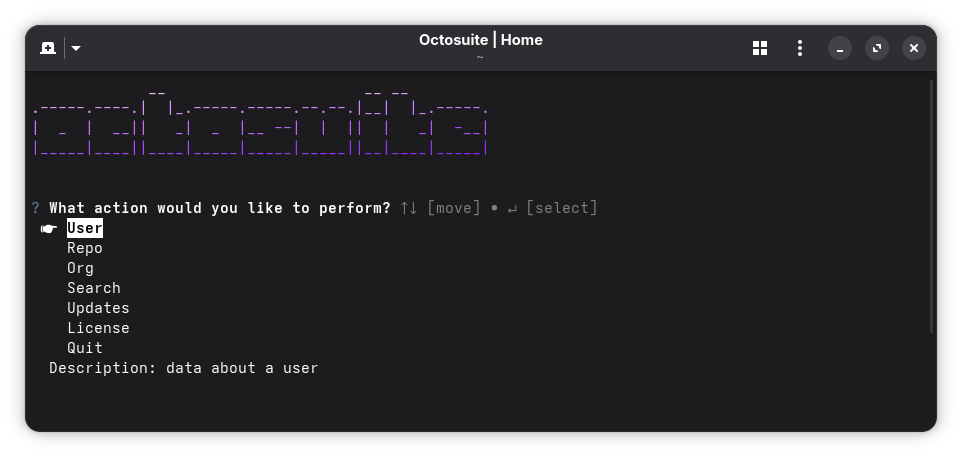
Navigate using <kbd>UP</kbd><kbd>DOWN</kbd> and <kbd>ENTER</kbd> to select options. In the export menu, you should
|
|
use <kbd>SPACE</kbd> to check the format you want.
|
|
|
|
The interface guides you through
|
|
selecting a
|
|
data source
|
|
and
|
|
choosing what information to retrieve. Preview the results and optionally export them in your preferred format.
|
|
|
|
|
|
|
|
## License
|
|
|
|
### MIT License
|
|
|
|
See the LICENSE file for details. License information is also available through the application's main menu.
|
|
|
|
## Contributing
|
|
|
|
Contributions are welcome. Please submit pull requests or open issues for bugs and feature requests. Good luck! |